Access, members and timers
Server Objects run on ck-exec.
Some rules are the same in every game: only the players of a team may spend the team's gold, a match starts once and only its leader starts it, a purchase can be made once a minute. You can write each of them in logic.rs, or you can set them in the definition asset and let the server code the editor generates enforce them before your code runs. Then logic.rs holds only the rules that are truly yours.
The settings fall into four groups in the asset's Details tab, each in its own category:
- Access: who can read a Server Object, who can call each Server Function, how often, and with what values.
- Members: who belongs to a Server Object.
- Timers & Events: things the server does on a clock, and when a player arrives or leaves.
- Can Call: the other Server Object types this one's server code may call; see Call other Server Objects.
After you change any of these, generate the server code and deploy it again, since the server enforces them.
Two examples in Oakford's world use every group; see Guild halls and arena lobbies.
Access
Readable By
Readable By is on the type: select Type Settings in the Server Object panel. It says who can read the variables that are Visible to Players and is told when they change.
| Choice | Who reads the variables |
|---|---|
| Every Player | Any player. |
| Owner Only | The one player who owns it. Its Instance Id is that player's user id. See Owner Only types. |
| Members | The members of the Server Object. Anyone can still see who the members are and whether joining is open, so a player who is not a member can find it and join. Members needs Members From. |
With Members or Owner Only the server does not send a change's values to everyone. It tells the watchers that something changed, and each reads the values again. That is fine for a team of five; for a big group, use Every Player. See Large groups.
Callable By
Callable By is on each function, in its Details.
| Choice | Who may call it |
|---|---|
| Players | Any player. |
| Members | A player who is a member of this Server Object. |
| Leader | The leader of this Server Object. |
| Server Only | No player. Only other server code and developer tools. |
Other server code and developer tools may call every function whatever it says. Members and Leader need Members From. The check is made on the server, so a modified game client cannot get around it.
Cooldown
Cooldown, in seconds, sits beside Callable By. It is how long one player waits between two calls of that function that succeeded; 0 means no wait. A call inside the wait is refused, and the refusal is retryable: "Feed can be called again in 4 s". A call that failed does not start the wait. Each player has their own wait, and the server remembers the last calls of up to 10,000 players per function.
Value Range
Value Range limits a number a caller sends. Select an Input of a number type in the function's Details and fill in the two boxes under Value Range, Min and Max, both optional. A call with a number outside them is refused before your code runs: bad_params: Amount must be 1 to 100.
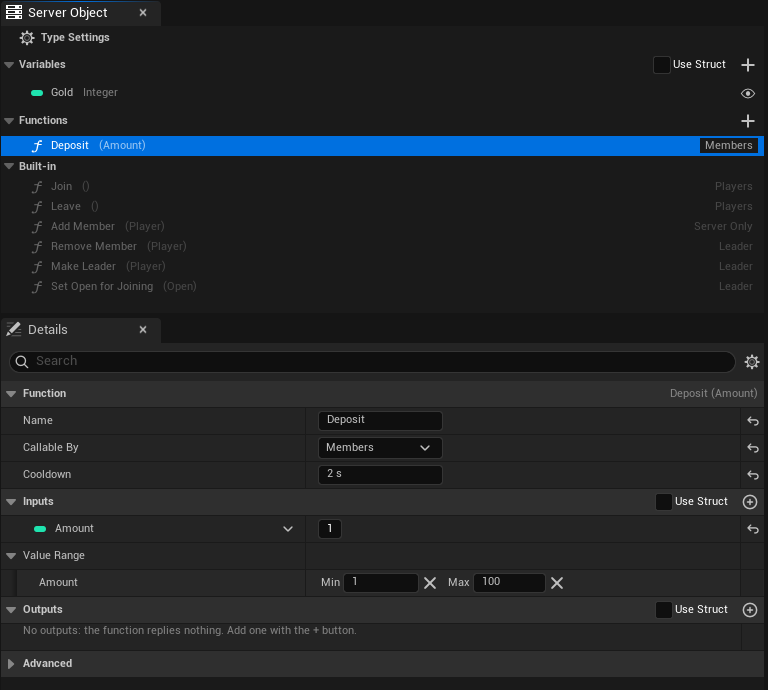
For an input taken from a struct, set the range on the struct's field with meta = (ClampMin = 1, ClampMax = 100); the two ways read the same. The range is read when the server code is generated, so generate and deploy again after changing it. Only number inputs can have one.
Only One Instance
Only One Instance is on the type, in Access, beside Readable By. Tick it for one shared instance for every player, like a registry or a world event: a list of the world's open arenas, the day's festival. Nothing picks an instance, so no Instance Id is needed anywhere.
- In Blueprint, the typed nodes for the asset need neither a Target nor a Find By Asset choice. Place the node and use it. A Crowdy Server Object component with the asset joins the one object whatever its Instance Mode says.
- From C++, acquire it with any Instance Id, or an empty one; the subsystem uses the one object.
- The generated server code refuses a call for any other instance with
denied, so a stray tool cannot make a second one. - It cannot be combined with Readable By set to Owner Only, whose Instance Id is each player's user id, or with Members From set to Crowdy Team, whose Instance Id is the team id. The asset says so when you save it.
Ticking or clearing it changes which object players reach, so generate and deploy the type again. Data saved under the old Instance Id is not moved to the new one.
Members
Members From is on the type. It decides who belongs to the Server Object.
| Choice | Members are |
|---|---|
| None | Nobody. There are no members, and saving refuses Members in Readable By and Members or Leader in Callable By. |
| This Object | Players the Server Object keeps itself. Players Join and Leave. |
| Crowdy Team | The members of a Crowdy Team whose id is the Server Object's Instance Id. |
This Object
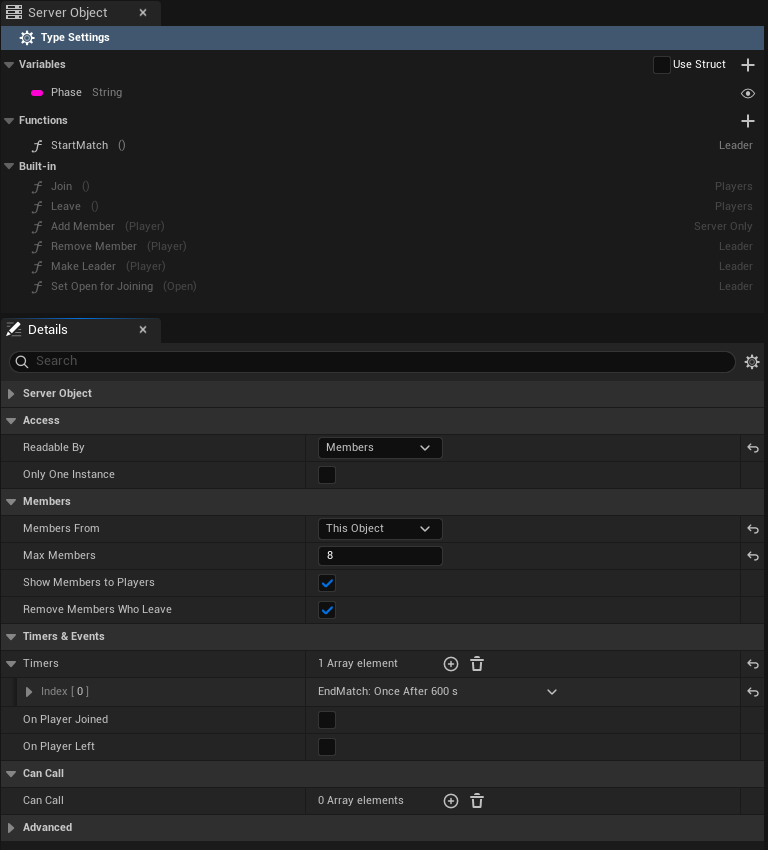
The Server Object keeps its members, their order of joining, its leader and whether joining is open, and saves them with its variables. Set:
- Max Members: the most members it takes. It is 100 unless you change it. 0 means no limit, and needs Show Members to Players off.
- Show Members to Players: on by default. Players can read who the members are. Turn it off for a large group: players then get only the number of members, and Max Members may be 0 or any size. With it on, Max Members must be 1 to 4,096.
- Remove Members Who Leave: on by default. A member who leaves the game, once their last connection to the Server Object closes, stops being a member. Turn it off to keep a member listed while they are away.
The panel's Built-in section then lists six functions, greyed out, each with its inputs as a function row shows them, such as Add Member (Player): you cannot edit or delete them, and you cannot make a function of your own with the same name. They work like any Server Function: call them from Blueprint with Make Inputs and Call Server Function, or from C++ with Call.
| Function | Inputs | Who may call it | What it does |
|---|---|---|---|
| Join | none | Any player | Adds the caller. Refused with "It is full" at Max Members and "It is not open for joining" while joining is closed. A player who is already a member succeeds. |
| Leave | none | Any player | Removes the caller. A player who is not a member succeeds. |
| Add Member | Player (Integer64) | Server code only | Adds that player, with the same limits as Join. |
| Remove Member | Player | The leader, or server code | Removes that player. |
| Make Leader | Player | The leader, or server code | Makes that member the leader. Refused for a player who is not a member. |
| Set Open for Joining | bOpen (Boolean) | The leader, or server code | Opens or closes joining. |
Add Member exists so that one type can seat players in another, as a registry does; see Guild Halls.
The inputs of Add Member, Remove Member and Make Leader are the struct FCrowdyServerMemberInputs, whose one field is Player. The input of Set Open for Joining is FCrowdyServerOpenInputs, whose one field is bOpen.
The leader
- The first member to join is the leader.
- When the leader leaves or is removed, the member who has been a member longest becomes the leader.
- An object with no members has no leader.
- Make Leader hands the lead to another member.
Open for joining
A Server Object with members kept by itself also has Open For Joining, which starts true. While it is false, Join and Add Member are refused. The leader closes it with Set Open for Joining, and your code closes it with members::set_open(false), for example when a match starts. It opens again by itself when the last member leaves, so nobody can close an empty object for good. Everyone can read it, and a registry reads it to skip a match that has already started.
What a player who is not a member sees
With Readable By on Members, a player who is not a member can still acquire the Server Object. They read the member count, the leader, Open For Joining and, with Show Members to Players on, the list of members, so they can decide to join. The variables stay at their defaults, Is Member is false, and any function whose Callable By is Members or Leader is refused. With Show Members to Players off they see the count, not the list. After a successful Join the game reads again and they see everything.
Crowdy Team
With Crowdy Team, the platform's teams own joining, roles and the size of the team. The Server Object keeps no members. Players join and leave through the Teams nodes (Create Team, Join Team, Request to Join Team, Leave Team); the Server Object asks the platform who belongs.
- The Instance Id is the team's id, written in digits. Anything else is refused, as is Crowdy Team with Readable By on Owner Only.
- Members means the team's members.
- Leader means a member who can manage the team, which the team's leader role can.
- The six built-in functions do not exist, and there are no
Members,MemberCount,LeaderorOpenForJoiningvariables. Is Member and Is Leader work as they do for This Object. - If the platform cannot answer who a player is, the call is refused: "membership could not be checked", with the reason after it.
Give an actor the Server Object of the player's team with the component's Player's Team mode; see Add the component.
Timers and events
Under Timers & Events, a Timer is something your Server Object does on a clock, each with:
- Name: what it is called. Not empty, unique, and not the name of a function.
- Runs: Every, which runs again and again, Time apart, or Once After, which runs once, Time after it starts. In C++ this is the enum
ECrowdyServerTimerRepeat, with the valuesEveryandAfter. - Time: in seconds, at least 0.01.
- Start Automatically: on by default. It starts when the Server Object first starts. With it off, your code starts it.
Each timer's row is titled with its name and when it runs, such as "Respawn: Once After 10 s".
Each timer is a function in logic.rs, named after it in snake case, so a timer named EndMatch is end_match. It changes the variables the same way a Server Function does, and its changes reach the watchers.
fn end_match(&mut self, _ctx: &Ctx) -> Result<()> {
    self.Phase = "Ended".into();
    Ok(())
}
Each timer's name is also a constant in the timers module, its function's name in capitals: EndMatch is timers::END_MATCH, which holds "EndMatch". Start and stop one from your code with timers::start(ctx, timers::END_MATCH) and timers::stop(ctx, timers::END_MATCH). Use the constant rather than typing the name: the name is matched exactly, capitals included, so "end_match" or a misspelling is only refused when the code runs, while a misspelt constant does not compile. A timer whose constant would be QUEUED is refused when you generate, since the timers code uses that name itself. Start uses the period set in the asset. Inside a Server Function they take effect only when that function succeeds. If the platform refuses a timer the function starts, the whole call is refused: nothing it changed is kept or published, any timer it already started in that call is cancelled, and the player sees ServerError with a reason such as the change was not kept: timer EndMatch could not start: <reason>.
The two Events are tick-boxes, On Player Joined and On Player Left. Each adds a function to logic.rs, on_player_joined and on_player_left, which get the player's user id. They count a player's connections to the Server Object, not its members. A player who opens the Server Object twice counts once: the first open runs on_player_joined and the last close runs on_player_left. When Remove Members Who Leave is on, the member is removed first and then on_player_left runs; it runs even when the player was never a member.
Call other Server Objects
Can Call, in the Can Call category, is a list of other Server Object definitions. Each is a type this one's server code may call, from logic.rs. Add the definition assets of the types, never the type's own. The types deploy together, so the callee is there when the caller runs.
Each function of a listed type becomes a typed function in logic.rs, under calls::<type>::<function>. It takes the Ctx, the callee's Instance Id and its inputs, and returns its outputs:
let hall = format!("hall-{}", self.Halls);
calls::guild_hall::add_member(ctx, &hall, &calls::guild_hall::MemberInputs { Player: player })?;
A call from server code is not stopped by Callable By, so this is also how a Server Only function gets called. When the call fails, its error comes back to your code with the type and function in front, "guild_hall.add_member failed: It is full". Return it with ? and the caller's player sees it as the reason their call failed. What the callee already changed stays changed even if your function then fails.
The first call to an instance that is just starting, such as a new match, can take longer than a call is allowed, and fails with "call deadline passed" although the callee may still finish it. A function that is safe to repeat, like Add Member, can simply be called again once:
let inputs = calls::guild_hall::MemberInputs { Player: player };
calls::guild_hall::add_member(ctx, &hall, &inputs).or_else(|_| calls::guild_hall::add_member(ctx, &hall, &inputs))?;
What a refused player sees
A refused call reaches the caller's OnDone, or On Failed in Blueprint, with its Outcome and Reason. See Troubleshooting.
| Why | Outcome | Reason |
|---|---|---|
| Server Only function | Denied | players may not call this function |
| Members function, caller not a member | Denied | only members may call Deposit |
| Leader function, caller not the leader | Denied | only the leader may call StartMatch |
| Owner Only, not the owner | Denied | only the owner may use this Server Object |
| Team membership could not be checked | Denied | membership could not be checked, and the reason |
| Cooldown not over | Denied, Retryable | Feed can be called again in 4 s |
| Value Range | ServerError | bad_params: Amount must be 1 to 100 |
| Join refused | ServerError | It is full, or It is not open for joining |
Denied is not retryable except for a cooldown: calling again will be refused the same way until something changes. A cooldown is retryable, and the number of seconds is rounded up.
Large groups
A guild of hundreds or a match of thousands works, with care:
- Set Readable By to Every Player and Show Members to Players off, with Max Members as high as you need or 0. Players are then sent the member count, the leader and whether joining is open along with each change, and nobody re-reads. With Members or Owner Only, every change to a large group makes every member read again.
- With the list hidden, Is Member and Is Leader follow the player's own Join and Leave and the next read, not a list.
- Keep busy per-player actions, such as every player's score or purse, off the one shared object. Give each player an Owner Only object for them, and let the shared one hold what the group shares. Every call on one Server Object goes through that one object, and every player watching it is told of each change.
Checks when you save
Saving refuses the asset, and lists every problem at once, when:
- Members or Leader is used in Callable By, or Readable By is Members, and Members From is None.
- A function of your own has the name of a built-in one while Members From is This Object.
- Max Members is below 0, or is 0 or above 4,096 while Show Members to Players is on.
- A Value Range has a minimum above its maximum, or is on an input that is not a number.
- A timer's name is empty, is used twice, is not a usable name once written in snake case, or is a function's name, or its Time is under 0.01 seconds.
- Can Call has an empty entry, the type itself, or a type without a Type Name.
- Members From is Crowdy Team and Readable By is Owner Only.
- Only One Instance is ticked with Readable By on Owner Only, or with Members From on Crowdy Team.
For logic.rs
The generated server code gives logic.rs these, when the definition uses the setting.
| Name | What it does |
|---|---|
members::list() | The members' user ids, in the order they joined. This Object only. |
members::leader() | The leader's user id, if any. |
members::is_member(player) | Whether a player is a member. |
members::is_open() | Whether joining is open. |
members::set_open(open) | Opens or closes joining. |
members::add(player) | Adds a member, and errors when full or closed. The first member leads. |
members::remove(player) | Removes a member. |
members::make_leader(player) | Makes a member the leader, and errors for a player who is not one. |
members::is_member_of_team(ctx, player) | Whether a player is in the team. Crowdy Team only. |
timers::start(ctx, timers::END_MATCH), timers::stop(ctx, timers::END_MATCH) | Starts or stops a timer with the asset's period. |
timers::END_MATCH | A timer's name, one constant per timer. |
calls::<type>::<function>(ctx, key, &inputs) | Calls a function of a Can Call type and returns its outputs. |
The members functions change the Server Object's own members, so a function that fails leaves them as they were, like its variables.
Related
- Create a Server Object type: the type's other settings and the asset editor
- Relate Server Objects to each other: which of these settings to use for one-to-one, one-to-many and many-to-many relations
- Guild halls and arena lobbies: a registry of teams of five, and a lobby with a leader and a timer
- Write its server logic: what the generated code does for you, and where
logic.rsgoes - Troubleshooting: outcomes and refusals
- Read and follow its variables, from Blueprint: Get Members, Is Member and Is Leader
- Get a Server Object, from Blueprint: the component's Player's Team and From Server Value modes
- Teams: the platform's teams, for Crowdy Team