Guild halls and arena lobbies
Server Objects run on ck-exec.
Two things Oakford's players do in groups, built from the settings on Access, members and timers. Each shows the settings on the asset, the few lines of logic.rs that are left, and the Blueprint side.
Guild halls
Oakford's players are seated in guild halls of five. A hall keeps a coffer of gold that only its five may add to. A registry seats each new player in the hall that has room, and the game shows the player their own hall.
Three types do it.
guild_hall, one per hall, with an Instance Id such as hall-1:
| Setting | Value |
|---|---|
| Members From | This Object |
| Max Members | 5 |
| Readable By | Members |
| Variables | Gold, Integer, Visible to Players |
Function Deposit | Callable By Members, Input Amount Integer with a Value Range of 1 to 100, Cooldown 2 |
player_team, one per player, whose Instance Id is the player's user id:
| Setting | Value |
|---|---|
| Readable By | Owner Only |
| Variables | TeamId, String, Visible to Players |
Function SetTeam | Callable By Server Only, Input TeamId String |
hall_registry, one for the village, with the Instance Id oakford:
| Setting | Value |
|---|---|
| Readable By | Every Player |
| Variables | Halls and Seated, Integers, and Seats, a Map of String to String (player to hall), all Server Only |
Function Assign | Callable By Players, no Inputs, Output TeamId String |
| Can Call | guild_hall, player_team |
The logic
The hall and the team object need almost nothing. Deposit is one line, since the server already checked that the caller is a member, that Amount is 1 to 100 and that the player is not depositing too fast:
fn deposit(&mut self, _ctx: &Ctx, _call: &Call<'_>, params: DepositParams) -> Result<()> {
    self.Gold += params.Amount;
    Ok(())
}
SetTeam on player_team stores params.TeamId in self.TeamId. The registry seats the player and tells their object:
fn assign(&mut self, ctx: &Ctx, call: &Call<'_>) -> Result<AssignReply> {
    let player = call.player()?;
    // A player who already has a hall keeps it, however often Assign is called.
    if let Some(hall) = self.Seats.get(&player.to_string()) {
        return Ok(AssignReply { TeamId: hall.clone() });
    }
    if self.Halls == 0 || self.Seated >= 5 {
        self.Halls += 1;
        self.Seated = 0;
    }
    let hall = format!("hall-{}", self.Halls);
    calls::guild_hall::add_member(ctx, &hall, &calls::guild_hall::MemberInputs { Player: player })?;
    let team = calls::player_team::SetTeamParams { TeamId: hall.clone() };
    calls::player_team::set_team(ctx, &player.to_string(), &team)?;
    self.Seated += 1;
    self.Seats.insert(player.to_string(), hall.clone());
    Ok(AssignReply { TeamId: hall })
}
Add Member is the built-in function that only server code may call, so a player cannot seat themselves. Seats makes Assign safe to call twice: the second call gives back the same hall.
The Blueprint side
- On the village's hall board,
BP_HallBoard, add a Crowdy Server Object component. Set Definition toCSO_HallRegistry, Instance Mode to Instance Id, and Instance Id tooakford. When a player presses the board, call Call Server Function on its Server Object with FunctionAssign. - On the player's character or HUD, add a second Crowdy Server Object component. Set Definition to
CSO_PlayerTeamand Instance Mode to Signed-In Player. ItsTeamIdsays which hall the player is in. - On the hall's own actor,
BP_GuildHall, add a third component. Set Definition toCSO_GuildHall, Instance Mode to From Server Value, Source Definition toCSO_PlayerTeam, Source Instance to Signed-In Player and Source Variable toTeamId. While the player has no hall,TeamIdis empty and the component waits ("Waiting for TeamId"). WhenAssignsets it, the component joinshall-1by itself, and follows the player if they are ever seated elsewhere.
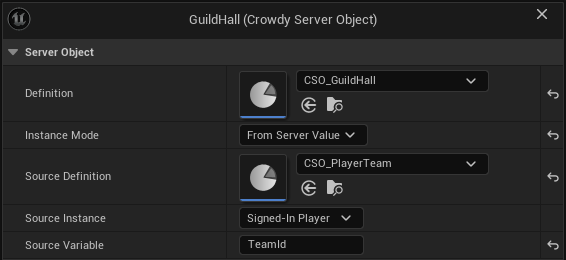
- In the hall's On Variables Changed, call Get Variables and Get Server Value with Name
Goldto show the coffer. Get Member Count and Get Members show who is in the hall. - To give gold, call Call Server Function with Function
Depositand Inputs made with Make Inputs and Set Server Value (Amount). A player from another hall gets On Failed with Outcome Denied and the Reason "only members may call Deposit", and reads noGoldat all. A second deposit within two seconds gets Denied with Retryable true.
If your halls were Crowdy Teams instead, set guild_hall's Members From to Crowdy Team, use Player's Team for the component, and let the Teams nodes seat players; the registry is no longer needed. See Crowdy Team.
The arena lobby
Oakford's arena takes eight players. They gather in a lobby, the first to arrive leads, the leader starts the match, nobody can join once it has begun, and ten minutes later it ends by itself.
One type, arena_match, with the Instance Id oakford-arena:
| Setting | Value |
|---|---|
| Members From | This Object |
| Max Members | 8 |
| Readable By | Members |
| Variables | Phase, String, starting at Lobby, Visible to Players |
Function StartMatch | Callable By Leader, no Inputs |
| Timer | EndMatch, Runs Once After, Time 600 seconds, Start Automatically off |
Change Readable By to Every Player if spectators should see Phase. As it stands, someone who is not in the lobby sees how many are in it, who leads and whether it is open, and can Join.
The logic
fn start_match(&mut self, ctx: &Ctx, _call: &Call<'_>) -> Result<()> {
    if self.Phase != "Lobby" {
        return Err(Error::new("the match has already started"));
    }
    members::set_open(false);
    self.Phase = "Running".into();
    timers::start(ctx, timers::END_MATCH)
}

fn end_match(&mut self, _ctx: &Ctx) -> Result<()> {
    self.Phase = "Ended".into();
    Ok(())
}
Nothing checks that the caller is the leader: Callable By did that. Nothing counts eight players: Max Members did. Closing joining is members::set_open(false), so Join is refused with "It is not open for joining" from then on.
The Blueprint side
- On
BP_ArenaLobby, add a Crowdy Server Object component with DefinitionCSO_ArenaMatch, Instance Mode Instance Id, Instance Idoakford-arena. - A Join button calls Call Server Function with Function
Joinand no Inputs. Under On Failed, show the Reason: "It is full", or "It is not open for joining". In the figure, the button is a custom event, OnJoinPressed, that takes Get Server Object from the lobby's component (the figure's variable is namedCrowdyServerObject), calls Call Server Function with FunctionJoin, and prints the Reason from On Failed.
Pan a Blueprint figure with the right mouse button. Press Copy nodes, then Ctrl+V in your own event graph.
- In On Variables Changed, call Get Member Count to show "5 of 8", Is Open For Joining to hide the Join button once it closes, and Is Leader to show a Start button to the leader only.
- Start calls Call Server Function with Function
StartMatch. A player who is not the leader is refused with Denied, "only the leader may call StartMatch", even from a modified client. - When
Phasechanges toEnded, On Variables Changed runs again and the game shows the result. Get Leader gives the leader's user id, for a name tag.
If the leader leaves the lobby, the member who has been in it longest leads, and Is Leader changes for both of them. A lobby for every match rather than one arena needs a registry that finds a lobby with room, as the guild halls have.
Related
- Access, members and timers: every setting used here
- Relate Server Objects to each other: registries, team objects and lobbies as relations, and good practice
- Get a Server Object, from Blueprint: the component modes
- Read and follow its variables, from Blueprint: the member nodes
- Write its server logic: where
logic.rslives