Keep a record per entity
Server Objects run on ck-exec. Records per entity are new in v2.19.0; see What's Changed.
A crowd of raiders on Oakford's north road is hundreds of entities, and each one has values the server must own: how hurt it is, what it carries, who hired it. A Server Object with Holds set to A Record per Entity keeps those values once for each entity, in one object, and tells each player only what that player may see.
When to use it
Use a record per entity when:
- you have many entities, such as a crowd, a warband or a field of crops, each with the same few values;
- the values are the server's to decide, so they belong in a Server Object and not in Crowdy State;
- players should see some values of an entity and others only for their own entities or their team's.
The object that holds the records is a shared one: one for an area of the world, for a match or for a team. It is not one object per entity. An app can run at most 1,024 instances at once (see Operations), so a Server Object for each of two thousand raiders cannot work, while one object per area holding their records can.
A thing that has one set of values, such as a boss, a beacon or a player's stash, stays a normal Server Object. See Relate Server Objects to each other.
The worked version of this page is Raiders on the north road.
Make the type
Make the asset as on Create a Server Object type, then select Type Settings and set:
| Setting | Where | Default | What it does |
|---|---|---|---|
| Holds | Server Object | One Set of Variables | Choose A Record per Entity. The variables become the fields of each record. |
| Visible to Players | Each variable's Details | Server Only, Everyone, Owner Only or Team Only. See Who receives a value. | |
| Max Records | Records | 2048 | The most records one object keeps, 1 to 4096. |
| Send Changes Every | Records | 250 ms | How often the server sends what changed, 50 to 5000 ms. |
| Team From | Records | This Object's Records | Where a team comes from: This Object's Records or Crowdy Team. See Who receives a value. |
| Area Size | Areas | 4 | The side of one area, in chunks, 1 to 64. See Pick the object. |
| Areas Followed Around a Player | Areas | 1 | How many areas out from a player's own are followed, 0 to 3. 1 follows the 3 by 3 around it. |
| Reads World Data | Platform Data | Off | Lets the server code ask which actors are near a chunk. Deploying asks for the world.read permission. |
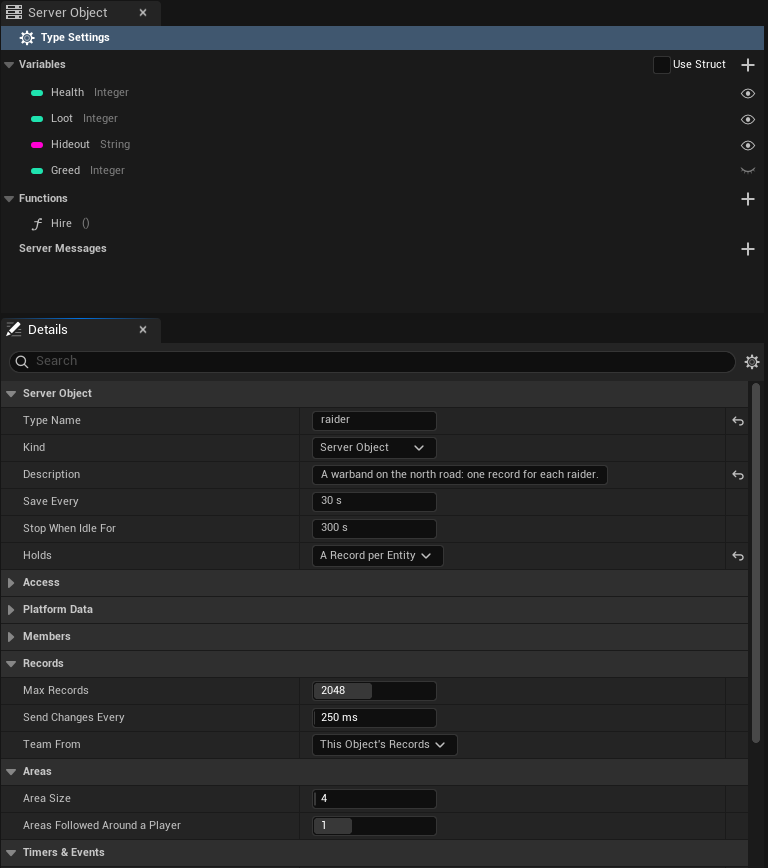
Readable By must be Every Player: who sees which variable is decided per variable, not for the whole object. Members From must be None, since each record carries its own owner and team. Saving the asset says so when either is wrong.
Area Size and Areas Followed Around a Player work for every type, whatever it holds. Reads World Data does too.
A type of this kind starts with no records. The server code adds them.
Who receives a value
Every variable of a record has one audience:
| Audience | Who receives it |
|---|---|
| Server Only | Nobody. It stays on the server. |
| Everyone | Every player who watches the object. |
| Owner Only | The player who owns the record's entity. |
| Team Only | A player whose own record in this object has the same team as this record. |
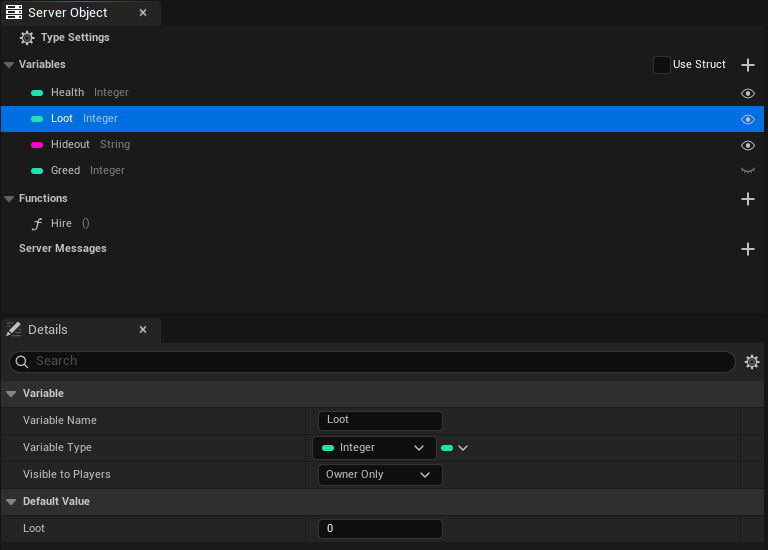
Each record has an owner, a player's user id or 0 for none, and a team, a string. Your server code sets both. They are not variables of your struct, and no player can set them.
Which players count as the record's team depends on Team From:
- This Object's Records, the default. A player's team in an object is the team of a record that player owns in that same object. A player who owns several records in one object uses the first by id. An empty team matches nothing. The team is a string you choose, such as
ravens. - Crowdy Team. A record's team is the id of a Crowdy Team, written in digits, and a player is on it when the platform says they are a member of that team.
insertandset_teamrefuse a team that is not digits; an empty team means no team. Deploying asks for theplayers.readpermission, since the server checks membership through the platform.
Choose by how far a team reaches. With This Object's Records a player's team is known only inside one object. When records are kept per area, that means Team Only values reach a teammate only while both players are in the same area. If teams must see each other's values across areas, use Crowdy Team.
A player who owns no record in the object and is on no matching team sees the Everyone values and nothing else.
How the values travel depends on the audience:
- Everyone values come in batches. The server collects the changes and, every Send Changes Every, sends the records that changed, each with only the Everyone variables that changed. A record that changes twice in between is sent once with its last value. A record you remove is removed on every player's side with the same batch.
- Owner Only and Team Only values are fetched. The batch carries a notice that some changed, and the owner's or team's game asks the server for them, at most once a second for each object. They arrive a moment after the Everyone values.
- A player who joins, or whose game missed a batch, reads every record again, a page at a time.
A value a player does not receive reads as the variable's default, and raises no change. When a record's owner or team changes, the Owner Only and Team Only values of that record go back to their defaults for everyone who just lost access. When a player's own team changes, their game reads the object again.
Pick the object
The component on an actor, and a crowd row, choose which object holds the records. For a crowd the usual choice is the area the entity stands in.
- Only One Instance (a setting of the type): one object for the whole world. Only for a small number of entities.
- Instance Id: a name you choose, such as
match-7, for a match or a team. - This Actor's Area: the object for the area the actor stands in, which changes as the actor moves.
This Actor's Area cuts the ground into squares of Area Size by Area Size chunks. The object's Instance Id is the square's x,y: the chunk's x and y, which are Unreal's X and Y over the session's chunk size, each divided by Area Size and rounded down, so the area at chunk (-1, 5) with an Area Size of 4 is -1,1. The height is not part of the key. The component checks every half second and, when the actor crosses into another area, joins that area's object and lets go of the old one after a short grace period, so an actor on a border does not flap.
Moving a record from one area's object to the next is your server code's job. One approach: the census in each area adds the entities it finds standing there and removes the ones that left, as the code below does.
Write the server code
Generate the type as on Write its server logic. In logic.rs the functions are implemented on Records, the object's records, and not on the state struct:
impl Functions for Records {
    fn skirmish(&mut self, _ctx: &Ctx) -> Result<()> {
        let ids: Vec<String> = self.ids().map(str::to_string).collect();
        for id in ids {
            let Some(raider) = self.get_mut(&id) else { continue };
            raider.Health -= 5;
            if raider.Health <= 0 {
                self.remove(&id);
            }
        }
        Ok(())
    }
}
Records gives your code:
| Name | What it does |
|---|---|
get(id) | The record's values, or None. |
get_mut(id) | The record's values to change, or None. |
insert(id, owner, team, state) | Adds the record, or replaces the one with that id. Returns an error past Max Records (records_full), for an id that is empty or over 64 bytes, for a team over 64 bytes, and for either holding a control character (bad_record). |
remove(id) | Removes the record and returns its values. |
set_owner(id, owner), set_team(id, team) | Change who owns the record and which team it is on. An error (bad_record) when there is no such record. |
owner(id), team(id) | The record's owner (0 for none) and team. |
ids(), len() | Every id in order, and how many records there are. |
owned_by(player) | The ids of the records a player owns. |
Records::area_of(chunk_x, chunk_y) | The Instance Id of the area holding a chunk, worked out with this type's Area Size: the same key the component uses. |
Changes made in one call are kept or put back together, like the variables of any Server Object: a function that returns an error leaves the records as they were. Ids are text, 1 to 64 bytes, and compared exactly, capitals included.
Count who stands in the area
To add the entities standing in an area, turn on Reads World Data and ask the world from a timer. actors(at) returns the actors in one chunk, and each one's uuid is the id its record uses. Ask for each chunk of the area in turn:
fn census(&mut self, ctx: &Ctx) -> Result<()> {
    let Some((x, y)) = area_origin(&ctx.key) else { return Ok(()) };
    for cx in x..x + AREA_SIZE {
        for cy in y..y + AREA_SIZE {
            let Ok(actors) = ctx.world().actors(ChunkPos::new(cx, cy, 0)) else { return Ok(()) };
            for actor in actors {
                if self.get(&actor.uuid).is_none() {
                    let _ = self.insert(&actor.uuid, 0, "", RaiderState::default());
                }
            }
        }
    }
    Ok(())
}
Three things to know about the census:
- It reads the heights it asks for. The call above reads ground level, height 0, and sees nothing standing higher. Ask for more heights if your world has them.
- One call answers up to 200 actors. A chunk with 200 in the answer may hold more. Do not remove a record because its actor is missing from an answer that is full: skip the removals for that tick.
- Do not use
actors_nearfor a dense crowd. It answers at most 500 actors across several chunks, so a crowded area is cut short, and records of live entities would look as if they had left.
area_origin turns the x,y in ctx.key back into the area's first chunk. Raiders on the north road shows the whole census, with the removal of the entities that left. The platform's pages on these calls are World and platform data.
From Blueprint
Put a Crowdy Server Object component on the actor, with Definition set to the type and Instance Mode set to This Actor's Area, Instance Id or the type's single instance. The actor needs a Crowdy Entity component as well: its id names the actor's record. Without one the component fails with "needs a Crowdy Entity component on this actor".
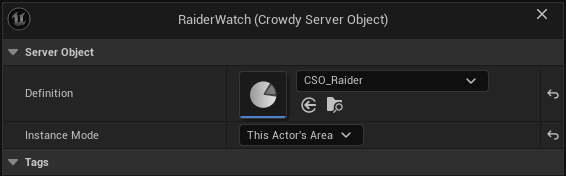
The component reads its actor's own record, so the nodes work as they do for any Server Object. The typed Get and On Changed nodes, On Variables Changed, Get Variables and Get Server Value all give that record's values, and Changed runs when one of them changes. See Read and follow its variables.
To reach other entities' records, take the Server Object from the component with Get Server Object, and use these nodes on it:
| Node | What it does |
|---|---|
| Find Record | Takes an Id and gives that record's Values, its Owner and its Team. Returns false when there is no such record. Read a variable out of Values with Get Server Value. |
| Get Record Ids | The id of every record the player can see, in no particular order. |
| Holds Records | True when the type keeps a record per entity rather than one set of variables. |
| Num Records | How many records the object holds now. |
| Watch Record | Takes a Record Id and an event (the delegate FCrowdyServerRecordEvent). The event runs with the Object, the Record Id and the Changed variables after each change of that record, and when it is removed (Find Record is then false). When the record is already current it runs once at once, naming all its variables. A watch added from an On Records Changed or On Records Updated handler gets that catch-up and does not run a second time for the same change. Records dropped because the object Failed are not reported; On Status Changed is. |
| Stop Watching Record | Takes the same Record Id and event, and stops that watch. |
| On Records Changed | An event that runs after every read, batch or fetch that changed records, with the Object, the ids that are new or changed, and the ids that were removed. |
| On Records Updated | Like On Records Changed, but each changed record comes with its changed variables: a list of Record Id and Changed Variables, then the removed ids. Changed Variables is empty when only the record's owner or team changed. |
Watch Record works like Watch Message: get the Server Object from the component, call Watch Record with a Record Id, and wire a custom event with the delegate's pins (the Object, the Record Id and the Changed variables) to its Event. The figure follows one record, here an id raider-1 that your server code inserted, and prints its id each time it changes.
Pan a Blueprint figure with the right mouse button. Press Copy nodes, then Ctrl+V in your own event graph.
Stop Watching Record takes the same Record Id and the same event:
On Records Updated is bound from Begin Play like any event of the object, with Bind Event to On Records Updated on the Server Object. Its event gets the changed records, each with its Record Id and Changed Variables, and the removed ids. The figure prints how many records changed:
Find By Asset and the by-name Watch Variables read a type of this kind as if it had no records, so they give its defaults. Use the component, or Find Record.
From C++
The component works as in Blueprint, and its GetVariables() and OnVariablesChanged give the actor's own record. To read others, acquire the area's object yourself. FindGroundChunk gives the chunk under a location as actor updates place it, and GetAreaKey on the definition turns it into the Instance Id:
UCrowdyServerObjectSubsystem* Objects = GetGameInstance()->GetSubsystem<UCrowdyServerObjectSubsystem>();
int64 ChunkX = 0;
int64 ChunkY = 0;
if (!Objects || !Objects->FindGroundChunk(GetActorLocation(), ChunkX, ChunkY))
{
	return;
}
FString Error;
UCrowdyServerObject* Area = Objects->Acquire(RaiderDefinition, RaiderDefinition->GetAreaKey(ChunkX, ChunkY), this, Error);
if (Area)
{
	Area->OnRecordsChanged.AddUObject(this, &ARoadWatch::HandleRecords);
}
OnRecordsChanged, an FOnCrowdyServerRecordsChanged, runs after every read, batch or fetch that changed records. It gives the object, the ids that are new or changed, the ids removed, and for each changed id the State fields that changed, one bit per field. Read a record with GetRecord, which returns an FCrowdyServerRecord holding the Values, the Owner and the Team:
void ARoadWatch::HandleRecords(UCrowdyServerObject* Object, TConstArrayView<FString> Changed, TConstArrayView<FString> Removed, TConstArrayView<TBitArray<>> ChangedFields)
{
	for (const FString& Id : Changed)
	{
		const FCrowdyServerRecord* Record = Object->GetRecord(Id);
		const FRaiderState* Raider = Record ? Record->Values.GetPtr<FRaiderState>() : nullptr;
		if (Raider)
		{
			UpdateBar(Id, Raider->Health);
		}
	}
}
HoldsRecords() says whether the definition keeps records, NumRecords() counts them, GetRecordIds() lists them, and WatchRecord(Id, Listener) follows one record, naming its variables on each change. Ids are compared with capitals significant. WatchValues and GetState() on a records object give the type's defaults, not a record.
The rest of the C++ surface for records:
UCrowdyServerObject::FindValuesgives a record's values by id, or the object's own when the id is null. The Blueprint On Records Changed is theRecordsChangedproperty, anFCrowdyServerRecordsChanged, and On Records Updated is theRecordsUpdatedproperty, anFCrowdyServerRecordsUpdatedwhoseFCrowdyServerRecordChangeentries hold aRecordIdand itsChangedVariables.UCrowdyServerObjectComponent::ReadsRecordsays whether the component reads its actor's record, andUCrowdyServerObjectComponent::GetRecordIdgives that record's id.UCrowdyServerObjectDefinition::GetAreaKeyand the staticUCrowdyServerObjectDefinition::MakeAreaKeyturn a chunk into an area's Instance Id, andUCrowdyServerObjectDefinition::HasCrowdyTeamRecordssays whether the type keeps records on Crowdy Teams.UCrowdyServerObjectSubsystem::GetChunkSizegives the chunk size the game session uses.- The settings are typed by
ECrowdyServerObjectHolds,ECrowdyServerFieldAudience(Everyone, Owner Only, Team Only) andECrowdyServerTeamSource(This Object's Records, Crowdy Team).
Crowd rows
A crowd drawn with the Crowdy Mass Rendering Backend has no actor for most entities, only rows, but a row reads the same records. See Draw a crowd with Mass. The record's id is the entity's id, the 32 characters the census calls report as uuid, so a census that keys records by the actor's uuid lands each record on its row.
- Set the Crowdy Server Object component's Instance Mode on the entity's actor class to Only One Instance, Instance Id with an id typed, or This Actor's Area. With any other mode the rows get no server values, and the log says why once for the class.
- Read the values with Read its server values, from Blueprint or Read its server values, from C++.
Size it
What a player receives is the changed records, times the bytes of each record, times the sends a second:
500 records changed in a send, 20 bytes each, 4 sends a second: about 40 KB a second to each player.
- Raise Send Changes Every when records change more than once in between: the last value is the only one sent. Lower it for faster feel, at the cost of more sends.
- Keep records small. Put a value in a record only if a player or the server logic needs it per entity.
- Max Records is 2048 unless you change it, and 4096 at most. A call that inserts past it is refused with
records_full. - A client refuses a message over 1 MiB. The server splits a batch at 4,096 records or 512 KiB into several sends, in order, and a player's first read comes in pages of up to 512 KiB.
- A player on a slow link falls behind and catches up. Batches queue instead of dropping.
- Size the area so one object holds the records you want its watchers to receive. A player follows
(2r+1)squared objects, withrthe Areas Followed Around a Player: 9 by default.
Limits and rules
- Readable By must be Every Player, and Members From must be None.
- A variable's audience is set per variable, and only a variable that is Visible to Players can be Owner Only or Team Only. A variable cannot be both. Saving checks both.
- The function name
changesand a timer whose name in snake case iscrowdy_flushorcrowdy_sessionsare reserved. - A record's id is 1 to 64 bytes of text with no control characters. Ids that differ only in capitals are different records.
- A team is at most 64 bytes. With Team From on Crowdy Team it is a team id in digits or empty, and anything else is refused.
- A type starts with no records, so a seed must be empty.
- The owner and team are set by server code only.
If a value is not what you expect
- Always the default. A player gets Owner Only values only for records they own, and Team Only values only when their own record in the object has the same team. A player who owns no record sees neither.
- A Team Only value arrives late. Owner Only and Team Only values are fetched, at most once a second for each object.
- The component stays Connecting or fails. See Troubleshooting. A record type needs its census or other server code to add records first.
- To see the pushes and fetches, turn on
crowdy.exec.trace.
Related
- Raiders on the north road: a warband with a record per raider
- Create a Server Object type: every setting
- Access, members and timers: the audience of a variable, and the checks when you save
- Write its server logic: the functions in
logic.rs - Get a Server Object, from Blueprint and from C++: This Actor's Area
- Read and follow its variables, from Blueprint and from C++
- Draw a crowd with Mass: the entities drawn as crowd rows that read these records