Make a Server Function Library
Server Objects run on ck-exec.
A Server Function Library is a Server Object type that has functions and nothing else. It is the server's counterpart of a Blueprint Function Library: a place for logic that many callers share, with no instance of its own to hold. You describe it in the same definition asset as any Server Object type, choose Kind: Server Function Library, and the editor hides what it cannot have.
| Server Object | Server Function Library | |
|---|---|---|
| Keeps variables, saved between calls | Yes | No |
| Instances | One for each Instance Id | One name for everyone; the server runs several instances of it and picks one for each call |
| Calls answered at the same time | One for each Server Object | Several for each instance, on several instances |
| Players watch its values, hear its messages | Yes | No: there is nothing to watch |
| Members, timers, records, messages, cooldowns | Yes | No |
| Players call its functions | Yes | Yes |
| Other server code calls its functions | Yes | Yes |
When to use one
Use a library for a rule or a calculation that has no memory of its own and that several callers need: turning a seed into a loot drop, pricing an item, checking whether a move is legal, scoring a result. Because several instances answer at once, a busy game keeps getting answers where one Server Object would make its callers queue. A library can also change game truth, but only by calling a Server Object: a library function that rewards a player calls the player's own Server Object and that object changes its values.
Do not use one for anything that has to remember. A counter, a stockpile, a match or a record per player belongs in a Server Object, because a library saves nothing: each instance runs your code in several copies, each with its own memory, so a value a function leaves in a variable can be there for one call and gone for the next. A library has no timers and cannot listen to messages, and a player cannot watch it; whatever players should see goes in a Server Object that the library's caller changes.
Two things to plan for:
- The first call after the library has been idle can take over a second. Players wait a little; server code calling it may be told the call timed out. See A call to a library from server code fails.
- Each instance counts toward the app's limit on running Server Objects, 16 for an app with no funds and 16,384 for a funded one. A library that keeps 4 instances running leaves an unfunded app room for 12 other Server Objects. See Scaling.
In the example world
The Hollow Giant should drop something when it falls, and a chest on the north road should hand out a trinket. Both want the same rule: turn a seed and a tier into an item name. That rule keeps nothing, so it is a library, CSO_LootRoller, with one function, RollLoot. The chest calls it from a Blueprint or from C++, and the boss's server code calls it too. Loot for the Hollow Giant builds all of it. This page makes the asset.
Make the asset
Make a Crowdy Server Object Definition as on Create a Server Object type and name it CSO_LootRoller. Select Type Settings, the first row of the Server Object panel. In Details, under Server Object:
| Setting | Value |
|---|---|
| Type Name | loot_roller |
| Kind | Server Function Library |
| Description | Turns a seed and a tier into an item name. |
Kind is the second row, after Type Name. It is Server Object until you change it, and changing it rebuilds Details at once. The Server Object panel then shows Type Settings and Functions, and no Variables or Server Messages. Add the function RollLoot with + in Functions, as on Create a Server Object type: Callable By on Players, and two inputs, Seed (Integer64) and Tier (Integer, starting at 1, with a Value Range of 0 to 4), and one output, Item (String). Or use structs, as the boss does.
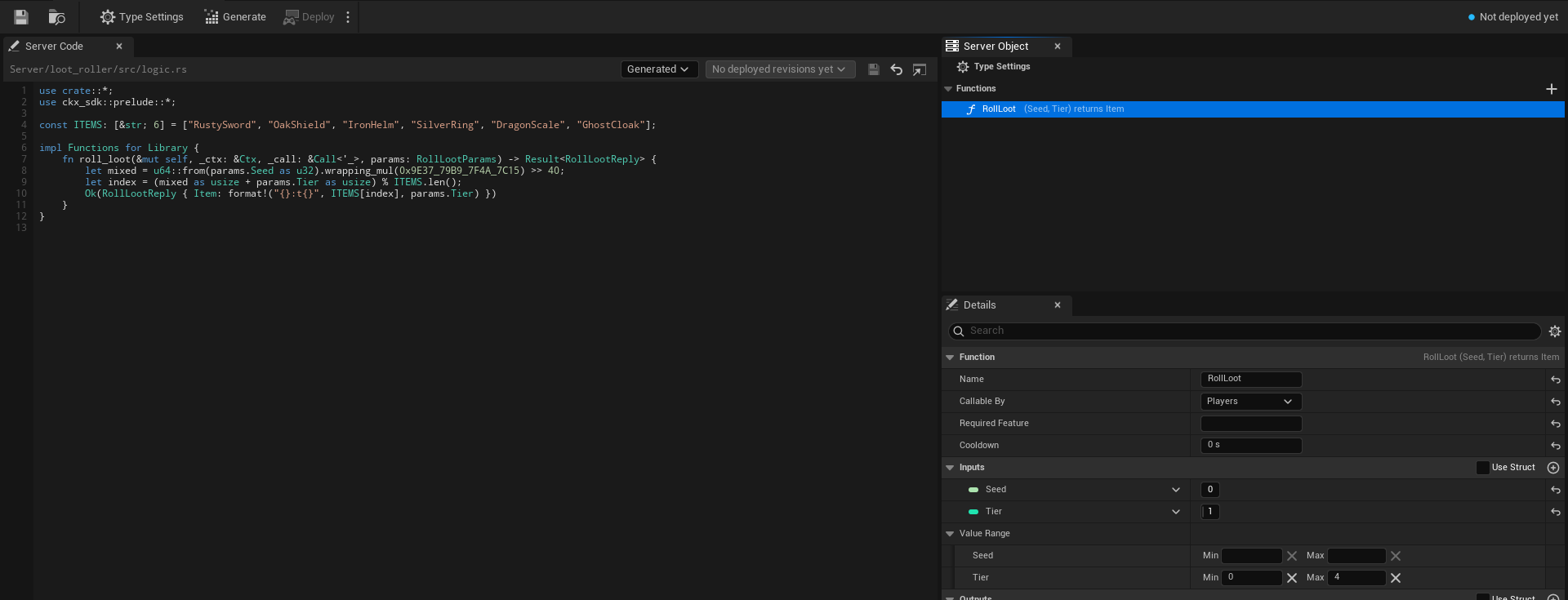
A library has these settings, and no others:
- Type Name, Kind and Description.
- Functions, with their Name, Callable By, Required Feature, inputs, outputs, Value Range and Server Name. Callable By can be Players, Server Only or Developers Only; see Callable By.
- Platform Data, as on Access, members and timers, for what the library's server code reads and changes of players, the world and grids.
- Can Call and Can Call Any Type, the types its server code may call; see Call other Server Objects.
- Scaling, below.
- Server Limits, collapsed, and Server Names, in the Advanced group, as on Every setting.
Everything else is hidden in Details and ignored everywhere, even if the asset still holds values from when it was a Server Object: it is not checked when you save, not in the generated server code, not deployed and not used by the game. That is the variables or State struct, Visible to Players, Readable By, Only One Instance, Holds and its records, Members From and the other member settings, Areas, Timers, On Player Joined and On Player Left, Server Messages, Listen To, Save Every and Stop When Idle For.
Nothing picks an instance of a library, so a caller gives no Instance Id. A library whose functions are all Server Only is closed to players: only other server code and developer tools reach it. That is what a library that only your Server Objects use should be.
Scaling
The Scaling category, shown only for a library, says how many instances the server runs and how many calls each answers at once. The platform term is in brackets.
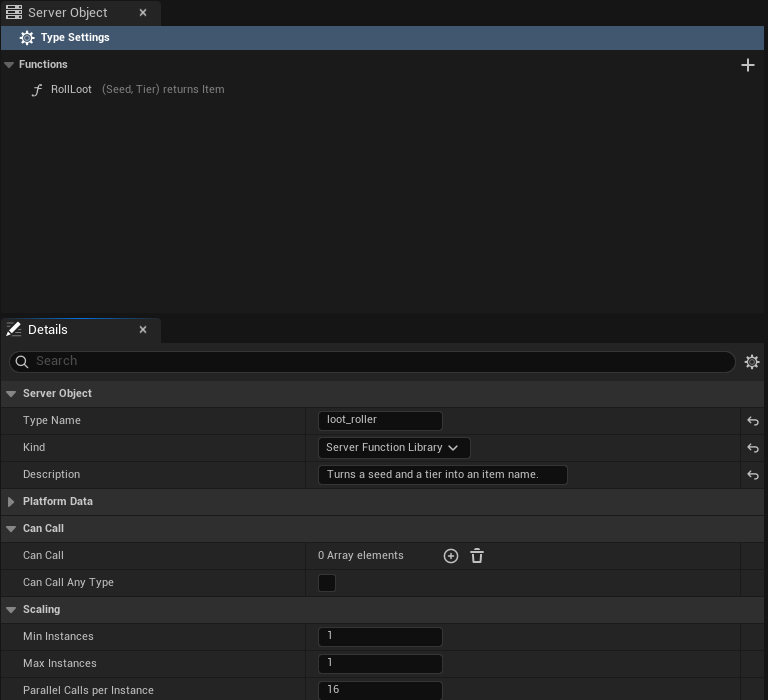
| Setting | C++ | Range | Default | What it does |
|---|---|---|---|---|
Min Instances [replicas] | MinInstances | 1 to 64 | 1 | How many instances run all the time. |
Max Instances [max_replicas] | MaxInstances | 1 to 64 | 1 | The most the server adds when calls wait. Equal to Min Instances, it never adds any. |
Parallel Calls per Instance [concurrency] | ParallelCallsPerInstance | 1 to 256 | 16 | How many calls one instance answers at the same time. |
The server adds an instance, up to Max Instances, once calls have waited 2 seconds for an answer, and removes an added instance after about 30 seconds in which it is nearly idle. It never goes below Min Instances. So the library answers at least Min Instances times Parallel Calls per Instance calls at once, and more when it has grown.
Start with the defaults. Raise Max Instances when bursts of callers wait, Min Instances to have those instances ready before the burst, and Parallel Calls per Instance to let each instance answer more at once. The longest one call may run is still the type's Time per Call, 2 seconds unless you change it, and a call that runs past it is answered Timeout like any other; see Server Limits. Calls one instance runs at the same time share its processor and Time per Call counts the time that passes, so a function that keeps the processor busy needs a Time per Call that covers Parallel Calls per Instance of them; see Library calls time out during a burst.
Every instance that runs counts toward the app's limit on running Server Objects, and the Server Compute header shows it ("3 of 16 Server Objects"); past the limit no new instance starts. See Large groups for the limits, and Deploy it with Server Compute for how a library's row reads.

With a Min Instances of 1 and a Max Instances of 4 the same line says "1 to 4 instances".
Checks when you save
Saving a library lists these problems at once, with the usual checks of the visible settings (the Type Name, the function and server names, inputs and outputs). A library needs no State struct and no variable, so "Choose a State struct" does not apply to it.
- A function's Callable By is Members or Leader: "RollLoot: Members and Leader need members, and a Server Function Library has none."
- A function has a Cooldown: "RollLoot: a cooldown is saved data, and a Server Function Library saves none." Clear it. A library cannot remember when a player last called.
- Max Instances is below Min Instances: "Max Instances must be at least Min Instances."
- Another Server Object type lists the library under Listen To: "loot_roller is a Server Function Library and sends no messages." Remove it from Listen To; a type can still list it under Can Call and call it.
The editor shows the first two as a warning under the function's row too.
Switch Kind
You can change Kind on a type that is already deployed, in either direction, and nothing is lost:
- To Server Function Library. The type's variables, members, timers, messages and the rest stay in the asset, hidden and unused. The server keeps the saved data of its Server Objects, unused, and it comes back if the type becomes a Server Object again. Server Objects of the type that were running stop answering. The deploy asks first and names the change: "loot_roller changes from Server Object to Server Function Library: its saved data is kept, unused, and comes back if it becomes a Server Object again."
- To Server Object. The hidden settings apply again, and the server starts each Server Object from the saved data it had, if any: "loot_roller changes from Server Function Library to Server Object: it starts from the saved data it had as a Server Object, if any."
Games that used the type change with it. A library has only Call nodes, and they take no Target and no Instance Id; Get, On Changed and On Received nodes of the type no longer apply, so remove them. See Call a Server Function Library. The Server Compute row reads Changed with "kind" in its list, and Changed with "scaling" when only Min Instances, Max Instances or Parallel Calls per Instance differ from the live version.
After you change Kind, Scaling or a function, generate the server code and deploy again.
Write and call it
- Its server code is a
logic.rslike a Server Object's, without a state: A Server Function Library shows the function, a library calling a Server Object, a Server Object calling a library, and what a library cannot do. - A game calls it with the Call RollLoot node, or
UCrowdyServerObjectLibrary::CallLibraryFunctionin C++: Call a Server Function Library, from Blueprint and from C++. - Server code calls it with a typed helper that takes no key, once the library is in the caller's Can Call list: Call other Server Objects.
Related
- Create a Server Object type: the asset editor, Callable By and every setting
- Loot for the Hollow Giant: the loot roller, a chest and the boss, step by step
- Access, members and timers: Can Call and Can Call Any Type
- Write its server logic: the server code of a library
- Deploy it with Server Compute: a library's row and the deploy that changes a Kind
- Troubleshooting: a cold first call
- Unreal and ck-exec names: Kind, Scaling and Can Call Any Type on the platform