Write its server logic
Server Objects run on ck-exec.
A Server Object's values change only when its server code says so. That code is a small Rust crate, one per type, which the editor writes from the type's definition asset. Most of it is generated and kept in step with the definition; the part that decides what a Server Function does is yours, and the generator never touches it again once it exists.
Generate it
There are two places to do it, and they do the same thing: in the Content Browser, right-click the definition asset, for example CSO_VillageBeacon, and choose Generate Server Code; or open the asset and press Generate in its editor's toolbar (see The Server Code tab). The editor checks the definition the same way saving it does and lists any problem instead of generating. When it succeeds, a notification names the folder it wrote:
Server/
  village_beacon/
    Cargo.toml
    src/
      lib.rs
      types.rs
      logic.rs
The folder is Server/<Type Name>/ in your project, next to the .uproject file and outside Content, so nothing in it is cooked into the game. The crate is named after the Type Name.
| File | What it holds | Written |
|---|---|---|
Cargo.toml | The crate's name, its two dependencies, ckx-sdk and serde, and the definition asset it was generated for. | Every time |
src/types.rs | A Rust struct for every struct the definition uses and a Rust enum for every enum, with the same fields and the same defaults as in Unreal. | Every time |
src/lib.rs | The glue between the platform and your code, and the Functions trait listing your Server Functions. | Every time |
src/logic.rs | Your code: what each Server Function does. | Once, only when it does not exist, and only when Code Source is Generated |
A deploy adds one more file to the folder, revisions.json, which records what each deploy sent; see What a deploy records.
Do not edit Cargo.toml, types.rs or lib.rs: the next generation replaces them. logic.rs is yours from the moment it is written. When you later add a Server Function, timer or event, Generate offers to add an empty version of it to logic.rs (see After you change the definition). To get a fresh starting point instead, delete logic.rs and generate again.
The Server Code tab
The definition asset opens in its own editor, and the large tab on its left is Server Code, so you can generate, edit and deploy the type's server code without leaving the asset.
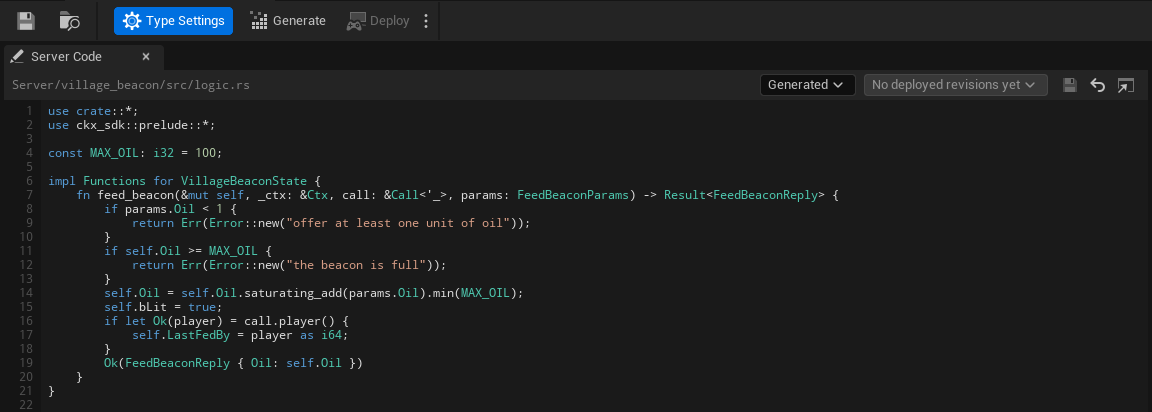
Generate and Deploy are in the editor's toolbar, after Save and Browse, not on the tab. Generate is the same as the Content Browser command, including the warning before a change would drop saved data (see After you change the definition). Deploy builds and deploys every Server Object type in the project, and the small arrow beside it opens Open Server Compute and Show build output. At the right of the toolbar a coloured dot and one line say where the type stands: Ready, Needs generating, Out of date or Problem, or how it compares with the live version (No changes, Changed since version 7, Not deployed yet, Live code unknown), the same states as on the Server Compute page. Hover the line to read the reason.
Along the top of the tab, from left to right:
- The file. The path of the Server Functions file this type uses, relative to the project folder,
Server/village_beacon/src/logic.rsfor Generated. Until the Type Name is valid it reads "Server/<Type Name>/src/logic.rs, once the Type Name is valid", and for My Own File with no file chosen "No file chosen: choose your .rs file with the folder button". "Unsaved changes" appears beside it while you have edits. - The source. A Code Source combo, Generated or My Own File; see Use your own logic file. With My Own File, a folder button beside it ("Chooses your .rs file") picks the file.
- Deployed revisions. A combo of the code this type had at earlier deploys, starting with Your code; see View, compare and restore an earlier deploy.
- Three icon buttons. Save ("Writes the code below to the logic file") is enabled only while you have edits, and keeps the file's line endings. Revert ("Shows the logic file as it is on disk again"). Open in external editor opens the file in the program your computer uses for
.rsfiles; it is disabled until the file exists.
Below is the code: an editor with line numbers down its left edge, and Rust colouring for keywords, types, strings, comments and numbers. Long lines scroll sideways instead of wrapping. When the file does not exist yet, a line above the editor says so ("logic.rs does not exist yet. Generate writes it.") with a Generate button for a generated logic.rs.
When the code lacks a function the definition now has, or defines one it no longer has, a line above the editor says so as you type, for example "logic.rs is missing test_function, on_player_joined, which this type now has." Its Add Stubs button adds empty versions of the missing ones just before the closing brace of your impl Functions block, as unsaved changes: look them over, then Save. When the code has no impl Functions for <State> block, the button reads Copy Stubs and copies them for you to paste where they belong. A function the type no longer has is only named ("logic.rs defines join, which this type no longer has: rename or delete it."); the editor never deletes your code.
The paths and the Type Name decide what the card can do:
- Generate and Save are disabled until the Type Name is valid, and their tooltips say why: "Set a valid Type Name first: lowercase letters, digits and underscores, starting with a letter, at most 48 characters". They are also disabled when the logic file would be outside the project folder ("The logic file must be inside the project folder"), and when another definition has the same Type Name. Save is also disabled when the file exists but could not be read ("The logic file could not be read, so saving could replace what it holds"). With no valid path the code editor is read-only, and says "Set a valid Type Name to edit this type's server code here."
- Save asks before it could lose anything. If the file changed on disk since the editor opened it: "
logic.rschanged on disk since it was opened here. Overwrite it with your edits?" Yes overwrites the file; No discards your edits and shows the file from disk, after a second question, since they cannot be recovered; Cancel keeps your edits unsaved. If the definition now points at another logic file: "This definition's logic file is no longerlogic.rs. Save your edits tologic.rsanyway?" If the file is not UTF-8 text, it warns that saving writes it as UTF-8, which can change characters that are not plain ASCII. If the file cannot be written: "Could not savelogic.rs. Close any program using it and try again." - Revert shows the file as it is on disk again, and asks first ("Discard your unsaved changes to
logic.rs?") when you have edits. - Edits made in another editor show up by themselves. The tab checks the file every second while it is visible. Saved in VS Code or another editor, the new code appears in the tab within a second when you have no unsaved changes here. If you do, the tab keeps them and says "
logic.rschanged on disk, for example in another editor, while you have unsaved changes here." with Reload, which drops your changes after asking, and Keep Mine, after which Save still asks before it overwrites the file. - Generate with unsaved edits asks "Save your changes to
logic.rsfirst? Generating never replaces an existing logic file." - Deploy, in the editor's toolbar, with unsaved edits asks "Save your changes to
logic.rsfirst? A deploy sends the files as they are saved." - Changing the Type Name, Code Source or Logic File while you have edits asks "Save your changes to
logic.rs? If not, they stay unsaved and come back when this editor showslogic.rsagain."
Unsaved edits are kept if the panel closes or refreshes. They are not on disk, so Server Compute's Deploy warns you about them before it sends the saved files, and closing the editor asks:
These server code files have edits that are not saved: ... Quit anyway and lose the edits?
Use your own logic file
The Code Source combo at the top of the Server Code tab, Generated or My Own File (the definition's Code Source), says where the type's Server Functions come from.
- Generated, the default, uses
Server/<Type Name>/src/logic.rs, the file Generate writes once. - My Own File keeps them somewhere else, for example in a file shared in your repo. A folder button appears beside the combo; choose your
.rsfile with it, relative to the project folder. Choose Generated again to go back tologic.rs; the file you chose is remembered but not used.
The choice is explicit: an empty Logic File no longer means "use the generated file". With My Own File and no file chosen, nothing can be generated or deployed for the type, and the messages say so:
- The toolbar's status line and the type's Server Compute row read Needs generating with "Code Source is My Own File but no file is chosen; choose one, or switch Code Source to Generated".
- Generate still writes the generated files, then shows "Code Source is My Own File but no file is chosen. Choose one, or switch Code Source to Generated."
- The tab says "Choose your .rs file above, or switch to Generated to use the generated logic.rs.", and Save says "Choose your .rs file first".
With your own file chosen:
- Generate writes only the generated files,
Cargo.toml,src/lib.rsandsrc/types.rs. It never creates or overwrites your file. - Deploy sends your file as the type's
logic.rs, whatever it is called on disk. - If the file is missing, the tab says "This file does not exist. Choose an existing file, switch to Generated, or type code below and Save to create it.", the type reads Needs generating with the reason "its Logic File ... does not exist; choose an existing file, or switch Code Source to Generated", and Generate says "The Logic File ... does not exist. Choose an existing file, or switch Code Source to Generated."
Your file implements the same Functions trait as the default one; see Write logic.rs.
View, compare and restore an earlier deploy
Every deploy records the code it sent for each type, so the type's Server Code tab can show you what was live before. The revisions combo in the tab's header lists them, newest first. Its first entry is Your code, the editor as you have been using it. The others give the version, how long ago it was deployed ("just now", "5 min ago", "3 h ago", "2 d ago"), and the word "live" for the revision the live version runs, so the beacon might list Version 7, live, 3 h ago, then Version 6, 2 d ago. When the type has never been deployed, the list says "No deployed revisions yet" and is disabled. How many revisions are kept is set on the Server Compute page's Settings tab.
Pick a revision and the editor shows that revision's logic.rs, read only, under a line such as "Viewing version 6's code (deployed 2 d ago)". Three buttons act on it:
- Compare with yours shows a line-by-line difference against the code in your editor, unsaved edits included: lines the revision has that yours does not in red with a minus, lines yours adds in green with a plus. The button then reads Show its code, to switch back.
- Restore puts the revision's code in your editor as unsaved changes. Nothing is written until you press Save, and nothing is live until you Deploy afterwards, so you can look at it, change it, or press Revert to throw it away. If you already have unsaved edits it asks "Replace your unsaved changes to
logic.rswith version 6's code?" first. Restore replaces only thelogic.rs(or your own file); the generated files stay as Generate writes them from the definition today. It is disabled, with the reason on hover, when there is no file to put it in (the Type Name is not valid, or My Own File has none chosen), when the file cannot be read, or when the revision has nologic.rs. - Back to your code returns to the editor.
A revision may have been built from an older definition: if you added a field or a function since, the old logic.rs no longer fits the types Generate writes now. The banner then warns "This revision was built from a different definition, so its code may not compile with the types Generate writes now." You can still restore it; expect to fix compile errors before it deploys.
To go back to an earlier version as it ran, without editing anything, use Make active on the Versions tab instead: it switches the app to that whole version at once. Restore is for when you want that code back in your project.
The Rust names
- Structs are named after the C++ struct without its
F:FVillageBeaconStatebecomesVillageBeaconState. A Blueprint struct uses its name as the editor shows it, with every character other than letters, digits and underscores removed. - Enums drop a leading
E:EBeaconColorbecomesBeaconColor. Each value keeps its name on the server. - A type name that Rust or the generated code already uses (
Vec,Error,Functionsand the like), or that another of your types already has, getsTypeadded, then a number if that is taken too. - Fields keep their names on the server exactly, so the beacon's code reads
self.Oilandself.bLit. A field named like a Rust keyword, such astype, is writtenr#type. - Server Functions become methods named by their Server Name:
FeedBeaconisfeed_beacon.
A few names cannot be written in Rust at all: a field or enum value named self, Self, super, crate or _, and a Server Function whose Server Name is on_timer, on_topic, on_presence, on_session, on_player_joined or on_player_left. Generation stops and names the one it hit; give it a different name on the server under the definition's Server Names, or the function a different Server Name.
Field types map like this:
| In Unreal | In Rust |
|---|---|
bool | bool |
int8, int16, int32, int64 | i8, i16, i32, i64 |
uint8, uint16, uint32, uint64 | u8, u16, u32, u64 |
float, double | f32, f64 |
FString, FName, FGuid, FGameplayTag, soft object and class paths | String |
FDateTime, FTimespan | i64 |
TArray | Vec |
TSet | BTreeSet |
TMap | BTreeMap |
TOptional | Option |
FVector, FVector2D, FRotator, FQuat | generated structs Vector, Vector2D, Rotator, Quat with f64 fields |
FIntPoint, FIntVector | generated structs IntPoint, IntVector with i32 fields |
FLinearColor, FColor | generated structs LinearColor (f32 fields) and Color (u8 fields) |
The generated structs keep the Unreal field names too: X, Y, Z, Pitch, Yaw, Roll, R, G, B, A. Each field in types.rs ends with a comment naming its Unreal type, since several Unreal types share one Rust type.
For the beacon, types.rs holds the state struct with the defaults FVillageBeaconState gives it in C++:
#[derive(Serialize, Deserialize, Clone, PartialEq, Debug)]
#[serde(default)]
pub struct VillageBeaconState {
    pub Oil: i32, // Int32
    pub bLit: bool, // Bool
    pub LastFedBy: i64, // Int64
}

impl Default for VillageBeaconState {
    fn default() -> Self {
        Self {
            Oil: 50,
            bLit: true,
            LastFedBy: 0,
        }
    }
}
A new beacon on the server starts from these values, the same ones a client shows before the first values arrive. A default must be the same every time the struct is made: a field initialized with FGuid::NewGuid() or the current time cannot be written as server code, and Generate Server Code names it.
Write logic.rs
lib.rs declares a trait, Functions, with one method per Server Function. For the beacon it reads:
pub trait Functions {
    fn feed_beacon(&mut self, ctx: &Ctx, call: &Call<'_>, params: FeedBeaconParams) -> Result<FeedBeaconReply>;
    fn on_timer(&mut self, ctx: &Ctx, name: &str) -> Result<()> {
        Ok(())
    }
    fn on_topic(&mut self, ctx: &Ctx, msg: TopicMsg<'_>) -> Result<()> {
        Ok(())
    }
    fn on_presence(&mut self, ctx: &Ctx, presence: &Presence) -> Result<()> {
        Ok(())
    }
}
You implement it on the State struct in logic.rs. The first generation writes a version whose functions all refuse with "not written yet"; replace them with your own. Here is the beacon's, which takes the oil it is offered up to a limit, relights itself, and remembers who fed it:
use crate::*;
use ckx_sdk::prelude::*;

const MAX_OIL: i32 = 100;

impl Functions for VillageBeaconState {
    fn feed_beacon(&mut self, _ctx: &Ctx, call: &Call<'_>, params: FeedBeaconParams) -> Result<FeedBeaconReply> {
        if params.Oil < 1 {
            return Err(Error::new("offer at least one unit of oil"));
        }
        if self.Oil >= MAX_OIL {
            return Err(Error::new("the beacon is full"));
        }
        self.Oil = self.Oil.saturating_add(params.Oil).min(MAX_OIL);
        self.bLit = true;
        if let Ok(player) = call.player() {
            self.LastFedBy = player as i64;
        }
        Ok(FeedBeaconReply { Oil: self.Oil })
    }
}
Each method gets:
self: the Server Object's state, to read and change.ctx: the platform's context for this Server Object.ctx.keyis its Instance Id, andctx.logwrites to the logs.call: who is calling.call.player()is the calling player's user id, or an error when the caller is not a player (a developer tool or other server code).params: the function's inputs, already decoded into their struct (FeedBeaconParams). A function with no inputs has noparamsargument.
It returns its outputs' struct (FeedBeaconReply), or Ok(()) for a function with no outputs. To refuse, return Err(Error::new("...")). The state is then put back exactly as it was before the call, nothing is published, and the caller's OnDone sees ServerError with your message as its Reason (see Troubleshooting). So a function can change fields as it goes and still refuse halfway. Do not start your own messages with unknown_method, denied or bad_params: those words mean the generated code refused the call.
The beacon never trusts the amount it is offered: the params are a request, and the reply says what the server did with it.
The optional hooks
on_timer, on_topic and on_presence do nothing unless you implement them in the same impl. They are the platform's hooks, described on Timers, subscriptions and presence: on_timer runs when a timer your code set with ctx.timer_after or ctx.timer_every comes due, on_topic when another instance publishes on a topic your code subscribed to, and on_presence only on the app's root hub. A hook changes the state the same way a Server Function does: its changes reach watchers, and an Err puts the state back.
What the generated code does for you
lib.rs handles everything the definition asset already says, so logic.rs holds only your rules:
-
Watched values. It answers the SDK's request for the watched values, and after every Server Function or hook that succeeds it compares the watched fields with what they were before and tells every watcher about the ones that changed, all in one notice. A change to a field that is not watched, like
LastFedBy, sends nothing. -
Owner Only. On an Owner Only type, a player may read or call a Server Object only when its Instance Id is that player's user id. An Instance Id that is not a user id written plainly in digits (
007,abc) starts no Server Object at all. -
Values every client can read. An Unreal client refuses some values:
- a number that is not finite;
- a list, set or map of more than 4,096 entries, or more than 65,536 entries in all the lists, sets and maps of one message;
- a text over 65,535 bytes, or a message over 1 MiB;
- two map keys or set values Unreal counts as one (it ignores the case of the letters A to Z, and reads an empty name as None);
- a text in an
FGuidfield that is not a GUID, a name or gameplay tag over 1,023 characters, a soft object or class path that is not an object path; - a date outside the years 1 to 9999, or a time span longer than Unreal holds.
Params holding one are refused with
bad_params. A change that would put one into a watched field, or a reply holding one, is not kept: the state goes back to what it was and the call fails with a message startingthe change was not kept. This keeps one bad call from breaking the Server Object for everyone watching it. The starting values of a new Server Object are checked too, and a bad one refuses to start it (bad_seed). A value that is already in the state, for example one loaded from a save made by older server code, makes reads fail withunreadableand the field at fault: players' Server Objects wait in Connecting, with that reason, until your server code replaces the value. Only the client knows which gameplay tags exist and which content roots are mounted, so keep tags and paths valid in your code. -
Callable By. A player may call only functions their Callable By allows: Players, Members for a member, Leader for the leader; a Server Only function refuses a player's call with
denied. Developer tools and other server code may call every function. -
Members, Cooldown, Value Range, timers and Can Call. The settings on Access, members and timers are enforced here, in order: who may call, the params, the Value Range, the Cooldown, then your function. Members, timers and calls to other types reach
logic.rsas themembers,timersandcallsnames listed under For logic.rs. -
Refusals. An unknown function is refused with
unknown_method, a call the checks above do not allow withdeniedorcooldown, and params that cannot be read as the function's inputs, or are outside a Value Range, withbad_paramsand the field at fault. These are the reasons listed on Troubleshooting. -
Saving and loading. It saves the whole state on the definition's Save Interval and loads it when the Server Object starts again. For a change that should not wait for the next save, call
ctx.persist_now()from your function.
After you change the definition
Generate the server code again after any change to the definition asset or to a struct it uses, then build and deploy it. Cargo.toml, types.rs and lib.rs are rewritten to match; logic.rs is not.
- A new Server Function, timer or event appears in the
Functionstrait, and the crate does not compile untillogic.rshas its method. After writing the other files, Generate Server Code compareslogic.rswith the trait and, when a method is missing, says which and asks: "Add empty versions of the missing functions?" Yes adds each one just before the closing brace of yourimpl Functions for <State>block, the way the first generation writes it: a Server Function refuses with "not written yet" until you write it, and a timer or event does nothing. No, the default, leaves the file as it is. If the file has no such block, or is not UTF-8 text, nothing is added and the empty versions are copied to the clipboard for you to paste. If the file changes while the question is open, for example saved from another editor, Yes adds the stubs to the file as it is then, or, when they no longer fit, adds nothing and asks you to generate again. If an open Server Code tab has unsaved edits to the file, Generate leaves it alone and the tab's Add Stubs line shows what is missing. - A renamed or removed Server Function, timer or event leaves its old method in
logic.rs, which no longer compiles against the trait. Generate Server Code names it ("logic.rs defines join, which this type no longer has: rename or delete it.") and never deletes it: rename it to the new name or delete it yourself. A rename is offered as a missing function plus a left-over one, so move your code from the old method into the new one. - A renamed variable, input or output added in the asset is noticed, since each one keeps an id of its own. Before it writes anything, Generate Server Code lists each one, such as "Gold was renamed to Coins (VillageBeaconState)", and asks: Yes keeps the old names on the server, so saved values carry over and
logic.rskeeps usingGold(it adds a List Value Names entry for each); No renames them on the server, and saved values under the old names are dropped; Cancel stops. Server code generated by an older SDK has no ids, so the first generation after updating reports a rename as the value being gone. - A removed or renamed field or enum value is something your saved Server Objects may still hold. Before it writes anything, Generate Server Code compares the new types with the ones already in
types.rsand, if a struct, field or enum value is gone or a field changed type, lists each one (for exampleVillageBeaconState.Oil is gone) and asks whether to regenerate anyway. Answer No and keep the old name on the server with a Server Name under Field Names or Enum Value Names on the definition, or keep the value instead of deleting it. See Changing a type later for what each change does to existing data. - Code in
logic.rsthat used a removed field stops compiling; fix it there. - A new type name (the definition's Type Name) goes into a new folder,
Server/<new name>/. Each generatedCargo.tomlrecords the definition asset it was generated for, so Generate Server Code finds the folder it wrote under the old name and asks: Yes movesServer/<old name>/toServer/<new name>/, keeping yourlogic.rsandrevisions.json, then generates; No generates into a fresh folder with a newlogic.rsand leaves the old one as it is; Cancel stops. A folder generated for another asset, such as the one you duplicated this definition from, is never offered. If you move or rename the definition asset in the Content Browser, saving it updates the record in its crate'sCargo.toml, so a later Type Name change still finds the folder. Either way, to the server it is a new type, so Server Objects saved under the old name are not carried over (see What a deploy records). A Type Name another definition already uses is refused.
Keep it in version control
The crate folder is source: commit Server/<Type Name>/ with the rest of your project, logic.rs above all, and revisions.json with it (see the next section). Building it locally creates a target/ folder inside it; leave that out, for example with a target/ line in your ignore file.
What a deploy records
The platform keeps only a fingerprint of what it built for each type (its build digest), never the code. So every deploy from the editor or the command line writes a record beside each type's crate, Server/<Type Name>/revisions.json, and that record is what lets the editor tell you what changed. Per deployed revision of the type it holds:
- the files as they were sent:
Cargo.toml(without the definition asset it records, which stays on your machine) and thesrcfiles, with your own file's code aslogic.rsif you use one, - a fingerprint of those files that ignores line endings and spaces at the end of a line, so opening a file in an editor that changes them does not make a new revision,
- the versions that ran it and the platform's build digests for it, and
- when it was deployed.
Deploying the same code again does not add a revision: it moves the existing one to the top and adds the version. The newest revisions are kept, as many as Revisions to keep on the Settings tab says, 5 by default. The file is written the same way on every platform, so it only changes in version control when a revision does.
A type's state on the Server Compute page is worked out from it. The platform tells the editor which build digest the live version runs for the type. If revisions.json has a revision with that digest, the type is compared with it: the fingerprint of the crate on disk now against the recorded one, and Save every and Stop when idle for against the live version's. Same means No changes; different means Changed, naming what differs (server code, save interval, idle timeout). If no revision has that digest, the type reads Live code unknown: the live version runs something this project has no record of. If the live version's manifest cannot be read at all, every type reads Live code unknown, never No changes.
Commit revisions.json with the crate, so your teammates see the same states you do. If a teammate deploys and you do not have their revisions.json yet, the type reads Live code unknown on your machine until you do, and Deploy's confirmation says it replaces live code you have no record of.
A revisions.json that cannot be read (someone edited it, or a merge left markers in it) is reported in the editor's log as "... is not a deploy record; fix or delete it", and its type reads Live code unknown. Deleting it forgets that type's history. The next deploy cannot add to a file it cannot read: it still deploys, then says "Deployed as version 8. Its record could not be saved, so its changes cannot be compared: ..." in the warning color, and the command line lists the same problems as recordErrors. Fix the file and deploy again. Deploy starter pack records nothing, since it does not send your code.
Build and deploy it
Open Crowdy Studio, choose Server Compute in its navigation, and press Deploy on its Overview tab, or press Deploy in a definition asset editor's toolbar. Deploy is offered only when something changed since the live version; see Server Compute. The editor sends every Server Object type in the project to the platform, builds it there (no Rust toolchain needed on your machine), and deploys the result as your app's new active server code. The same page shows the build output, the versions you can make active again, and the logs and call activity of what is running, and -run=CrowdyServerCompute does it from the command line for CI. See Server Compute.
A Server Object acquired before its type is deployed waits in Connecting and comes up once it is; see Waiting is not failing.
By hand
The platform's own build and deploy do the same work without the editor, for a setup the Server Compute page does not cover:
-
Build. Send the crate's
Cargo.toml, without its[package.metadata.crowdy]section (the platform's build accepts only[package],[lib]and[dependencies]), and its three files undersrc/to the platform's build; see Builds and starter packs. CrowdyJS and CrowdyCPP wrap it: see From an SDK. You can also build locally withcargo build --release --target wasm32-unknown-unknownand deploy the module yourself; see Deploying. -
Deploy. Give the type an entry in your app's manifest, named by its Type Name, and deploy the build with it; see Deploying a build. A deploy replaces the app's whole manifest, so it lists every type your app runs. The beacon's entry, as the editor writes it under its
roottype:"village_beacon": { "kind": "hub", "parent": "root", "crate": "village_beacon", "client": true, "persist_every_ms": 30000, "evict_after_ms": 300000 }clientmust betruefor players to reach it.persist_every_msandevict_after_msare the definition's Save Interval Seconds and Idle Timeout Seconds in milliseconds.
Building and deploying need your organization's manage_compute permission. Operations explains how to move a running Server Object to new code at once, and where a crashed call's log is.
Related
- Deploy it with Server Compute
- Create a Server Object type
- Call its functions, from Blueprint and from C++
- Troubleshooting: the refusals this code produces
- Unreal and ck-exec names
- ck-exec overview: hubs, the manifest, and the
ckx-sdkyour code runs on