Promote close entities to actors
A crowd row has no bones you can reach, no animation Blueprint and no attachments. That is fine at a distance and wrong up close. The near tier promotes a crowd row that comes close to the camera into a real, pooled actor, the near tier actor, and turns it back into a row when it moves away. On this page you build the shell, BP_LanternPlayer_Shell, point ALanternPlayer at it, and write the animation Blueprint it uses.
When you need this
Use a near tier when players that come within a few metres of the camera should look like a full character: a real animation graph, a held torch attached to a hand socket, a material you change at runtime. Skip it when a crowd row is good enough at every distance. Promotion is opt-in per class. A class that declares no shell is drawn as a row at every distance and costs nothing extra.
Everything on this page is an observer-side picture. The entity stays the thing that exists: it keeps its identity, its state and its place in the crowd, and the near tier actor only shows it. It never owns state and never sends anything. It does not receive events either. An event aimed at a promoted entity runs on the per-class stand-in exactly as it does for a row, and the near tier actor shows any action through its animation Blueprint. See Run your code on a crowd row.
The three pieces
- The class declares a shell.
BP_LanternPlayergets a Crowdy Mass Near Tier Shell component (UCrowdyMassNearTierShellComponent) whose Near Tier Actor Class names the actor to promote to. - The shell is an actor class you build. The easy path is a Blueprint subclass of Crowdy Mass Near Tier Actor (
ACrowdyMassNearTierActor), which already carries everything the shell needs. - The shell carries a Crowdy Mass Near Tier component (
UCrowdyMassNearTierComponent). It joins the spawned actor to its entity and drives it every frame.ACrowdyMassNearTierActorhas one already, calledNearTier.
The shell declaration is read from the class defaults before anything is spawned, so the answer is worked out once per class, not once per entity.
Build the shell
-
In the Content Browser, create a Blueprint whose parent class is Crowdy Mass Near Tier Actor. Name it
BP_LanternPlayer_Shell. -
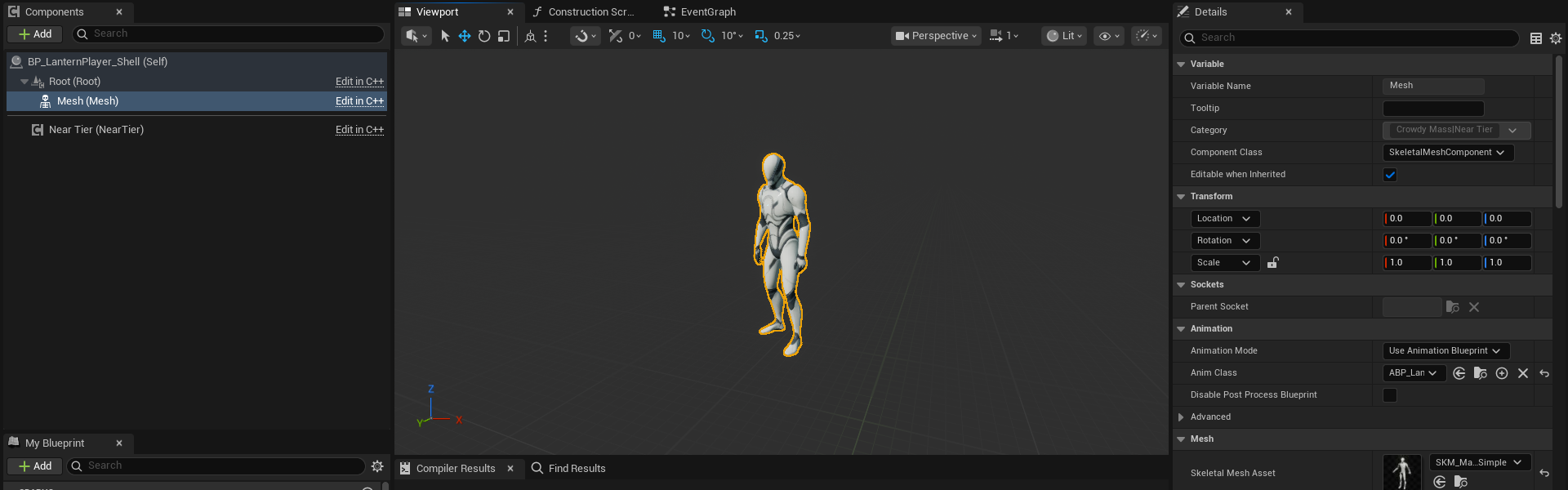
Open it. It already has three components:
Component Type What it is RootUSceneComponentThe pivot the actor is placed by. It draws nothing. MeshUSkeletalMeshComponentWhat the actor draws, under the pivot. NearTierUCrowdyMassNearTierComponentThe component that follows the entity. -
Select
Mesh. Set its Skeletal Mesh to the meshBP_LanternPlayeruses, and set its Anim Class toABP_LanternPlayer_Shell, the animation Blueprint you build for the shell (see What to put in the AnimBP). Do not use the character's own animation Blueprint. -
Leave the event graph empty. An empty shell is the normal shape.
-
Compile and save.
-
Open
BP_LanternPlayer. In the Components panel choose Add, then Crowdy Mass Near Tier Shell. Select it and set Near Tier Actor Class toBP_LanternPlayer_Shell. -
Compile and save.
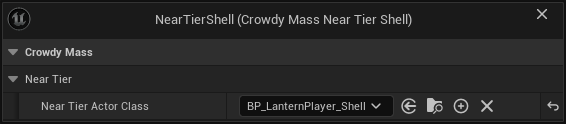
The class named on the shell component is loaded once per class, when its entity configuration is first worked out. The component itself does nothing at runtime.
Its near tier actors are created and released constantly as players walk in and out of range. Give it a mesh and the things that decorate a mesh, and nothing that owns state or talks to the network.
- Do not add a movement component or a colliding capsule. The entity's transform is written onto the near tier actor every frame, and a movement component would fight that write.
- Do not add a Crowdy Entity Component, and do not implement the Crowdy event source interface. The entity already has its own registered participant, and a second one for the same id is refused.
- Do not add a Crowdy Mass Anim Set component to the shell. If the shell's class names a different anim set from the entity's, actions are refused for that pairing and the log names both sets. Motion and pose keep working. A shell that names no anim set of its own is the correct case.
The crowd stops drawing a row the moment a promotion is decided, so a near tier actor that is not ready leaves a hole, not a fade. Assign a skeletal mesh asset on the shell before you test. If your shell class adds its own skeletal mesh instead of filling in Mesh, readiness, hiding and action playback all use whichever skeletal mesh actually has an asset. Only Mesh is placed to match the crowd.
Entity transform offset
Entity Transform Offset (EntityTransformOffset, in the shell's Class Defaults) says where the shell's root belongs relative to the entity. It points from the entity to the root, in the entity's own space, so it turns with the entity.
The default is zero, and zero is right for the shape you built above. The entity's transform is the location the owning client replicates, which for a Character is the middle of its capsule. The shell's root sits there, and its Mesh takes the crowd's placement, which already carries the character's drop to its feet. Set an offset only for a shell whose root belongs somewhere other than that location. If a promoted player floats or sinks by a fixed amount while its row stands correctly, this is the value to look at.
A C++ shell can override GetEntityTransformOffset, which is also a pure node (Get Entity Transform Offset), when the offset is computed rather than fixed.
Correct the mesh, not the placement
When a near tier actor is bound to an entity, its Mesh is placed to match the crowd's own placement of that character, so a promoted player faces the same way the row did. What you set on the shell's Mesh transform is a correction on top of that placement, not the whole placement. Author only the difference. An unauthored Mesh takes the crowd's placement unchanged.
If a promoted player turns or drops compared with its row, the difference is what to author on Mesh. To read both halves, run crowdy.mass.neartier.trace 1: the log prints where the near tier actor placed its mesh, where the crowd places it, and what the actor added on top.
Pooling
ACrowdyMassNearTierActor is already pooled. Promotions reuse near tier actors instead of spawning and destroying one each time, and you set nothing to get that.
If you promote to an actor class of your own instead of a subclass of Crowdy Mass Near Tier Actor, that class needs a Crowdy Mass Near Tier component. It should also implement the engine's IMassActorPoolableInterface (CanBePooled, PrepareForPooling, PrepareForGame). Without it every promotion is a real spawn and a real destroy, with no warning, which is the cost the near tier exists to avoid.
crowdy.mass.neartier.trace 1 prints a line when an actor is taken from the pool, when one had to be spawned because the pool had none to give, and when one goes back. That log is the only evidence that pooling is happening.
Distances and counts
Three settings in Project Settings, Plugins, Crowdy Mass (UCrowdyMassDeveloperSettings), under Near Tier, decide when a row becomes an actor.
| Label | Default | What it does |
|---|---|---|
| Near Tier Distance | 1000 | How close an entity must be, in centimetres, before it is promoted while it is not on screen. |
| Near Tier Visible Distance | 2000 | How close an entity the camera can see must be before it is promoted. Normally larger than Near Tier Distance, because a visible crowd is worth more. |
| Max Near Tier Actors | 50 | The most entities that may be near tier actors at once. The nearest win. The rest stay crowd rows however close they get. |
Only classes that declare a shell are ever promoted.
If you ask for distances that reach past the band beyond them, the SDK cuts them back and logs a warning naming the values it used. Lower them to remove the warning.
If you authored a Mass entity configuration for the class yourself, its own level distances and ceiling decide when promotion happens, and the near tier settings above are left alone. The log says so when it builds the configuration. See Make a character draw as a crowd row for where the configuration comes from.
- A configuration that already promotes to an actor wins. The shell declaration is never read, and the log warns once per class.
- A configuration that names an actor while its nearest level is still drawn as an instance promotes nothing by itself. The declared shell replaces that actor in a per-class copy of the configuration, the class does promote, and the log warns. If the configuration names another representation actor management class, the SDK also swaps in
UCrowdyMassRepresentationActorManagementand warns, because only that class hides, places and readies a near tier actor the way the handover needs. - The engine also logs
Overriding <trait> with another instanceas that copy builds. That line is this working.
How a near tier actor animates
Nothing pushes variables into your animation Blueprint. The SDK does not set AnimBP variables, does not call an event on it and does not need an interface or a special base class. The near tier component reads the entity's data every frame, after physics, and exposes it as read-only getters. Your animation Blueprint reads them.
Every getter is a pure node in the Crowdy Mass|Near Tier category and is safe to call from an animation graph's thread-safe update.
| Node | C++ name | Returns | Notes |
|---|---|---|---|
| Is Bound to Entity | IsBoundToEntity | bool | False means there is no answer yet. It is not an error. |
| Get Entity UUID | GetEntityUUID | FGuid | The id of the entity this near tier actor stands for. |
| Get Smoothed Speed | GetSmoothedSpeed | float | Drive locomotion from this. |
| Get World Velocity | GetWorldVelocity | vector | |
| Get Local Velocity | GetLocalVelocity | vector | The same velocity in the near tier actor's own space, for a strafing blend space. |
| Get Gait Id | GetGaitId | integer | One-based row in the anim set's gaits. 0 means no gait. |
| Get Gait Name | GetGaitName | name | The authored gait name, None when there is no gait. |
| Get Pose Id | GetPoseId | integer | One-based row in the anim set's poses. 0 means no pose. |
| Get Pose Name | GetPoseName | name | The authored pose name, None when there is no pose. |
| Has Pose | HasPose | bool | True when the pose id is not 0. |
| Get Action Id | GetActionId | integer | 0 while no action is playing. |
| Get Action Variant | GetActionVariant | integer | |
| Get Action Play Rate | GetActionPlayRate | float | |
| Get Action Serial | GetActionSerial | integer | Goes up on every trigger, including a repeat of the same action. |
| Get Action Elapsed Seconds | GetActionElapsedSeconds | float | How far into the action the entity is. |
A remote entity's velocity comes from interpolating between position updates, so it reads the speed of one segment and then exactly zero until the next update arrives. Fed into a blend space, that makes a near tier actor stutter between walking and standing while the crowd behind it moves smoothly.
The component does not nudge a missing gait to row 1. Treat 0, and Is Bound to Entity being false, as "no answer yet". An id is a row position in one anim set. It means nothing across two classes. Branch on Get Gait Name and Get Pose Name when one animation Blueprint serves more than one character.
The one thing the near tier does push into your graph is a one-shot action. It plays the action as a dynamic montage in the slot named by Action Slot Name, as described below.
The near tier component's settings
Select the NearTier component in the shell, or any Crowdy Mass Near Tier component you add yourself.
| Label | Default | What it does |
|---|---|---|
| Action Slot Name | DefaultSlot | The Slot node your animation graph exposes for one-shot actions. A graph with no slot of this name plays nothing and says so once. |
| Action Blend in Seconds | 0.1 | How long an action blends in. An action picked up already running gets no blend. |
| Action Blend Out Seconds | 0.1 | How long an action blends out. |
| Drive Owner Transform | on | Moves the near tier actor to the entity's transform every frame. Leave it on. |
| Apply Trace Collision | on | Lets the entity's trace collision setting decide the actor's collision object type and channel responses, so a row and a near tier actor answer traces the same way. The promoted shell takes that collision only on its character mesh and on components tagged CrowdyTraceCollision; a held weapon, a hat or other decoration is left as authored and cannot be hit. Tag a hand-made hit box with CrowdyTraceCollision to keep it hittable. |
Drive Owner Transform is what keeps a near tier actor with its entity. Nothing else moves a near tier actor after it is placed, so turning it off leaves the actor standing where it was born while the entity walks away. Turn it off only for an actor that moves itself from somewhere else and wants only the animation inputs.
The component also carries Get Server Value and the On Server Values Changed event for reading an entity's record. See Read its server values, from Blueprint.
What to put in the AnimBP
The shell's Mesh uses an animation Blueprint of its own, ABP_LanternPlayer_Shell. It reads the near tier getters above, not a character. Get Owning Actor returns the near tier actor, which is not your character and has no character movement component. A copy of the character's animation Blueprint that casts to the character fails the cast, and the graph stands in its default pose. Create a new animation Blueprint for the same skeleton and build it from the getters.
If the class uses one-shot actions, the graph needs exactly one thing: a Slot node whose slot name matches Action Slot Name. The default is DefaultSlot, which is also the engine's own default and what the stock mannequin animation Blueprint already has.
For ABP_LanternPlayer_Shell, build the graph like this.
- In Event Blueprint Initialize Animation, call Get Owning Actor, then Get Component By Class with Crowdy Mass Near Tier, and keep the result in a variable named
NearTier. The component belongs to the near tier actor, so it is the same for every player that actor stands for. - In Blueprint Thread Safe Update Animation, set two variables from
NearTier: aSpeedfloat from Get Smoothed Speed, and abFallenbool that is true when Has Pose is true and Get Pose Name equalsFallen. Drive the locomotion blend space fromSpeed. For a strafe axis, use Get Local Velocity. - Choose the locomotion state from Get Gait Name, comparing against
Idle,WalkandRun, or ignore gaits and useSpeedalone. - Choose the held pose from Get Pose Name, comparing against
SittingandFallen. Do not compare ids. - Treat Is Bound to Entity false, and a gait id of 0, as "no answer yet". Do not read them as the first gait.
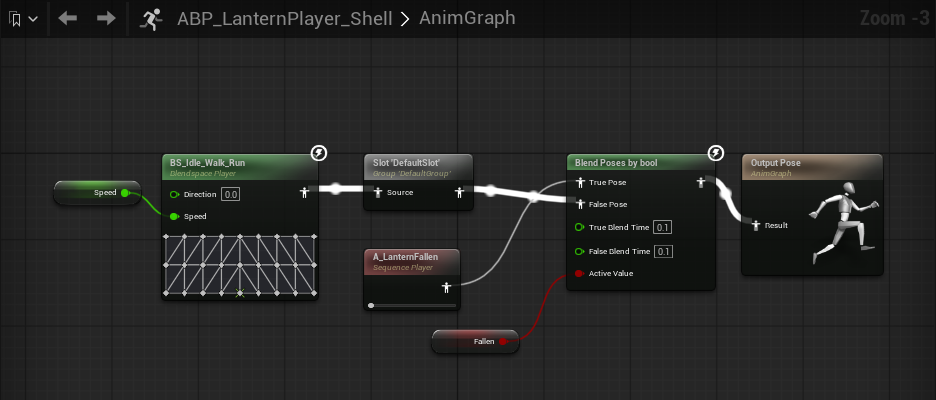
- Route the locomotion output through a Slot node named
DefaultSlot. Actions such asWaveandCheerplay over whatever the graph shows. Fallenis authored Above Actions, so it should suppress actions. The near tier component does not apply that rank for you. Add a Blend Poses by bool after the Slot node. Plug the Slot node into False Pose, a sequence player for theFallenclip into True Pose, and drive Active Value frombFallen. Then plug the blend into Output Pose. While the player is down the graph shows the fallen clip and skips the Slot node, so no action plays over it. SetbFallenin the update step, as step 2 does, because reading the component inside the AnimGraph itself is not thread safe and the compiler warns about it.
A C++ animation instance does the same: find the component with FindComponentByClass<UCrowdyMassNearTierComponent>() once, then call the getters.
An action that is already running
A player does not wait to be promoted before it waves. When a promotion happens in the middle of an action, the near tier component starts the montage at the position the action has already reached. The near tier actor then shows the same frame the row was showing. An action that joins mid-clip gets no blend, because easing into a mid-swing pose from the graph's default pose would show a pose the character never holds. An action that starts at its beginning keeps its authored blend.
What you see at the handover
When a row becomes a near tier actor, it appears already in the right pose: its speed, gait, pose and any running action are applied before its first drawn frame. An actor taken from the pool starts from a fresh animation graph, so you never see a bind pose or the previous player's pose for a frame. You author nothing for this. The actor is shown as a whole, so a component you deliberately left hidden stays hidden.
If a class does not promote
Promotion needs a class that declares a shell, a shell that loads as an actor and carries a Crowdy Mass Near Tier component, and a free place under Max Near Tier Actors. A class with a shell but no assigned Near Tier Actor Class is drawn as a row at every distance. For the ordered checklist and the log line each cause prints, see the section "A class never promotes" in Fix a crowd that does not look right.
Demotion and release
When an entity moves out of the near band, a class whose configuration the SDK builds from the class releases its near tier actor back to the pool: the actor is hidden, unbound and has its collision off. If the entity comes back, it takes an actor from the pool again, so it may not be the same one. An authored configuration follows its own level settings.
A release also stops the montage with no blend and gives back the trace collision the actor was pushing. An entity destroyed while promoted goes straight to the pool the same way, so a hidden actor never sits at the dead entity's last position and blocks traces and camera sweeps through a point where nothing is drawn.
C++ members
Everything above is available from Blueprint. A C++ shell or game system can also use these.
| Member | What it does |
|---|---|
UCrowdyMassNearTierComponent::BindToEntity, UnbindFromEntity | Join or leave an entity by hand, for an actor class of your own. Promotion calls them for you. |
GetBoundEntity, GetResolvedAnimSet | Read the bound entity and the anim set it renders through. |
ReadServerValueInto, OnServerValuesChanged (FCrowdyMassNearTierServerValuesChanged) | Read a server value of the bound entity, and listen for changes. |
ACrowdyMassNearTierActor::IsReadyForRepresentation | Virtual. Answer true as soon as there is something to draw. |
Related
- Set up the animation set: the gaits, poses and actions the near tier actor reads by name.
- Play poses and one-shot actions: how a pose or an action reaches the entity.
- Run your code on a crowd row: what an event body does for a row and for a promoted entity.
- Read its server values, from Blueprint and Read its server values, from C++: the near tier component's server value nodes.
- Fix a crowd that does not look right: symptoms first, with the diagnostic commands.