Set up the animation set
A crowd row has no animation graph, so it cannot play a clip the way an actor does. Instead you author one asset, a Crowdy Mass Anim Set, that lists what the rows of your character class can look like: how they move at each speed, which held poses they can take, and which one-shot actions they can play. This page builds DA_LanternPlayerAnims, the anim set for the Oakford player, and TP_LanternPlayer, the bank of clips it indexes into.
What a crowd row can show
A row shows one of three things at a time, and the set has a section for each.
| Kind | What it is | What chooses it |
|---|---|---|
| Gait | Locomotion by speed: idle, walk, run | The observer, from how fast the row is moving. You send nothing. |
| Pose | A held state: sitting, fallen, mounted | A replicated enum on your character. See Play poses and one-shot actions. |
| Action | A one-shot that plays once and returns: a wave, a swing | An event, or Send Crowdy Action. See Play poses and one-shot actions. |
A class with no set, or a set with no Bank, stands in bind pose. That is the not-yet-authored state, not a failure.
The set and the bank
You author two assets.
The anim set is a Data Asset of class UCrowdyMassAnimSet. In the Content Browser choose Add, Miscellaneous, Data Asset, then pick Crowdy Mass Anim Set and name it DA_LanternPlayerAnims. It holds rows that name clips.
The bank is a UAnimSequenceTransformProviderData, the engine asset the crowd's mesh draws through. It is a flat list of animation clips, and TP_LanternPlayer is the one the Oakford crowd uses. The renderer does not take a clip. It takes an index into that list. Create the bank below builds it and sets it as the set's Bank.
The set's Bank field names the bank the crowd's mesh draws through. A config the SDK builds from your class gives its mesh that bank, so a class whose set names a Bank animates with nothing else authored. The editor also checks your rows against the same Bank while you work.
The renderer only reacts when the index changes
This one engine behavior shapes how you author everything else.
The renderer starts a new animation only when the index it is given changes. Ask for the same index again and the animation does not restart and does not blend. It stays where it is.
Three authoring rules follow from it.
- An action needs two bank slots holding the same clip. Playing the action alternates between them, so the index always changes and the clip always restarts. Playing a wave twice in a row only works because of the second slot.
- A pose needs a bank slot of its own. If a pose shares a slot with the animation the row returns to, the renderer is handed the index it already has when the pose ends. The row stays frozen in the pose.
- Two gaits may not share a clip. They would resolve to the same slot, and switching between them would change nothing.
Sync actions into the bank does the first rule for you. Validation checks all three.
Create the bank
The bank is an asset you create in the editor, fill with clips, and set as the anim set's Bank. Do these three steps once for each character mesh.
Create the asset
- In the Content Browser choose Add, Miscellaneous, then Transform Provider Data. The editor opens a class picker titled Pick Transform Provider Data Class.
- Choose Anim Sequence Transform Provider Data and name the asset
TP_LanternPlayer. - Open it and set Skinned Asset to the Skeletal Mesh your character class draws with.
The Skeletal Mesh must have Optimize for Instancing switched on in its build settings. Validating the bank reports an error naming the mesh when it does not.
Add the clips
Leave Sequence List empty and add one entry under Sequences for each clip a gait or pose will use. For TP_LanternPlayer those are the Idle, Walk, Run, Sitting and Fallen clips. Each entry has a Sequence, a Play Rate and a Position.
- An entry with no Sequence is a validation error, and the engine treats a bank with such an entry, or with no entries, as switched off.
- Every clip must be for the mesh's skeleton, or for one the engine can map onto it. Validation reports a clip whose skeleton it cannot map.
- A clip is found by its position in the list, so add new clips at the end. Removing or reordering entries changes the slot number every action row already holds.
You do not add the action clips by hand. Sync actions into the bank appends them.
Connect the bank to the crowd's mesh
Open DA_LanternPlayerAnims and set Bank, in the set's Bank section, to TP_LanternPlayer. That is the only step a class needs.
The bank reaches the crowd through the mesh description of the class's Mass entity config. Each entry of the description has an Asset, the Skeletal Mesh, and a Transform Provider, the bank. When the first row of a description is drawn, Mass creates one instanced skinned mesh component for each entry, gives it the Asset, and sets the Transform Provider as the component's bank. Every row that shares the description shares that bank.
A config the SDK builds from your class fills in the mesh description for you. It gives the crowd's mesh the set's Bank as its transform provider, so a class with a Crowdy Mass Anim Set component whose set names a Bank animates with nothing else authored. A set with no Bank, or a class with no anim set, stands in bind pose, and the log says the mesh carries no bank so nothing can be animated.
An authored Mass Entity Config keeps control of its own mesh description, so it names the bank itself:
- Author a Mass Entity Config for the class, as Make a character draw as a crowd row describes, and give it a visualization trait.
- In the trait's Skinned Mesh Instance Desc, add one entry under Meshes. Set its Asset to the character's Skeletal Mesh and its Transform Provider to
TP_LanternPlayer, the same bank as the set's Bank. - Add a Crowdy Mass Animation trait to the config and set its Anim Set to
DA_LanternPlayerAnims. - Bind the config to the class on the Backend Config, or set it as the Remote Entity Config.
The set's rows and its validation index into the set's Bank. If the mesh entry's Transform Provider is a different bank, those indices point into a list the crowd never draws with, and validation reports no problem, because the set cannot see which mesh description will render it.
The animation pass reads the bank back from the mesh description. If a description carries two different banks it warns and uses the first, because a slot number would mean a different clip in each. The first time the animation pass pairs the set with the bank in a running game, it runs the validation checks and logs each failure.
Bind the set to the class
A set does nothing until a class names it. Add a Crowdy Mass Anim Set component (UCrowdyMassAnimSetComponent) to BP_LanternPlayer and point its Anim Set property at DA_LanternPlayerAnims.
| Label | Default | What it does |
|---|---|---|
| Anim Set | None | The set this class's crowd rows render through. Read off the class, before anything spawns. The component has no runtime behavior and no tick. |
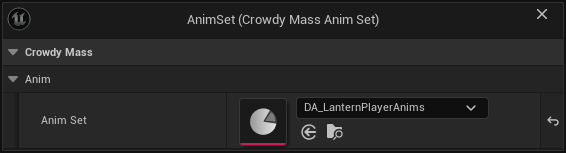
The entity config the SDK works out from your class gains a Crowdy Mass Animation trait from this component. The trait names the set, and the config's mesh gets the set's Bank. See Connect the bank to the crowd's mesh.
- A component with an empty Anim Set is reported as a component with nothing in it. That is a different message from a class with no component at all: one is a slot to fill, the other is a component to add.
- If you authored an entity config for the class by hand, name the set on that config's Crowdy Mass Animation trait, and name the same bank on its mesh entry. The trait wins. The component is still found when the config carries no animation trait, but nothing renders the set, so rows stand in bind pose and the log says so.
The Oakford set
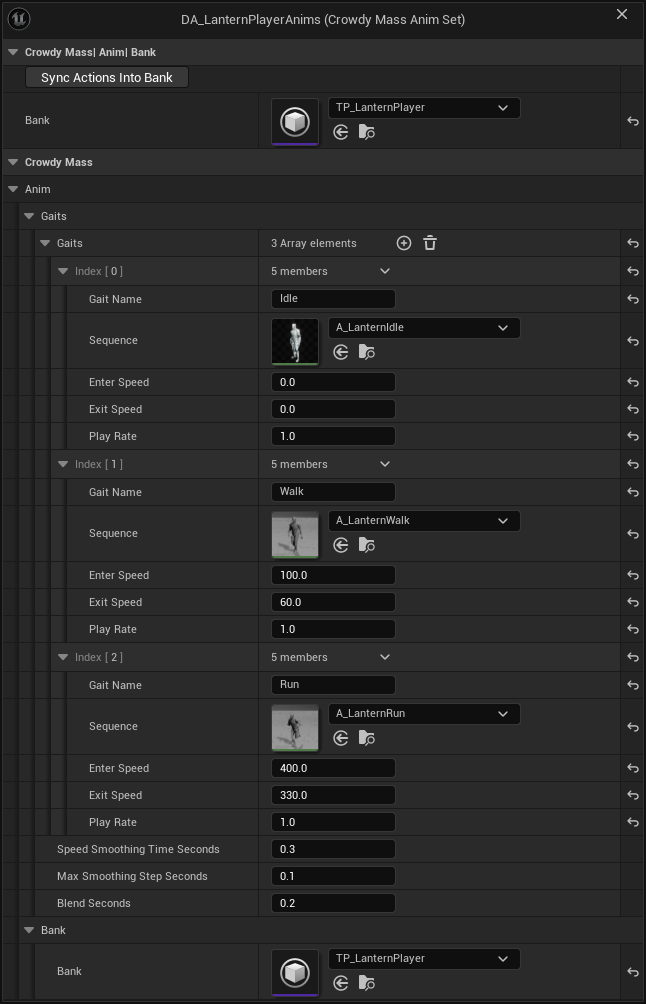
DA_LanternPlayerAnims holds these rows. The sections below explain each setting.
| Section | Rows |
|---|---|
| Gaits | Idle, Walk, Run |
| Poses | Sitting (Below Actions), Fallen (Above Actions, Hold Last Frame) |
| Actions | Wave (id 1), Cheer (id 2) |
TP_LanternPlayer holds the five clips the gaits and poses name, as Create the bank builds it. You do not add the action slots by hand, because Sync actions into the bank appends them.
The asset, section by section
Every setting is on the asset itself or on one of the three row structs, FCrowdyMassGaitEntry, FCrowdyMassActionEntry and FCrowdyMassPoseEntry.
| Section | Label | Default | What it does |
|---|---|---|---|
| Gaits | Gaits | Empty | Rows of FCrowdyMassGaitEntry. Author them slowest first. Row order decides which gait a row speeds up into. |
| Gaits | Speed Smoothing Time Seconds | 0.3 | How long the smoothed speed takes to follow a change in real speed. Keep it above one position-update interval. The default suits the 10 Hz updates remote players arrive on. |
| Gaits | Max Smoothing Step Seconds | 0.1 | The longest frame the smoothing treats as real. Without it, one long frame drops the whole crowd to the slowest gait. |
| Gaits | Blend Seconds | 0.2 | Blend time when a gait or a pose changes. Does not apply to actions. Zero snaps. |
| Actions | Actions | Empty | Rows of FCrowdyMassActionEntry. Action id N is row N, counting from 1. Id 0 means no action. |
| Bank | Bank | None | The bank the crowd's mesh draws through, a UAnimSequenceTransformProviderData. A config the SDK builds from the class gives its mesh this bank. Validation and Sync Actions Into Bank work against it. |
| Bank | Sync Actions Into Bank (UCrowdyMassAnimSet::SyncActionsIntoBank) | Button | Gives each action row its two bank slots in the Bank. |
| Pose State | Pose State Enum Is | Native By Name | Whether the state enum is declared in C++ (Native By Name) or is a Blueprint Enumeration asset (Blueprint Asset). Chosen with ECrowdyMassPoseStateEnumSource. |
| Pose State | Pose State Enum | Empty | The enum the pose rows name. A dropdown of every byte-wide enum compiled into the build for Native By Name, or an object picker for Blueprint Asset. Only one of the two shows. |
| Pose State | Poses | Empty | Rows of FCrowdyMassPoseEntry. Authored in Play poses and one-shot actions. |
One set may hold at most CrowdyMassMaxGaits gaits and CrowdyMassMaxPoses poses, both 255. Ids are one byte and 0 means none, so row 256 would take an id that wraps to 0 and clear instead of set. Rows past the limit are refused and validation reports it.
The first gait row is what every other gait falls back to. Its Enter Speed and Exit Speed are never read.
Check the rows against the bank
With a Bank set, saving or validating the asset checks what would otherwise stay invisible until a crowd is on screen:
- an action whose two slots are identical, out of range, or hold two different clips
- a gait or pose whose clip is not in the bank
- an action whose Sequence (the clip an actor plays) disagrees with the clip its slots render for the crowd
- a pose that shares a bank slot with a gait, another pose, or an action
The last one is easy to miss. Every row involved is correct on its own, so only a check that sees the bank can catch it. The message says what will happen:
so an entity leaving that pose is handed the index it already has and stays frozen in the pose. Give the pose a sequence of its own in the bank.
With no Bank, validation gives one warning, and only when the set has action rows. It says the slot pair on each action row cannot be checked, because a slot pair is raw numbers that mean nothing without the bank they index. Gait and pose rows name clips as assets, so their row-level checks still run without a bank, but the slot collision checks do not. A named bank that fails to load is an error, not a warning.
Sync actions into the bank
An action is authored as a name plus a clip. The Sync Actions Into Bank button works out the two slots.
- Set Bank.
- Give the action row an Action Name and a Sequence. Leave Primary Index and Alternate Index alone.
- Press Sync Actions Into Bank on the asset.
The button follows four rules.
- It only appends. It never reorders or removes bank entries, so every index your gaits and poses already use keeps its meaning.
- It never hands an action the slot a gait or pose already resolves to, even when the clip is the same. It appends a fresh pair instead.
- Running it twice changes nothing the second time, even when a row already names its pair in the other order.
- Ctrl+Z restores both the set and the bank.
It leaves alone the rows it cannot help and names them in the log. A row with no Sequence is a crowd-only action whose slots you author yourself. A row whose clip will not load is reported as a fault. The button finishes with a line like this:
CrowdyMassAnimSet DA_LanternPlayerAnims: Sync Actions Into Bank appended 4 slot(s) to 'TP_LanternPlayer' and moved the slot pair on 2 action row(s).
For Wave and Cheer that is two new slots each, four in all, and both rows moved. The button writes to the bank asset, so it runs only when you press it.
The same function can be called from an editor Python script or a Blueprint editor utility, for a batch of sets or a build step. In Python it is anim_set.sync_actions_into_bank(), on the loaded set. It follows the same four rules and logs the same line. It refuses while a game or a Play in Editor world is running, so stop Play first.
Gaits
A gait is locomotion selected by speed. The animation pass smooths each row's 2D velocity into one speed and picks the gait whose band contains it. Selection is local to each observer. Nothing on the sending side changes, and no gait is ever replicated.
Each row of FCrowdyMassGaitEntry has these settings:
| Label | Default | What it does |
|---|---|---|
| Gait Name | None | A name for authoring and messages. Selection uses the row's position and never searches by name. |
| Sequence | None | The clip. It must already be in the bank. The row matches the clip by asset and does not add it. |
| Enter Speed | 0.0 | The smoothed speed above which this gait may be entered. Ignored on row 0. |
| Exit Speed | 0.0 | The speed below which a row leaves this gait for the one below it. Author it below Enter Speed. |
| Play Rate | 1.0 | Applied once, when the gait is entered. The renderer reads playback settings only when the index changes, so a rate cannot track speed continuously. |
The gap between Enter Speed and Exit Speed is the hysteresis band. It stops a row hovering at a boundary from swapping clips every frame. Make it wider than the ripple the smoothing leaves behind, because a remote player's speed arrives as bursts of movement between position updates.
The Oakford player uses three rows. Speeds are in Unreal units per second.
| Row | Gait Name | Enter Speed | Exit Speed |
|---|---|---|---|
| 0 | Idle | 0 | 0 |
| 1 | Walk | 100 | 60 |
| 2 | Run | 400 | 330 |
What validation rejects
These are errors, reported when the asset is saved or validated.
- A gait row with no Gait Name, with a duplicate name, or with no Sequence.
- A Sequence that does not load, such as a deleted asset.
- Two gaits sharing a Sequence. Both resolve to the same slot and the per-gait Play Rate is discarded.
- On any row after row 0, an Exit Speed above the Enter Speed, or equal to it once the Enter Speed is above zero.
- From row 2 on, an Enter Speed below the row before it. The row can never be shown. Author slowest first.
One case is a warning. A row after row 0 with an Enter Speed of zero or less is entered at any speed, so every slower row, the floor row included, can never be shown.
Look rows up from code
The set carries lookups for tools and tests. None of them belongs in a per-row loop.
| Blueprint name | What it returns |
|---|---|
Find Pose Id (FindPoseId) | The id of a pose by name. 0 for an unauthored name or None. |
Find Pose Id by State Value (FindPoseIdByStateValue) | The id a state enum value selects. A value no row names gives 0, which clears the pose. |
Find Action Id (FindActionId) | The id of an action by name. 0 for an unauthored name. |
Find Action Sequence (FindActionSequence) | The clip an actor plays for an action id, or none for a crowd-only row. |
Get Action Duration Seconds (GetActionDurationSeconds) | An action's length, read through its Primary Index slot of a bank you pass in. |
Resolve Gait (ResolveGait), Resolve Pose (ResolvePose) | An FCrowdyMassResolvedSequence for a row against a bank you pass in. |
Validate Action (ValidateAction), Validate Against Bank (ValidateAgainstBank) | The bank checks above, at runtime. Both return false if anything failed. Validate Against Bank logs each failure. Validate Action checks one action's slot pair and does not log. |
An action or pose id is a position in one class's set, so it means nothing across two sets. Resolve it against the set of the class you are asking about.
Gotchas
- The set is shared. One asset serves every entity of every class that names it. Two classes can map the same enum value to different clips by naming different sets.
- Rows past the limit are lost. Ids wrap, so the 256th gait or pose is refused rather than risk clearing.
- A wide enum cannot carry a pose. A pose value rides one byte. A pose row that names an enum entry outside 0 to 255 is an error, and a property declared over a wider enum is not read as the pose. The log says to declare the enum as
enum classwith: uint8.
Related
- Play poses and one-shot actions: drive the pose and action rows from your character.
- Make a character draw as a crowd row: the mesh and entity config the bank belongs to.
- Promote close entities to actors: how the same set drives a near tier actor.
- Fix a crowd that does not look right: rows that stand in bind pose or stay frozen in a pose.