Quickstart
This page puts you on the wire, then builds one small thing, a lantern, with one of each SDK idea on it: an entity, an RPC event, and a Crowdy State property. Each step is a few lines of C++ or a few Blueprint nodes, and each ends with something you can see. A single Play in Editor client is enough for all of it.
Two words you will meet on every step. An entity is an actor other players can see: an actor with a Crowdy Entity Component, which gives it a shared identity and one owner, the client that simulates it; every other client holds a proxy that plays back what the owner sends. A map profile is a small data asset (UCrowdyMapProfile) that switches the SDK on for one map; it is assigned per map under Project Settings, Plugins, Crowdy SDK, Map Profiles.
One fact shapes the order of the steps. The server knows a client by the actor updates it sends: your player pawn, as an entity, is what makes you present, and a client with no fresh actor is at no position on the map and receives no spatial event. So the pawn comes first, the lantern after.
Before you start
- Install the plugin into a project whose player already moves, the Third Person template or your own game, and confirm it compiles. Step 1 adds a component to the character you have; a bare Character has no body and no input, so start from one that walks.
- Open Crowdy Studio, sign in, pick your app on the Project page, and press Sync to project on its Configuration tab. See Config Sync.
- Optional: give your test map a map profile of its own. Without one it runs on the SDK's shipped default, which is enough for this page.
- Know that nothing on this page reaches another client until your own pawn is sending updates (step 1). An event sent before that goes to nobody.
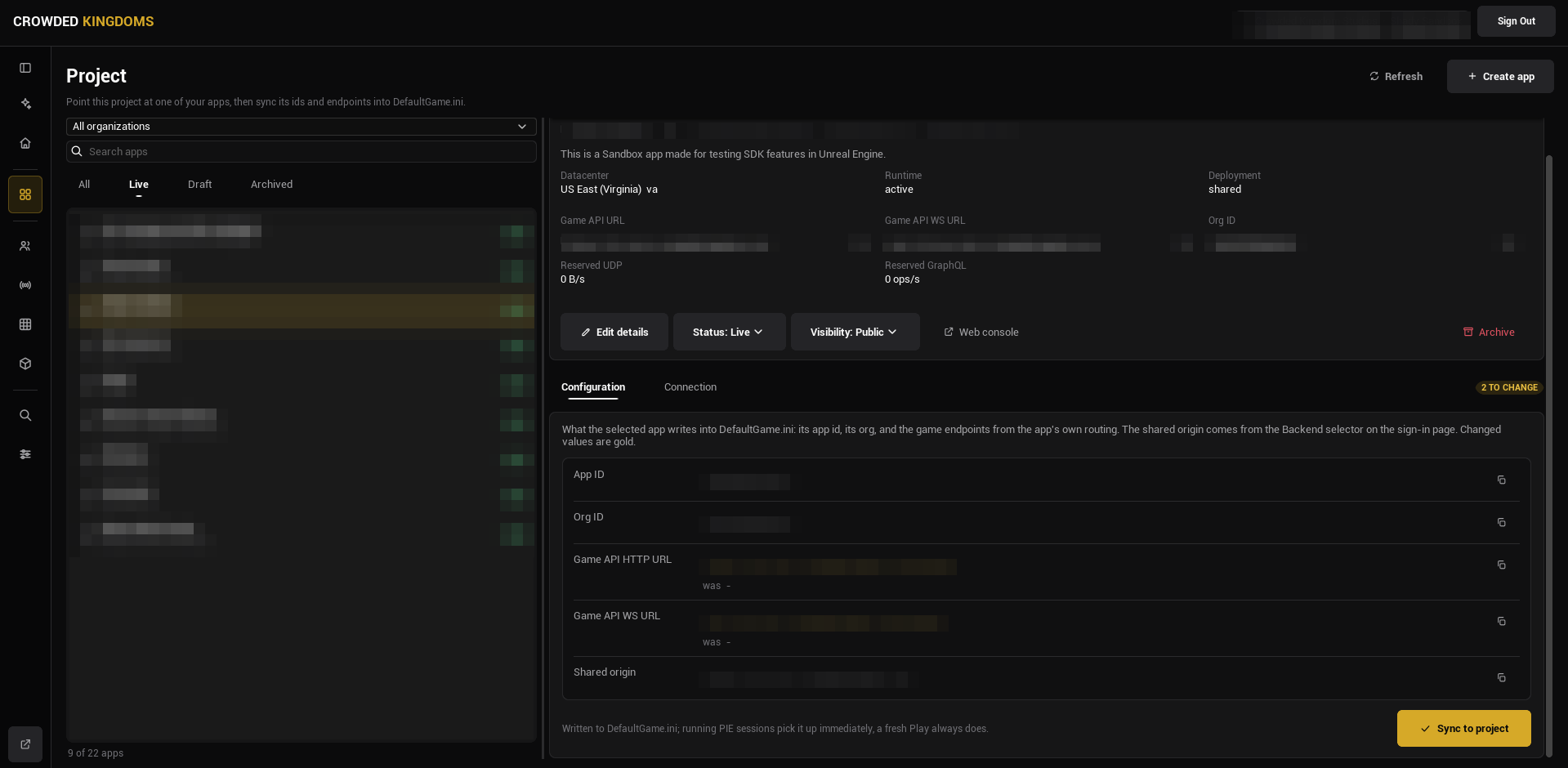
Config Sync points the project at an app; a map profile decides what the SDK does on a map. With none assigned, the shipped default applies (networking on, the actor pool drawing remote entities with the shipped transform policy), so every step below works without authoring one. Author a profile when you need per-map settings; see Map profiles.
About the code on this page
The C++ steps build three small things. Step 0 is the Game Instance, LanternGameInstance.h and LanternGameInstance.cpp. Step 1 is your player, LanternPlayer.h and LanternPlayer.cpp, with a Game Mode, LanternGameMode.h and LanternGameMode.cpp, that spawns it at the right moment. Steps 3 to 5 build one actor, ALantern, in Lantern.h and Lantern.cpp: step 3 gives you both files, each later step is what you add to them, and the finished actor is at the end of the page. The first comment line of each block names the file it goes in. The usual boilerplate is left out so the SDK parts stand out: add #pragma once, #include "CoreMinimal.h", and the base class include (GameFramework/Actor.h, GameFramework/Character.h, GameFramework/GameModeBase.h, Components/ActorComponent.h, or Engine/GameInstance.h) at the top of each header yourself. Everything else, including the .generated.h line, is in the block.
The Blueprint steps build the same three things: a Game Instance Blueprint, a Character Blueprint with a Game Mode Blueprint, and one Actor Blueprint for the lantern. The lantern needs two components before you start: a Sphere Collision (the trigger a player walks into) and a Point Light named Light, the thing every lantern graph drives. Every Blueprint figure can be panned with the right mouse button. Press Copy nodes, then Ctrl+V in your own event graph.
0. Sign the player in
Nothing connects by itself. The SDK requests its realtime connection only after a player signs in, so the game signs the player in once, at startup, from its Game Instance: call Login (or Register for a new account) on the Crowdy SDK subsystem and wait for two events: On Login (the account is signed in) and then On UDP Connection Success (the realtime connection is up). Every entity, event, and property below depends on that connection.
- C++
- Blueprint
// LanternGameInstance.h
#include "Subsystem/CrowdySDKSubsystem.h"
#include "LanternGameInstance.generated.h"

UCLASS(Config = Game)
class ULanternGameInstance : public UGameInstance
{
	GENERATED_BODY()

public:
	virtual void Init() override;

	// A development account read from Config/DefaultGame.ini. Never ship credentials in a game.
	UPROPERTY(Config)
	FString Email;

	UPROPERTY(Config)
	FString Password;

private:
	UFUNCTION()
	void HandleLogin(bool bSuccess, FString Message);

	UFUNCTION()
	void HandleConnected();
};

// LanternGameInstance.cpp
#include "LanternGameInstance.h"

void ULanternGameInstance::Init()
{
	Super::Init();
	UCrowdySDKSubsystem* Sdk = GetSubsystem<UCrowdySDKSubsystem>();
	Sdk->OnLogin.AddDynamic(this, &ULanternGameInstance::HandleLogin);
	Sdk->OnUDPConnectionSuccess.AddDynamic(this, &ULanternGameInstance::HandleConnected);
	Sdk->Login(Email, Password);
}

void ULanternGameInstance::HandleLogin(bool bSuccess, FString Message)
{
	UE_LOG(LogTemp, Log, TEXT("Login %s %s"), bSuccess ? TEXT("ok") : TEXT("failed:"), *Message);
}

void ULanternGameInstance::HandleConnected()
{
	// From here on entities register on the wire and a host is elected.
	UE_LOG(LogTemp, Log, TEXT("Connected to the app"));
}
Make it the project's Game Instance under Project Settings, Maps & Modes, Game Instance Class, then give it a test account in Config/DefaultGame.ini (YourModule is your game module's name):
[/Script/YourModule.LanternGameInstance]
Email=you@example.com
Password=your-test-password
Create a Blueprint with Game Instance as its parent class and make it the project's Game Instance under Project Settings, Maps & Modes, Game Instance Class. In its event graph the Init event runs once at startup; the Login node is latent, with On Success and On Error pins. Fill in a test account.
Success signal. The log reports Login ok, then Connected to the app (the two handlers in the C++ block; in Blueprint, bind On UDP Connection Success on the Crowdy SDK Subsystem for the second moment). From then on Get UDP Connection State on the subsystem reads connected. See Authentication for the sign-in link and provider flows, and for restoring a saved session so a returning player types nothing.
1. Make your player a Crowdy entity
Your player pawn is the first entity, before any lantern, because it is what makes you exist to the server. A pawn with a UCrowdyEntityComponent in Dynamic mode sends an actor update every replication interval (ten a second on the shipped profile), and a heartbeat at least once a second while it stands still; the server registers your position from those updates, and from then on you are a recipient of everything sent near you. The component needs three settings changed from their defaults: Mode Dynamic (the continuous channel; the default, Static, is for things that do not move), Identity Policy Player Derived (the identity is derived from the signed-in account, so it is the same on every client and on every launch; only valid on the locally controlled pawn), and Ownership Local Client (this client simulates the pawn; a pawn the Game Mode spawns is owned by the client that spawned it whatever this reads, so Local Client is the honest value; the default, Host, is for a level-placed world entity, which sends nothing until the elected host is known). Leave State Executor empty: the SDK's default executor snapshots the pawn's location and rotation, which is all this page needs.
The identity is derived once and nothing re-derives it later: at BeginPlay when the pawn already has a controller, otherwise inside its first possession, which for a pawn the Game Mode spawns during play is the RestartPlayer call that spawned it. A pawn spawned by the Game Mode on the first frame begins play before the sign-in has answered, and its first updates leave before the server is ready for them, so the Game Mode starts players as spectators and the connected handler spawns the pawn instead. On UDP Connection Success fires once the server has assigned you and its readiness wait has elapsed (the SDK times that, you never do), and every update the pawn sends after it counts.
Where the account id becomes readable. The engine possesses a pawn spawned during play only after its BeginPlay, so the component waits and registers inside that first possession, after the pawn's own Possessed and Controller Changed events; the first controller of any kind completes it, and an AI-possessed pawn takes the random-id fallback with its warning. A respawn that leaves the old pawn standing hands the account id to the new one, and the old pawn's component stops replicating. Read the id from the component's On Crowdy Ownership Assigned (OnCrowdyOwnershipAssigned) or the entity subsystem's OnEntityRegistered, never from BeginPlay or Possessed; Is Locally Owned on the pawn reads false until that registration, so a pawn graph that gates on it at BeginPlay runs nothing.
- C++
- Blueprint
ALanternPlayer is a Character with a Torch point light and the entity component. ALanternGameMode names it as the default pawn, starts players as spectators, binds On UDP Connection Success in its own BeginPlay, and spawns the pawn with RestartPlayer when the event fires. The event fires again after a re-assignment, and RestartPlayer keeps a pawn the player already has, so a reconnect does not respawn you.
// LanternPlayer.h
#include "Components/PointLightComponent.h"
#include "Replication/Components/CrowdyEntityComponent.h"
#include "LanternPlayer.generated.h"

UCLASS()
class ALanternPlayer : public ACharacter
{
	GENERATED_BODY()

public:
	ALanternPlayer();

	UPROPERTY(VisibleAnywhere, Category = "Lantern")
	TObjectPtr<UPointLightComponent> Torch;

	UPROPERTY(VisibleAnywhere, Category = "Crowdy")
	TObjectPtr<UCrowdyEntityComponent> CrowdyEntity;
};

// LanternPlayer.cpp
#include "LanternPlayer.h"

ALanternPlayer::ALanternPlayer()
{
	Torch = CreateDefaultSubobject<UPointLightComponent>(TEXT("Torch"));
	Torch->SetupAttachment(RootComponent);

	// Dynamic sends the transform every interval, Player Derived names the entity after the signed-in user, Local Client makes this client its sender.
	CrowdyEntity = CreateDefaultSubobject<UCrowdyEntityComponent>(TEXT("CrowdyEntity"));
	CrowdyEntity->Mode = ECrowdyEntityMode::Dynamic;
	CrowdyEntity->IdentityPolicy = ECrowdyIdentityPolicy::PlayerDerived;
	CrowdyEntity->Ownership = ECrowdyOwnership::LocalClient;
}
// LanternGameMode.h
#include "LanternGameMode.generated.h"

// Spawns the Lantern Player only once the app connection is up, so its first update carries the signed-in identity.
UCLASS()
class ALanternGameMode : public AGameModeBase
{
	GENERATED_BODY()

public:
	ALanternGameMode();
	virtual void BeginPlay() override;

private:
	UFUNCTION()
	void HandleConnected();
};

// LanternGameMode.cpp
#include "LanternGameMode.h"

#include "LanternPlayer.h"
#include "Subsystem/CrowdySDKSubsystem.h"

ALanternGameMode::ALanternGameMode()
{
	DefaultPawnClass = ALanternPlayer::StaticClass();
	bStartPlayersAsSpectators = true;
}

void ALanternGameMode::BeginPlay()
{
	Super::BeginPlay();
	GetGameInstance()->GetSubsystem<UCrowdySDKSubsystem>()->OnUDPConnectionSuccess.AddDynamic(this, &ALanternGameMode::HandleConnected);
}

void ALanternGameMode::HandleConnected()
{
	// The pawn's updates from here on are what make this client present to the server; on a reconnect the player keeps the pawn it has.
	RestartPlayer(GetWorld()->GetFirstPlayerController());
}
ALanternPlayer has no mesh and no input of its own, so keep the body and the movement you already have: open the template's BP_ThirdPersonCharacter (or your own Character), set its Parent Class to Lantern Player under Class Settings, then create a Blueprint whose parent is Lantern Game Mode and set its Default Pawn Class to that character, overriding the C++ class the constructor names. Make that Game Mode Blueprint the project's default under Project Settings, Maps & Modes, Default Modes, Default GameMode, or set it as the test map's Game Mode Override in World Settings. The Game Instance from step 0 is unchanged.
Three Blueprints, two of them settings only.
- The Character. Open the template's
BP_ThirdPersonCharacter, or your own Character that already moves; a new Blueprint with Character as its parent has no body and no input, so do not start from one. In the Components panel click Add and choose Crowdy Entity Component. In its Details panel, under Crowdy SDK, Entity Component, set Mode to Dynamic, Identity Policy to Player Derived, and Ownership to Local Client. Two rows appear once Mode is Dynamic, State Executor and Auto Register: leave the executor at None and Auto Register ticked; a third, Host Override, appears once Ownership is Local Client: leave it at Allow. Add a Point Light namedTorchwhile you are there; a later page drives it. - The Game Mode. Create a Blueprint with Game Mode Base as its parent class. Set Default Pawn Class to your Character and tick Start Players as Spectators under Game Mode. Make it the project's default under Project Settings, Maps & Modes, Default Modes, Default GameMode.
- The spawn. In the Game Mode's event graph, from Event BeginPlay, get the Crowdy SDK Subsystem and Bind Event to On UDP Connection Success to a custom event
OnConnected(the same Bind Event shape the Authentication page uses for On Login).OnConnectedcalls Restart Player with Get Player Controller (index 0) on its New Player pin. The Game Instance from step 0 is unchanged.
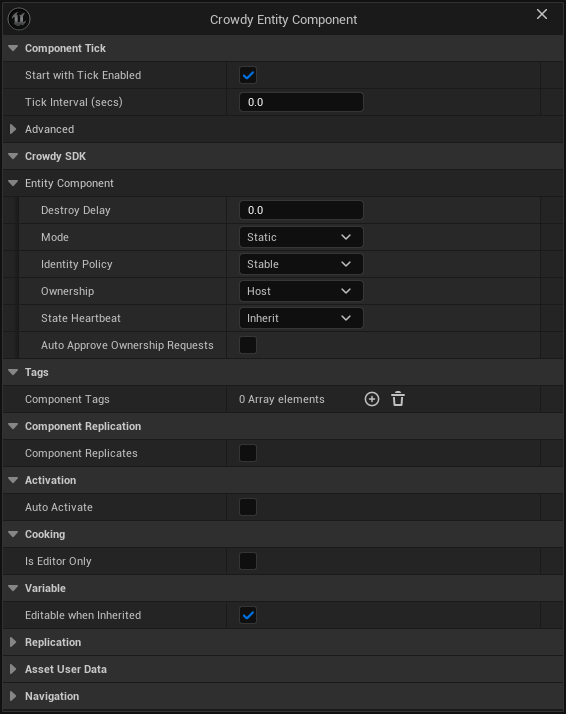
Success signal. Press Play. The map sits still under a fixed camera until Connected to the app, then your character spawns at a Player Start and you can move it. With crowdy.entity.trace 1 on, the log shows the pawn's entity registering on the wire right after the connection comes up.
Nothing warns. Two such clients conflate into one player, and the host cannot be found by its avatar. Keep the pawn's spawn behind On UDP Connection Success, as the block does: the pawn then registers under your account's id inside the possession that RestartPlayer performs.
2. See yourself
Walk forward. Within a second or two a second copy of your character appears where you were a moment ago and follows you around at a small delay (if you kept a bare Character with no mesh, the copy is the torch light alone). That is not a local mirror: your updates went to the server, the server fanned them back to every client in range, you included, and the actor pool on this client drew the result as a proxy of your own class, interpolated to about 100 milliseconds plus one round trip behind you. The shipped profile keeps that echo because Enable Owner Tracking on the map profile defaults to on; turning it off drops your own echo and nothing else.
What it means: the server received your updates, so you exist to it. The same updates are what make you a recipient of the lantern's event in step 4. In a shipped game you hide one side of the pair yourself (SetActorHiddenInGame on the local pawn when IsLocallyOwned(), or leave the echo off); for this page, keep it: it is the proof.
The other way to see the same thing is two real clients. Open two Play in Editor windows signed into two different accounts, as Testing locally describes; each window shows the other's pawn as a proxy, moving as its owner moves.
Success signal. A second character follows you. If none appears, check in this order: the log shows Connected to the app; the pawn spawned after it, not on the first frame; the map's profile (or the shipped default) has its actor tracker on; crowdy.entity.trace 1 shows the registration.
3. Light a lantern
An entity is an actor with a UCrowdyEntityComponent. Two of the component's defaults are what most level-placed things want: Static mode (event-only; the other mode, Dynamic, streams a state snapshot every replication interval, as your pawn does) and a Stable identity every client derives the same way. This example changes the third: it sets Ownership to Local Client, so the client that placed the lantern owns it the moment it registers. With the default, Host, an entity is owned by the elected host, and IsLocallyOwned() stays false until the host is known, which happens after the sign-in above completes.
The lantern is a sphere trigger with a point light on it. On the client that owns it, the light turns blue; on every other client it keeps its default colour. That is the ownership question, asked once at BeginPlay.
- C++
- Blueprint
// Lantern.h
#include "Components/PointLightComponent.h"
#include "Components/SphereComponent.h"
#include "Replication/Components/CrowdyEntityComponent.h"
#include "Lantern.generated.h"

UCLASS()
class ALantern : public AActor
{
	GENERATED_BODY()

public:
	ALantern();

	virtual void BeginPlay() override;

	UPROPERTY(VisibleAnywhere, Category = "Lantern")
	TObjectPtr<USphereComponent> Trigger;

	UPROPERTY(VisibleAnywhere, Category = "Lantern")
	TObjectPtr<UPointLightComponent> Light;

	// Makes the actor an entity: every client in the session sees it, one of them owns it.
	UPROPERTY(VisibleAnywhere, Category = "Crowdy")
	TObjectPtr<UCrowdyEntityComponent> CrowdyEntity;
};

// Lantern.cpp
#include "Lantern.h"

ALantern::ALantern()
{
	Trigger = CreateDefaultSubobject<USphereComponent>(TEXT("Trigger"));
	Trigger->InitSphereRadius(100.f);
	SetRootComponent(Trigger);
	Light = CreateDefaultSubobject<UPointLightComponent>(TEXT("Light"));
	Light->SetupAttachment(Trigger);

	// The client that places the lantern owns it at once; a host-owned entity waits for the host election.
	CrowdyEntity = CreateDefaultSubobject<UCrowdyEntityComponent>(TEXT("CrowdyEntity"));
	CrowdyEntity->Ownership = ECrowdyOwnership::LocalClient;
}

void ALantern::BeginPlay()
{
	Super::BeginPlay();
	if (CrowdyEntity->IsLocallyOwned())
	{
		Light->SetLightColor(FLinearColor(0.4f, 0.7f, 1.f));
	}
}
In the Actor Blueprint, click Add in the Components panel and choose Crowdy Entity Component, then set its Ownership to Local Client in the Details panel. In the event graph:
Success signal. Place the lantern in the map and press Play. Its light is blue, because this client owns it. The component also broadcasts OnCrowdyOwnershipAssigned on every client on the tick after the entity registers, with bIsLocallyOwned true on the owner; bind to it when you need the answer from an event rather than a poll. Once the sign-in has connected, crowdy.entity.trace 1 logs the entity's registration on the wire.
4. Send one RPC event
An RPC event is a function you mark with CrowdyEvent. You call it like any function; the SDK runs the matching receiver on the other clients. The recipient decides who: SpatialMulticast (everyone in range, the default), Multicast (everyone on the session channel), OwningClient, or Host. A spatial event is addressed by position, and a client's position is the one its pawn's updates registered: this works now because step 1 put you on the map, and it reaches only clients whose pawns did the same.
The lantern's event is Flicker: walking into the lantern blinks its light off and on for a moment, and every client in range sees the blink. Only the owning client reacts to the overlap; on a SpatialMulticast event the owner runs the body itself and sends it to everyone in range, so a proxy's copy of the overlap must not send a second one.
In C++ the pattern has two halves. The receiver is a normal UFUNCTION you declare yourself, named <Name>_Implementation and tagged with the CrowdyEvent meta; it is what runs on every recipient. The call site is CROWDY_EVENT(<Name>), a macro placed inside the class body (no trailing semicolon) that generates <Name>(...): calling it marshals the arguments and sends them. The receiver has to be a real UFUNCTION because the header tool does not expand macros when it scans for reflected functions.
- C++
- Blueprint
// Lantern.h
#include "Replication/RPC/CrowdyEvent.h"

virtual void NotifyActorBeginOverlap(AActor* OtherActor) override;

// The receiver runs on every client in range, the caller included; Flicker() is the call that sends it.
UFUNCTION(meta = (CrowdyEvent, CrowdyRecipient = "SpatialMulticast"))
void Flicker_Implementation();
CROWDY_EVENT(Flicker)

// Lantern.cpp
#include "TimerManager.h"

void ALantern::NotifyActorBeginOverlap(AActor* OtherActor)
{
	Super::NotifyActorBeginOverlap(OtherActor);
	if (!CrowdyEntity->IsLocallyOwned())
	{
		return;
	}
	Flicker();
}

void ALantern::Flicker_Implementation()
{
	Light->ToggleVisibility();
	FTimerHandle Handle;
	GetWorldTimerManager().SetTimer(Handle, FTimerDelegate::CreateWeakLambda(this, [this] { Light->ToggleVisibility(); }), 0.2f, false);
}
A replicated event is a Custom Event with Crowdy Replicates ticked in its Details panel and a Recipient chosen there. The figure is the receiver. Call it by name from any graph on the actor, exactly like a local custom event: from Event ActorBeginOverlap, behind the same Is Locally Owned branch as step 3; the call node is the ordinary one the editor offers for any custom event.
Success signal. Walk your pawn into the lantern: the light blinks. With one client there is nobody else to receive the event (a sender never receives its own event from the network); to see the send and the receive on the wire, loop it back to yourself:
crowdy.rpc.loopback 1
crowdy.rpc.trace 1
Now the blink comes from the looped-back receive instead of the local run, and the trace logs the send and the receive (function, entity, addressing, parameter bytes). Turn both off before you measure anything.
5. Replicate one property
A Crowdy State property is a UPROPERTY marked CrowdyState. On the lantern, which step 3 made Local Client owned, the owner assigns and stops: the SDK diffs the property every tick, ships the change to every proxy, then runs the CrowdyOnRep function there. That is the client-owned pattern, in either entity mode, Static or Dynamic. A host-owned entity is different: the lantern post on the identity page, or any placed actor left at Ownership = Host, never ships a plain assignment; mark the property CrowdyManualDirty and call MarkStateDirty on the entity component after each write (or give it CrowdyHeartbeat), as the host push explains.
The flicker in step 4 is a moment: a client that joins afterwards never sees it. The lantern's lit state is different, it has to be the same on every client, late joiners included, so it is a replicated property, bLit. Walking out of the lantern flips it, and OnRep_Lit applies it to the light wherever the value lands. The SDK runs the owner's notify too, on the tick that ships the change; calling it here as well makes the light react on the same frame. That is safe because OnRep_Lit only applies the current value.
- C++
- Blueprint
// Lantern.h
virtual void NotifyActorEndOverlap(AActor* OtherActor) override;

// View state: a wrong value is a visual glitch, not a cheat, so it belongs on the Crowdy State plane.
UPROPERTY(meta = (CrowdyState, CrowdyOnRep = "OnRep_Lit"))
bool bLit = true;

UFUNCTION()
void OnRep_Lit();

// Lantern.cpp
void ALantern::NotifyActorEndOverlap(AActor* OtherActor)
{
	Super::NotifyActorEndOverlap(OtherActor);
	if (!CrowdyEntity->IsLocallyOwned())
	{
		return;
	}
	// On a client-owned entity, assign and stop: the SDK ships the change to every proxy; the owner runs the notify itself. A host-owned entity needs CrowdyManualDirty and MarkStateDirty.
	bLit = !bLit;
	OnRep_Lit();
}

void ALantern::OnRep_Lit()
{
	Light->SetVisibility(bLit);
}
There is no node for this; it is a setting on the variable.
- Add a Boolean variable named
Litto the Actor Blueprint, default true. - Select it in My Blueprint and find the Crowdy Replication dropdown in the Details panel.
- Set it to Replicated. A RepNotify field appears; the editor creates an
OnRep_Litfunction for you. In it, call Set Visibility onLightwithLit. - Compile. The variable's Get and Set nodes now show the replication badge in their corner.
From Event ActorEndOverlap, behind the same Is Locally Owned check, set Lit to NOT Lit and call OnRep_Lit. That is the client-owned pattern, the lantern's. On a host-owned actor (Ownership left at Host) a plain Set ships nothing: tick Update manually in the same dropdown and call Mark Crowdy State Dirty with the variable on its Property Name pin after each Set; see the host push. See Crowdy State for the other toggles in that dropdown.
A Blueprint variable that is both natively Replicated and Crowdy Replicated fails to compile with an error in the Message Log. In C++, keep Replicated off a CrowdyState property. Pick one.
Success signal. Walk through the lantern: the light goes out, and stays out; walk through again and it comes back. A single client owns the property but has no proxy to receive it, so to see the delivery, spawn a local mirror:
crowdy.state.loopback 1
crowdy.state.trace 1
The trace logs each delta and its size, and OnRep_Lit runs on the mirror. Turn both off afterwards.
6. The finished lantern
The two lantern files after steps 3 to 5, for comparison with your own:
// Lantern.h
#include "Components/PointLightComponent.h"
#include "Components/SphereComponent.h"
#include "Replication/Components/CrowdyEntityComponent.h"
#include "Replication/RPC/CrowdyEvent.h"
#include "Lantern.generated.h"

UCLASS()
class ALantern : public AActor
{
	GENERATED_BODY()

public:
	ALantern();

	virtual void BeginPlay() override;

	UPROPERTY(VisibleAnywhere, Category = "Lantern")
	TObjectPtr<USphereComponent> Trigger;

	UPROPERTY(VisibleAnywhere, Category = "Lantern")
	TObjectPtr<UPointLightComponent> Light;

	// Makes the actor an entity: every client in the session sees it, one of them owns it.
	UPROPERTY(VisibleAnywhere, Category = "Crowdy")
	TObjectPtr<UCrowdyEntityComponent> CrowdyEntity;

	virtual void NotifyActorBeginOverlap(AActor* OtherActor) override;

	// The receiver runs on every client in range, the caller included; Flicker() is the call that sends it.
	UFUNCTION(meta = (CrowdyEvent, CrowdyRecipient = "SpatialMulticast"))
	void Flicker_Implementation();
	CROWDY_EVENT(Flicker)

	virtual void NotifyActorEndOverlap(AActor* OtherActor) override;

	// View state: a wrong value is a visual glitch, not a cheat, so it belongs on the Crowdy State plane.
	UPROPERTY(meta = (CrowdyState, CrowdyOnRep = "OnRep_Lit"))
	bool bLit = true;

	UFUNCTION()
	void OnRep_Lit();
};

// Lantern.cpp
#include "Lantern.h"
#include "TimerManager.h"

ALantern::ALantern()
{
	Trigger = CreateDefaultSubobject<USphereComponent>(TEXT("Trigger"));
	Trigger->InitSphereRadius(100.f);
	SetRootComponent(Trigger);
	Light = CreateDefaultSubobject<UPointLightComponent>(TEXT("Light"));
	Light->SetupAttachment(Trigger);

	// The client that places the lantern owns it at once; a host-owned entity waits for the host election.
	CrowdyEntity = CreateDefaultSubobject<UCrowdyEntityComponent>(TEXT("CrowdyEntity"));
	CrowdyEntity->Ownership = ECrowdyOwnership::LocalClient;
}

void ALantern::BeginPlay()
{
	Super::BeginPlay();
	if (CrowdyEntity->IsLocallyOwned())
	{
		Light->SetLightColor(FLinearColor(0.4f, 0.7f, 1.f));
	}
}

void ALantern::NotifyActorBeginOverlap(AActor* OtherActor)
{
	Super::NotifyActorBeginOverlap(OtherActor);
	if (!CrowdyEntity->IsLocallyOwned())
	{
		return;
	}
	Flicker();
}

void ALantern::Flicker_Implementation()
{
	Light->ToggleVisibility();
	FTimerHandle Handle;
	GetWorldTimerManager().SetTimer(Handle, FTimerDelegate::CreateWeakLambda(this, [this] { Light->ToggleVisibility(); }), 0.2f, false);
}

void ALantern::NotifyActorEndOverlap(AActor* OtherActor)
{
	Super::NotifyActorEndOverlap(OtherActor);
	if (!CrowdyEntity->IsLocallyOwned())
	{
		return;
	}
	// On a client-owned entity, assign and stop: the SDK ships the change to every proxy; the owner runs the notify itself. A host-owned entity needs CrowdyManualDirty and MarkStateDirty.
	bLit = !bLit;
	OnRep_Lit();
}

void ALantern::OnRep_Lit()
{
	Light->SetVisibility(bLit);
}
Gotchas
- No login, no connection. Until
Get UDP Connection Statereads connected, every step looks dead. - No pawn, no presence. The server knows you by your pawn's updates; a client whose pawn is not sending is at no position and receives no spatial event, and its own spatial sends reach nobody. A
Multicastevent is the exception: it goes by session channel membership, which connecting joins. - Spawn the pawn after On UDP Connection Success. Before it, the identity derives from user id 0 and the first updates leave before the server is ready to take them; nothing is queued or replayed, the next interval's update is the recovery. A pawn spawned after it registers inside its first possession, so read its id from On Crowdy Ownership Assigned, not at
BeginPlay. - The Game Mode binds the event in its own
BeginPlay. A map opened after the connection is already up never sees it; check Get UDP Connection State atBeginPlayfirst and restart the player at once when it reads connected, or bind in the Game Instance and spawn from there. - A map whose
MapProfilesrow orDefaultProfilenames an asset that did not load is inactive; the warning names the asset. Check that before any code. A map with no row at all runs on the shipped default. - The loopback variables are test aids. Leave them off in a normal session; they change what a single client sees.
- An RPC receiver must be a real
UFUNCTIONyou declare yourself; theCROWDY_EVENTmacro only generates the call site.
Next steps
- The Two Planes: decide where each new piece of state goes.
- Entities, Identity, and Ownership: owner, proxy, host, and what Ownership chooses.
- Sessions and presence: what the server counts as a present player, and when it stops.
- Continuous state: what your pawn sends every interval, and how to send more than the transform.
- Entities and spawning: spawn entities at runtime and receive them on remote clients.
- RPC events in C++ and in Blueprint.
- Crowdy State: the five metadata keys and what each does.