Authentication
Authentication runs through UCrowdyAuthentication, a UGameInstanceSubsystem owned by
UCrowdySDKSubsystem. It is available throughout the lifetime of your game instance.
Crowded Kingdoms supports several sign-in methods side by side, and they all converge on the same result: an identity session token. Nothing here is deprecated in favor of anything else -- email + password sign-in is a first-class, permanent method, not a legacy path being phased out.
- Email + password --
Login/Register. - Magic link -- a one-time link emailed to the player (
RequestLoginLink+CompleteLoginLink, or the one-callBeginMagicLinkSignIn). - Social / OIDC -- a federated provider (e.g. Google), run in the system browser (never an
embedded webview) via
BeginSocialSignIn. - Dev bypass -- a one-call sign-in by email, for local/dev/test only (
DevLogin); never available in production.
Gameplay then needs an app-scoped token minted from the session token. For the transport-level details of sign-in and the app-token patterns, see Native & non-browser clients and Sign in (passwordless).
The recommended place to wire up authentication is a Widget Blueprint, such as a sign-in screen. Use the
latent UCrowdyAuth_* nodes (see Blueprint nodes below) -- they give you Success/Error
exec pins with no manual delegate binding. The C++ examples below show the same flow for projects that
drive auth from code.
Getting the subsystem
Fetch the subsystem from the game instance.
#include "Subsystem/CrowdyAuthentication.h"
UCrowdyAuthentication* CrowdyAuth = GetGameInstance()->GetSubsystem<UCrowdyAuthentication>();
Call this once and keep the pointer, or fetch it wherever you need it.
Sign in
Every sign-in call takes a pair of per-call delegates instead of one subsystem-wide event:
DECLARE_DYNAMIC_DELEGATE_OneParam(FOnAuthSuccess, FCrowdyAuthResult, Result);
DECLARE_DYNAMIC_DELEGATE_OneParam(FOnAuthError, FString, Message);
FCrowdyAuthResult carries GameToken (the identity session token) and UserID. The session token is a
management-plane credential -- it is not a gameplay credential; the Game API and UDP surface
reject it. After sign-in, mint an app-scoped token (see
Mint an app-scoped token); the SDK does this automatically as part of every
sign-in call below before firing your OnSuccess.
Email + password
UFUNCTION(BlueprintCallable, Category="Crowdy SDK|Authentication")
void Login(const FString& Email, const FString& Password, FOnAuthSuccess OnSuccess, FOnAuthError OnError);

UFUNCTION(BlueprintCallable, Category="Crowdy SDK|Authentication")
void Register(const FString& Email, const FString& Password, FOnAuthSuccess OnSuccess, FOnAuthError OnError);
Register creates the account and signs in; both feed the same mint pipeline as every other method.
Dev bypass
UFUNCTION(BlueprintCallable, Category="Crowdy SDK|Authentication")
void DevLogin(const FString& Email, FOnAuthSuccess OnSuccess, FOnAuthError OnError);
Only works against a server running DEV_AUTH_BYPASS; a production server rejects it with FORBIDDEN
via OnError.
Magic link
Two-step, for full control over the request/complete boundary:
UFUNCTION(BlueprintCallable, Category="Crowdy SDK|Authentication")
void RequestLoginLink(const FString& Email, const FString& RedirectUri,
                      FOnLoginLinkSent OnLinkSent, FOnAuthError OnError);

UFUNCTION(BlueprintCallable, Category="Crowdy SDK|Authentication")
void CompleteLoginLink(const FString& Token, FOnAuthSuccess OnSuccess, FOnAuthError OnError);
FOnLoginLinkSent(bool bSent, FString DevToken) reports whether the email was sent; on a dev server it
also returns a DevToken you can pass straight to CompleteLoginLink, skipping the inbox.
Or the one-call convenience, which opens a loopback listener on 127.0.0.1, requests the link with that
loopback as the redirect, and completes automatically when the player clicks it:
UFUNCTION(BlueprintCallable, Category="Crowdy SDK|Authentication")
void BeginMagicLinkSignIn(const FString& Email, FOnAuthSuccess OnSuccess, FOnAuthError OnError);
On a dev server the server-returned token short-circuits the email/browser round-trip entirely.
OnError fires on failure or if the player never returns (timeout).
Social / OIDC
UFUNCTION(BlueprintCallable, Category="Crowdy SDK|Authentication")
void GetAvailableLoginProviders(FOnLoginProvidersReceived OnResult, FOnAuthError OnError);

UFUNCTION(BlueprintCallable, Category="Crowdy SDK|Authentication")
void BeginSocialSignIn(const FString& Provider, FOnAuthSuccess OnSuccess, FOnAuthError OnError);
GetAvailableLoginProviders is public (no session required) and queries availableLoginProviders --
build your sign-in UI from its result instead of hard-coding provider names. BeginSocialSignIn opens the
same loopback listener as the magic link, opens the provider's consent page in the system browser, and
completes automatically when the provider redirects back.
Identity management
Once signed in, a player can list and manage the identities linked to their account:
UFUNCTION(BlueprintCallable, Category="Crowdy SDK|Authentication")
void GetMyIdentities(FOnIdentitiesReceived OnResult, FOnAuthError OnError);

UFUNCTION(BlueprintCallable, Category="Crowdy SDK|Authentication")
void BeginLinkIdentity(const FString& Provider, FOnIdentityLinked OnResult, FOnAuthError OnError);

UFUNCTION(BlueprintCallable, Category="Crowdy SDK|Authentication")
void UnlinkIdentity(const FString& IdentityId, FOnIdentityUnlinked OnResult, FOnAuthError OnError);
BeginLinkIdentity runs the same loopback/browser flow as BeginSocialSignIn, but attaches the identity
to the current session instead of starting a new one. UnlinkIdentity requires an active session and
the server refuses to remove a user's last remaining sign-in method.
Bind your delegates before you start sign-in, or the response can fire before your handler is attached, and you will miss it.
- C++
- Blueprint
FOnAuthSuccess OnSuccess;
OnSuccess.BindDynamic(this, &UMyWidget::HandleLoginSuccess);

FOnAuthError OnError;
OnError.BindDynamic(this, &UMyWidget::HandleLoginError);

CrowdyAuth->Login(Email, Password, OnSuccess, OnError);
// MyWidget.h
UFUNCTION()
void HandleLoginSuccess(FCrowdyAuthResult Result);

UFUNCTION()
void HandleLoginError(FString Message);
// MyWidget.cpp
void UMyWidget::HandleLoginSuccess(FCrowdyAuthResult Result)
{
    // Result.GameToken is the identity SESSION token (management-plane only); the
    // SDK already stores it and has minted an app-scoped token by the time this
    // fires. Request UDP access:
    if (UCrowdySDKSubsystem* CrowdySDK = GetGameInstance()->GetSubsystem<UCrowdySDKSubsystem>())
    {
        CrowdySDK->RequestUDPAccess();
    }
}

void UMyWidget::HandleLoginError(FString Message)
{
    // Show a sign-in error to the player.
}
Use the latent nodes described in Blueprint nodes -- no manual delegate binding needed.
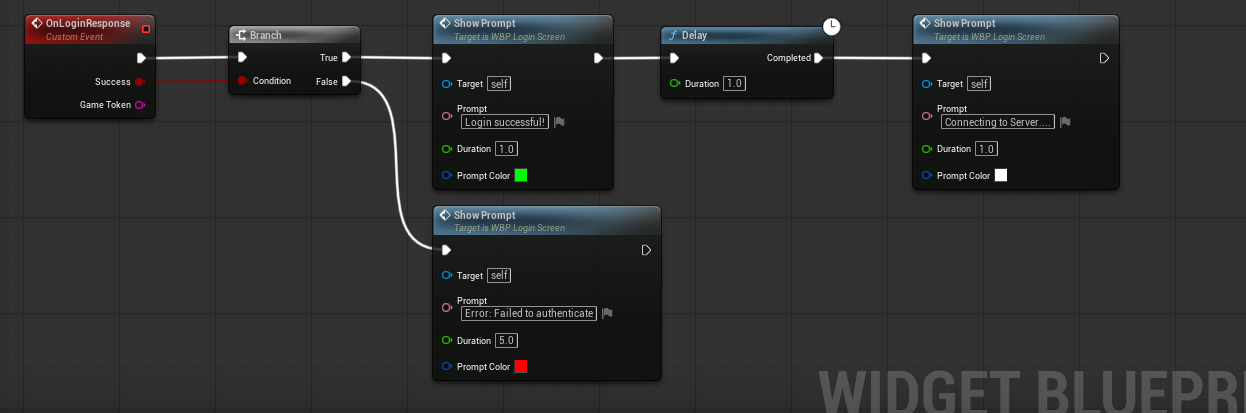
Blueprint nodes
CrowdyServices/Public/Subsystem/AsyncActions/CrowdyAuthenticationActions.h wraps every sign-in call as
a dedicated latent Blueprint node, each with Success/Error exec pins -- no manual delegate binding
required:
| Node | Wraps |
|---|---|
| Login | Login |
| Register | Register |
| Dev Login | DevLogin |
| Magic Link Sign In | BeginMagicLinkSignIn |
| Social Sign In | BeginSocialSignIn |
| Restore Session | RestoreSession |
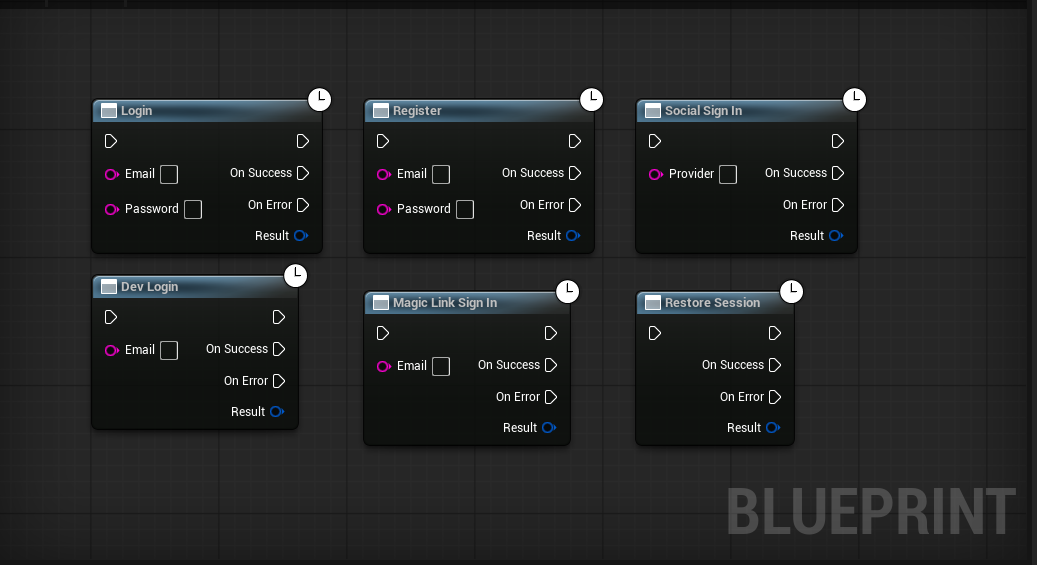 Each node's
 OnSuccess fires with an FCrowdyAuthResult, and OnError fires with an error message –
the same shape as the C++ delegates above. Drop a node onto your sign-in Widget Blueprint graph, wire its
inputs (email/password, or nothing for Restore Session), and handle the two exec pins.
Session persistence
The SDK persists the session token (encrypted at rest) so a player does not need to sign in again on
every launch. These are accessible via the UCrowdyAuthentication subsystem.
UFUNCTION(BlueprintCallable, Category="Crowdy SDK|Authentication")
bool RestoreSession(FOnAuthSuccess OnSuccess, FOnAuthError OnError);

UFUNCTION(BlueprintCallable, Category="Crowdy SDK|Authentication")
void ClearSavedSession();

UFUNCTION(BlueprintCallable, BlueprintPure, Category="Crowdy SDK|Authentication")
bool HasSavedSession() const;
Call RestoreSession manually on startup (for example, before showing a sign-in screen) -- if a saved
session exists it restores the token, re-mints an app token, and fires OnSuccess (the SDK then requests
UDP access); if not, OnError fires immediately. Call ClearSavedSession on logout so the next launch
does not attempt to restore a stale token.
Mint an app-scoped token
Sign-in yields an identity session token -- a management-plane credential that cannot drive
gameplay. Buddy and the Game API accept only an app-scoped token: a short-lived (~30 min)
credential confined to one app. Every sign-in and restore call above mints this automatically before
firing its success delegate, via the Management API mintAppToken mutation (bearer = the session token):
mutation Enter($appId: BigInt!) {
  mintAppToken(input: { appId: $appId }) {
    token gameTokenId appId expiresAt gameApiUrl gameApiWsUrl launchUrl
  }
}
The returned token is the credential that signs UDP spatial messages and opens the replication
connection -- RequestUDPAccess authorizes the session with it, not with the identity session token.
See Native & non-browser clients,
Portals & app-scoped tokens, and
Authenticate and assign.
Handling TOKEN_EXPIRED
App-scoped tokens expire mid-session. The SDK refreshes proactively before expiry and reactively when
Buddy drops the session and emits TOKEN_EXPIRED (32); OnAppTokenRefreshed fires after a
rotation so you can react if needed, and the SDK automatically calls RequestUDPAccess again. See
Error codes.
UDP access
After sign-in and minting an app-scoped token, call RequestUDPAccess. The SDK then:
- Fires
OnUDPAddressNotifywith the result. - Fires
OnUDPConnectionSuccessonce the UDP socket is established.
- C++
- Blueprint
Bind the delegate:
CrowdySDK->OnUDPAddressNotify.AddDynamic(this, &UMyWidget::HandleUDPAddress);
Declare the handler:
// MyWidget.h
UFUNCTION()
void HandleUDPAddress(bool bSuccess, bool bGateKeep);
Implement the handler:
// MyWidget.cpp
void UMyWidget::HandleUDPAddress(bool bSuccess, bool bGateKeep)
{
    if (!bSuccess)
    {
        // Could not resolve a server address. Show an error.
        return;
    }
    // On success the SDK connects automatically. Load the game world and start play.
}
In a Widget Blueprint, bind the OnUDPAddressNotify event and handle the result.
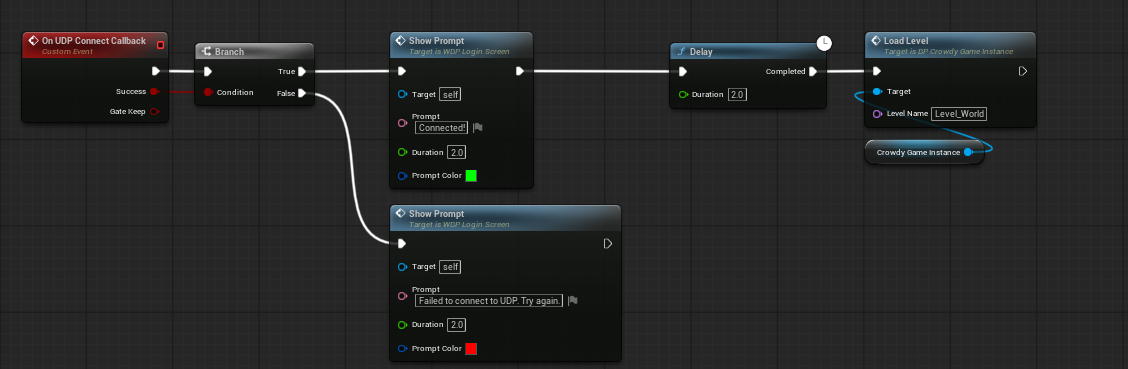
Blueprint example
The sample project drives authentication from Widget Blueprints and includes helpers for validating input and showing sign-in errors. Use it as a starting point.
The event bindings tie the SDK delegates to your widget:
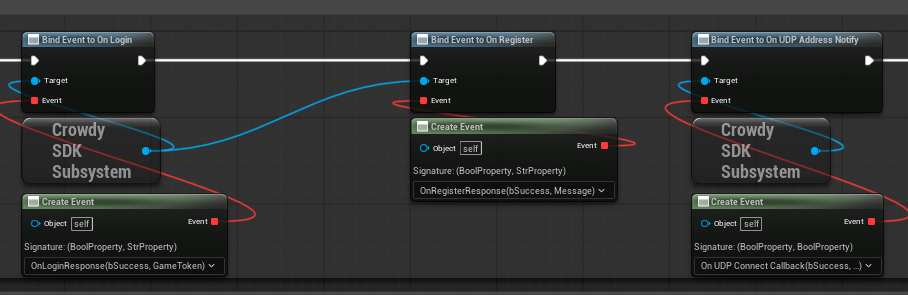
Full flow
The end-to-end sequence from sign-in to the game world:
Sign in (password / magic link / social / dev bypass)
  then OnSuccess (FCrowdyAuthResult)     // identity SESSION token (management-plane only), already minted
  then RequestUDPAccess()                // authorizes the UDP session with the app-scoped token
  then OnUDPAddressNotify (bSuccess = true)
  then enter the game world
  // on TOKEN_EXPIRED (32): the SDK refreshes/re-mints automatically, then re-requests UDP access
Logs
Watch the Output Log in the editor as you use these functions. The SDK logs request and response activity, including errors that are not surfaced through the delegates.