Crowdy State
Mark a UPROPERTY with meta=(CrowdyState) and the client that owns the entity diffs it at the map's replication cadence and ships only the changed values to every proxy, which write them back onto their own copy of the actor. No wire struct, no executor, no manual send unless you ask for one. It replicates single values: POD leaves and USTRUCTs made of them, never containers or object references, and it says so once at startup for each property it drops.
When to use it
For view state that has to be the same on every client, late joiners included: a lantern's lit flag, an animation stance, a cosmetic colour. It works in either entity mode, Static or Dynamic, and on a replicated subsystem.
This is the view plane. The owner writes a value and every other client believes it; the host's precedence below is a convention the receiver honours, not a check. Hit points, currency, inventory: your server code, always. See The Two Planes.
Prerequisites
The actor carries a UCrowdyEntityComponent, and the map profile's bUseStateReplicator is on (the default). A property the class declares is discovered at startup by the auto registry, which builds the class's replication layout once; the layout is baked into the registry for packaged builds, so no metadata is read at runtime.
The metadata keys
All on the UPROPERTY, all spelled exactly as shown.
| Key | Value | Effect |
|---|---|---|
CrowdyState | none | The marker. The property replicates on the view plane. |
CrowdyOnRep | a function name | A parameterless UFUNCTION run after the value is written, on the receiver and on the sender. Read the property for the new value; there is no previous-value argument. |
CrowdyOwnerOnly | none | Delivered only to the owning client, over the targeted path, never on the spatial broadcast. Scope, not secrecy. |
CrowdyHeartbeat | none | Opt in to the periodic keyframe: the property is re-sent every StateKeyframeIntervalSeconds even when unchanged, so a late or desynced observer converges. Off by default in C++; the Blueprint dropdown turns it on. |
CrowdyManualDirty | none | Never auto-diffed. The value ships only when you mark it, with MarkStateDirty. For a property that is expensive to compare every tick. See Marking state from outside the actor. |
An enum is held state: sent on change, never re-sent. A client that starts observing after the last change, or that loses the one datagram carrying it, shows the wrong value until it changes again. The startup scan warns once per such property; crowdy.state.heartbeat.advisories lists every one it found. Add CrowdyHeartbeat, or tick Keyframe heartbeat in the variable's Crowdy Replication settings, unless the value is meant to be transient.
Mark a property
The Quickstart's bLit is the plain form: assign, and the change ships. This page adds a second property to ALantern, TimesLit, marked CrowdyManualDirty, so the count is pushed once per lighting instead of compared every tick. RecordLighting (a plain void RecordLighting(); member you declare in the header) is called from the owner-gated overlap of the Quickstart's step 3; it increments the count and marks it, and every proxy's OnRep_TimesLit scales the light by the count.
- C++
- Blueprint
// Lantern.h
// A manual-dirty property ships only when you schedule it, not every tick.
UPROPERTY(meta = (CrowdyState, CrowdyManualDirty, CrowdyOnRep = "OnRep_TimesLit"))
int32 TimesLit = 0;

UFUNCTION()
void OnRep_TimesLit();

// Lantern.cpp
void ALantern::RecordLighting()
{
	++TimesLit;
	CrowdyEntity->MarkStateDirty(TEXT("TimesLit"));
}

void ALantern::OnRep_TimesLit()
{
	Light->SetIntensity(2000.f * TimesLit);
}
Add an Integer variable TimesLit, set its Replication dropdown under Crowdy Replication to Replicated, and tick Update manually there (the other two toggles are Keyframe heartbeat and Only send to owner). From Event ActorBeginOverlap, the pure Is Crowdy Entity Locally Controlled feeds a Branch; on the true side Get TimesLit feeds a +, Set TimesLit stores the result, and the static Mark Crowdy State Dirty schedules it with TimesLit on the Property Name pin and Target left as self (the member form on the component would need a component getter as well). Seven nodes, one of them the owner gate the lantern's C++ overlap handler has: on a proxy the mark is not ignored, it becomes the host push described below.
The notify
CrowdyOnRep names a parameterless function, GAS-style. It fires wherever the value genuinely moved since the last send: on every receiver after the write, and on the sender itself, because a sent delta never comes back to its sender and the owner would otherwise never run it. A keyframe re-sending an unchanged value fires nothing, and a manual dirty mark on a value that did not move fires nothing either. Each slot fires at most once per tick, and a change the notify makes to its own property is folded into the sent baseline rather than re-sent.
The Quickstart lantern is the state-onrep example: bLit with CrowdyOnRep = "OnRep_Lit", and a notify that sets the light's visibility.
- C++
- Blueprint
// Lantern.h
// View state: a wrong value is a visual glitch, not a cheat, so it belongs on the Crowdy State plane.
UPROPERTY(meta = (CrowdyState, CrowdyOnRep = "OnRep_Lit"))
bool bLit = true;

UFUNCTION()
void OnRep_Lit();

// Lantern.cpp
void ALantern::OnRep_Lit()
{
	Light->SetVisibility(bLit);
}
Select the variable, set Crowdy Replication to Replicated, and a RepNotify field appears; the editor creates the OnRep_ function. The variable's Get and Set nodes then carry the replication badge:
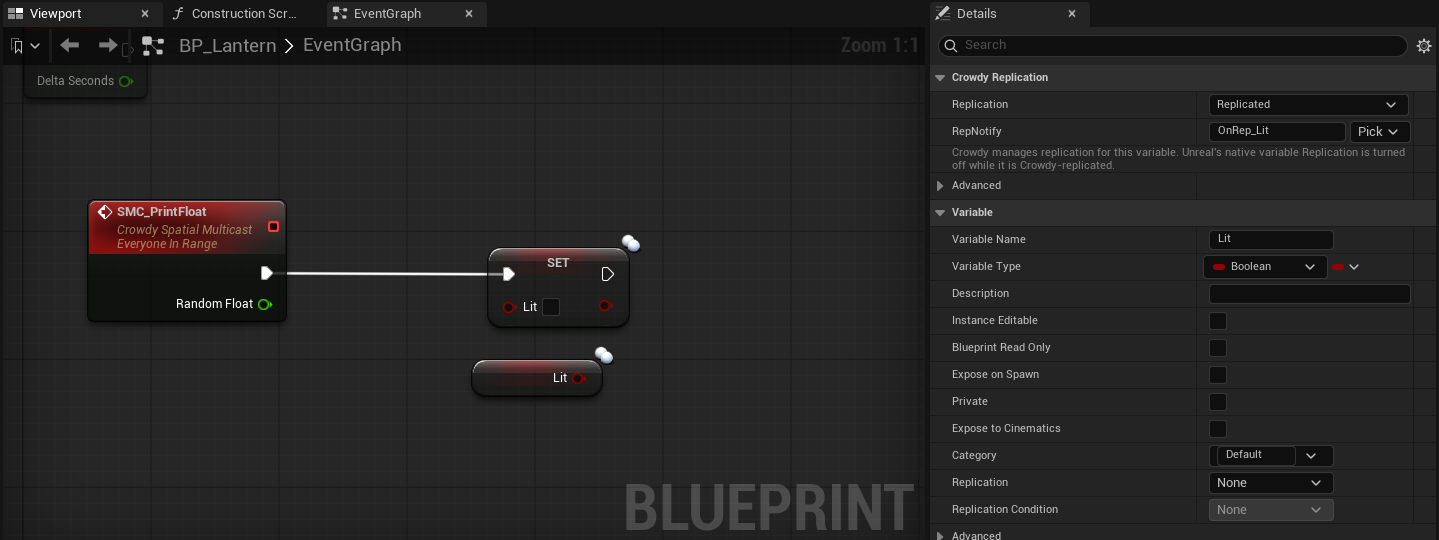
The body of the notify, drawn here as a custom event named OnRep_Lit because a generated graph cannot draw the editor-made function itself: Get bLit feeds Set Visibility on Light.
Write the notify as the one place the value is applied to the world, the way OnRep_Lit drives the light, and keep it idempotent. The Quickstart calls OnRep_Lit itself right after the assignment for an immediate local response; the replicator runs it once more on the tick that ships the change, which is harmless for a notify that only applies the current value and wrong for one that counts its own calls.
What ships, and when
Only the owning client diffs. A remote proxy never diffs; it applies. The cadence is the map profile's ReplicationIntervalHz (1 to 10, default 10), the same clock the continuous channel uses, though the two send independently. Each tick the replicator compares every auto-diffed property of every entity this client drives against a shadow copy of the last sent value and encodes the changed ones into one FCrowdyStateDelta; owner-only properties go out as a second, targeted delta. Every StateKeyframeIntervalSeconds (default 2, on the map profile; 0 turns it off) each entity also emits a keyframe carrying its CrowdyHeartbeat properties, unless the entity's StateHeartbeat is Off. A delta travels as far as the profile's StateRelevanceDistance (Four Chunks by default), which is tighter than the continuous channel.
A struct with a native net serializer (FVector_NetQuantize, FRotator) rides the engine's own quantized serializer automatically; a plain FVector stays exact. Quantization is chosen by type, not by a key. See What a state property may be.
Every delta carries a layout hash that folds each property's name and canonical type in declaration order. A receiver whose own hash for the class differs drops the delta cleanly rather than reading bytes by position, so adding, removing, reordering, or retyping a replicated property on one build and not another costs you deltas, not corruption. An enum property is carried as its underlying integer (blob version 2, CrowdyStateBlobVersion); a peer on the older format drops these deltas rather than misparsing them, so every client of an app runs one build.
What a state property may be
You marked a property CrowdyState and nothing arrives, or you are about to mark one and want to know if it will. The classifier every surface shares, FCrowdyStateLayoutBuilder::ClassifyStateProperty (with IsStateReplicatable as the yes-or-no form and DescribeStateSupport for the sentence), decides at discovery; the Blueprint compiler's variable check and the variable-details dropdown reuse it, so every surface reports the same reason.
Accepted
| Kind | Examples | Notes |
|---|---|---|
| Numeric | int32, int64, uint8, float, double | Diffed and sent as their bytes. |
| Boolean | bool | |
| Enum | enum class E : uint8, TEnumAsByte | Carried as the underlying integer. Consider CrowdyHeartbeat; see The metadata keys. |
| Name and string | FName, FString | |
| Plain struct | any USTRUCT whose fields, at every depth, hold no container | One slot in the layout; diffed and sent as one unit. |
| Net-serialized struct | FVector, FRotator, FVector_NetQuantize, any struct with a native net serializer | Rides its own NetSerializeItem, quantized as the engine defines it, and exempt from the nested-container check because its serializer bounds the decode. |
Rejected
The error names the escape hatch: CrowdyState: property 'Players' on '/Script/MyGame.Lantern' is a container; CrowdyState does not replicate containers; use a CrowdyEvent RPC or a Server Object. Omitting it. A list of who lit the lantern is a TArray parameter on a CrowdyEvent if it is a moment, or a Server Object if it is truth. Never re-attempt it here.
| Rejected | The reason discovery logs |
|---|---|
TArray, TSet, TMap | is a container; CrowdyState does not replicate containers; use a CrowdyEvent RPC or a Server Object |
| A plain struct that holds a container at any depth | is a USTRUCT that transitively contains a container (TArray/TSet/TMap); such nested containers are rejected because a forged element count would drive an unbounded allocation on decode |
A fixed-size C array (float Values[4]) | is a fixed-size array; CrowdyState replicates only single-value POD and USTRUCT properties (its positional diff would miss changes past element 0) |
UObject*, TSubclassOf, soft object and class references, interfaces, delegates | is an object/interface/delegate reference; CrowdyState replicates only POD and USTRUCT values |
Anything else, FText for one | has an unsupported type 'X'; CrowdyState replicates only POD and USTRUCT values |
A rejected property is omitted from the class's layout, so it never corrupts the positional wire order of the ones that were accepted; the rest of the class replicates normally. The line is an error and is not gated by crowdy.state.trace, so it is in the log whether or not tracing is on.
Structs
A plain USTRUCT is a single slot. The whole struct is compared with the engine's Identical and, when any field differs, the whole struct is sent; on the receiver every field lands together, before the notify runs. That is the reason to use one: two fields that must always be seen together, a colour and an intensity, cannot arrive half-applied the way two separate properties can.
The lantern's glow is such a pair. FLanternGlow holds a colour and an intensity; WarmGlow on the owner changes both, and OnRep_Glow applies both to the light in one step.
- C++
- Blueprint
// Lantern.h
// A plain struct rides CrowdyState as one value; its fields always arrive together.
USTRUCT()
struct FLanternGlow
{
	GENERATED_BODY()
	UPROPERTY() FLinearColor Color = FLinearColor::White;
	UPROPERTY() float Intensity = 1.f;
};

UPROPERTY(meta = (CrowdyState, CrowdyOnRep = "OnRep_Glow"))
FLanternGlow Glow;

UFUNCTION()
void OnRep_Glow();

// Lantern.cpp
void ALantern::WarmGlow()
{
	Glow.Color = FLinearColor(1.f, 0.6f, 0.2f);
	Glow.Intensity += 500.f;
}

void ALantern::OnRep_Glow()
{
	Light->SetLightColor(Glow.Color);
	Light->SetIntensity(Glow.Intensity);
}
A Blueprint variable of a C++ struct type replicates the same way: set its Crowdy Replication dropdown to Replicated and give it a RepNotify, exactly as for a scalar. Authoring a new struct type in Blueprint for this is unusual, so this section has no Blueprint graph of its own; the mechanics of marking and notifying are under Mark a property and The notify.
Changing one field of a five-field struct re-sends all five. Five scalar properties diff independently and each ships alone. Group fields into a struct when they must land together; keep them separate when they change at different times.
Where the list you wanted belongs
| You wanted | Put it on |
|---|---|
| The names of the players who lit the lantern this match | Your server code, if it is truth the server should hold; otherwise a TArray<FString> parameter on a Multicast CrowdyEvent when it changes. |
| A ring buffer of recent positions | The continuous state snapshot, as fixed fields, or nothing: the proxy interpolates for you. |
| A reference to another actor | Its NetID as an FGuid, resolved with FindEntity on the receiver. |
| A list of active effects | Your server code. |
Marking state from outside the actor
UCrowdyStateBlueprintLibrary has two static nodes that schedule a CrowdyManualDirty property to ship without first fetching the actor's Crowdy Entity Component: Mark Crowdy State Dirty and Mark All Crowdy States Dirty. Each resolves the target actor's component and forwards to its MarkStateDirty or MarkAllStateDirty. Use them whenever the caller does not already hold the component: a graph on another actor, a function library, a UI widget. From the actor's own graph either form works; the static one needs no component reference wired in.
The two nodes
| Node | C++ | What it does |
|---|---|---|
| Mark Crowdy State Dirty | UCrowdyStateBlueprintLibrary::MarkCrowdyStateDirty(Target, PropertyName) | Schedules one manual-dirty property on the target's entity for the next replication tick. |
| Mark All Crowdy States Dirty | UCrowdyStateBlueprintLibrary::MarkAllCrowdyStatesDirty(Target) | Schedules every manual-dirty property on that entity. |
Both are DefaultToSelf on Target: from an actor's own graph you wire nothing and pick the property. From a component graph or a plain object graph, self is not an actor, so wire the actor in; the node shows a "Wire an Actor into Target" hint until you do.
Both are safe no-ops, never a crash, when the target is null, has no entity component, or the map runs no state replicator. On an entity this client does not drive the two differ: Mark All Crowdy States Dirty is ignored, while Mark Crowdy State Dirty is not a no-op at all; it becomes the host push described below. On an entity this client does drive, marking a property that is auto-diffed anyway is a no-op logged at verbose level as ignored: not a manual-dirty property, never an error.
The example is the same TimesLit member Mark a property added; this is the alternate call site, not a second gameplay moment.
- C++
- Blueprint
// Lantern.cpp
#include "Replication/State/CrowdyStateBlueprintLibrary.h"

void ALantern::PushTimesLit()
{
	// Schedule the same property from anywhere, without fetching the component first.
	UCrowdyStateBlueprintLibrary::MarkCrowdyStateDirty(this, TEXT("TimesLit"));
}
From Event ActorBeginOverlap, the pure Is Crowdy Entity Locally Controlled feeds a Branch, and the true side calls Mark Crowdy State Dirty with Target left unwired (self) and TimesLit picked from the Property Name dropdown. No component reference is needed. The branch is the owner gate the C++ caller has: on a proxy the same mark becomes the push described below, which is not what an overlap on a proxy means.
The property picker
The Property Name pin carries a dropdown, supplied in the editor by FCrowdyStatePropertyPinFactory, listing the resolved target class's properties that are marked CrowdyManualDirty and pass the type check. The dropdown is editor-only metadata scanning; the name you pick bakes into the compiled Blueprint as a literal FName, so a packaged build never reads metadata for this node.
An auto-diffed property does not need marking; assign it and it ships. A property that failed the check was omitted from the layout at startup with an error; see What a state property may be.
On an entity you do not own: the host push
Mark Crowdy State Dirty on an entity another client owns is not a no-op. It becomes a one-shot super-user push: the live value of the named property is read on the next replication tick and broadcast once, with no shadow and no ongoing tracking, stamped host-sourced when the caller is the elected host. It works for any Crowdy State property on that entity, not only the manual-dirty ones, because a host override may need to correct anything. An OwnerOnly entity refuses it at the source: the push is dropped before it is sent, and a receiver drops one that arrives anyway.
A host-owned world entity is the other case. On the host it is tracked with auto-diff off, so a plain CrowdyState property on it never ships on change; the host's mark works only for a CrowdyManualDirty property (the CrowdyHeartbeat keyframe still restates the rest). Mark a host-owned entity's changing properties manual-dirty, or give them CrowdyHeartbeat.
The receiver honours a push by the entity's HostOverride policy: Allow (the default) adopts a host-sourced value into the owner's baseline. A push from a client that is not the host is not stamped, so the real owner drops it, and every other proxy applies it, so the proxies disagree with the owner until the owner's next change. That is the hazard behind the owner gate above: a mark issued on a proxy by mistake is a push.
The value on the calling client is broadcast as it stands. There is no shadow to revert to and no acknowledgement. Read the current value first, set what you mean, then mark.
A modified client can stamp its own pushes host-sourced. This orders who wins on the view plane and nothing more; see Host authority and The Two Planes.
A field that silently does nothing
The first thing to check. Discovery logs an unconditional error for every marked property it cannot carry, of the shape CrowdyState: property 'X' on '/Script/MyGame.Lantern' is a container; CrowdyState does not replicate containers; use a CrowdyEvent RPC or a Server Object. Omitting it. The reasons are a container, a struct that buries a container, a fixed-size array, an object or interface or delegate reference, or an otherwise unsupported type such as FText; Rejected lists them. One more line to know: a property whose name and type also appear in the actor's continuous-state executor struct is dropped with also lives in its executor state struct ... Dropping it from the CrowdyState layout, so a field lives on exactly one channel.
These fire at class registration and are not gated by the trace variable. Grep the log for CrowdyState: property, which all three lines share, before turning anything on. When the property is in the layout but the change is not arriving, that is the other question:
crowdy.state.trace 1     per delta: entity, changed-property count, byte size, spatial or owner-only or keyframe
crowdy.state.loopback 1  decode your own deltas onto a local mirror entity, for a single-client test
Two read-only diagnostics on UCrowdyStateReplicator answer the same questions from code or Blueprint: IsStateReplicated(Actor) is true when the actor's class carries at least one accepted property, whichever client drives it, and GetLastSentStateBytes(Actor) is the blob size this client last sent for the actor, or -1 when this client does not drive it. crowdy.state.scopes adds a CPU trace scope around each delta decode for profiling.
Host precedence
When the local client is the elected host, every delta it sends is stamped host-sourced. A receiver that owns the entity adopts a host-sourced value into its own baseline instead of reverting it on the next diff, provided the entity's HostOverride is Allow (the default); OwnerOnly drops even a host correction. A host-owned world entity is driven by the host alone, and only by explicit pushes: its manual-dirty marks and its keyframe, never a background diff. See Host authority.
It orders who wins on the view plane; it does not make either value trustworthy. If the value matters, it belongs in your server code and the question does not arise.
Gotchas
- Grep for
CrowdyState: propertyfirst. A property that is not in the layout replicates nothing and says so once, at startup, as an error. - The notify has no parameters and no old value. Keep the previous value yourself if you need it.
- A Blueprint variable that is both natively Replicated and Crowdy Replicated fails to compile. In C++, keep
Replicatedoff aCrowdyStateproperty. CrowdyOwnerOnlyis delivery scope, not secrecy. The value still travels in the clear to the owner.StateKeyframeIntervalSecondsat 0 stops the baseline re-send only; on-change replication is unaffected.- The loopback and trace variables are test aids. Leave them off in a normal session.
FTextis not accepted on this plane, though it is on a CrowdyEvent. Use anFStringor anFName.- A struct that is net-serialized is exempt from the nested-container check only because its serializer bounds the decode. A plain struct with a
TArrayinside is rejected however small the array. - Quantization is decided by the struct's type. To ship a quantized position, declare
FVector_NetQuantize, notFVector. Targeton the static nodes defaults to self only where self is an actor. In a component or widget graph, wire the actor.- The push is scheduled, not sent. It goes out on the next replication tick with the value the property holds then.
- Marking twice in one tick sends once.
- A host-owned world entity is written only through the host's manual-dirty marks and the keyframe; assigning a plain property on it and waiting does nothing. See Host authority.
Related
- Continuous state: the sibling channel for many fields that move together.
- Map profiles: the cadence, the relevance distance, and the keyframe interval.
- State meta keys.
- RPC events in C++: containers and object references as event parameters.
- The Two Planes: what belongs on the truth plane instead.
- Host authority: host-owned entities and the host override.
- Ownership transfer: making another client the owner instead of pushing over it.