Entities and Spawning
An entity is an actor with a UCrowdyEntityComponent. A level-placed one needs no spawn call: every client loads it and derives the same NetID. This page is about the other kind, an actor created during play, which one client spawns and every other client rebuilds from a spawn event. For identity policies, NetIDs, and the owner and proxy roles, read Entities, Identity, and Ownership first.
When to spawn through the SDK
Whenever an actor created at runtime must exist on other clients: a dropped item, a thrown object, a summoned creature. The plain engine SpawnActor creates a local actor and tells nobody; the SDK's spawn call creates the same actor and announces it.
Spawning
UCrowdyEntitySubsystem::SpawnEntity(EntityClass, SpawnTransform, InitialState) spawns the class locally with a deferred spawn, injects the entity's identity into its component before BeginPlay, and broadcasts a spawn event so every client in range spawns the same class as a proxy. The client that called it is the owner; Role is Owner there and RemoteProxy everywhere else. UCrowdyUtilities::SpawnCrowdyEntity(WorldContextObject, EntityActorClass, SpawnTransform, InitialState) is the same operation as a static call with a world context pin, which is the form a Blueprint uses.
InitialState is an FInstancedStruct of your own type. It travels with the spawn and lands in the component's OnCrowdySpawned event on every client; pass an empty struct when there is nothing to send.
The lantern world's runtime spawn is the player arriving with a lantern. ALanternPlayer is the player character: a pawn carrying a UCrowdyEntityComponent in Dynamic mode with PlayerDerived identity and LocalClient ownership, declared in full on Continuous state. Once the character knows it is locally owned, ALanternPlayer::DropLantern spawns an ALantern a short way in front of it, and the new lantern appears there on every client in range. The moment is OnCrowdyOwnershipAssigned, not BeginPlay: a player pawn spawned during play (RestartPlayer) is possessed after its BeginPlay, and its Player Derived identity resolves inside that first possession, so IsLocallyOwned() is still false at BeginPlay. The AddDynamic in the block sits in ALanternPlayer::BeginPlay, after Super::BeginPlay(); the handler fires on the tick after the entity registers, on the first-frame pawn and the runtime-spawned one alike.
- C++
- Blueprint
// LanternPlayer.h
virtual void BeginPlay() override;

UFUNCTION()
void HandleOwnershipAssigned(const FGuid& NewOwnerID, ECrowdyRole NewRole, bool bIsLocallyOwned);

void DropLantern();

// LanternPlayer.cpp
#include "Lantern.h"
#include "Utils/CrowdyUtilities.h"

void ALanternPlayer::BeginPlay()
{
	Super::BeginPlay();
	// A pawn spawned during play registers inside its first possession, after BeginPlay, so the owner answer arrives here.
	CrowdyEntity->OnCrowdyOwnershipAssigned.AddDynamic(this, &ALanternPlayer::HandleOwnershipAssigned);
}

void ALanternPlayer::HandleOwnershipAssigned(const FGuid& NewOwnerID, ECrowdyRole NewRole, bool bIsLocallyOwned)
{
	// Each player arrives carrying a lantern; only the owner spawns it, every client then sees it.
	if (bIsLocallyOwned)
	{
		DropLantern();
	}
}

void ALanternPlayer::DropLantern()
{
	const FTransform SpawnAt(GetActorRotation(), GetActorLocation() + GetActorForwardVector() * 150.f);
	UCrowdyUtilities::SpawnCrowdyEntity(this, ALantern::StaticClass(), SpawnAt, FInstancedStruct());
}
Any Actor Blueprint can spawn; nothing on the spawner needs a component. In the player pawn's Blueprint, at Event BeginPlay, Get Crowdy Entity Component feeds Bind Event to On Crowdy Ownership Assigned, whose Event pin is wired to a custom event, OnOwnershipAssigned, that receives the owner id, the role, and the Is Locally Owned flag; the pawn registers inside its first possession, after BeginPlay, so this is where the answer arrives. The event's Is Locally Owned pin feeds a Branch (the owner gate: only the owner spawns), and on the true side Get Actor Transform feeds the Spawn Transform pin of Spawn Crowdy Entity, which takes the entity class and an optional Initial State struct and returns the spawned actor. The class pin in the figure names the sample lantern; pick your own entity class there. A spawner that is not a Player Derived pawn can run the same Branch straight from Event BeginPlay with the pure Is Crowdy Entity Locally Controlled as the condition; only a Player Derived pawn learns its identity after BeginPlay.
SpawnEntity injects a fresh NetID, Role = Owner, and the spawning client's player id before BeginPlay, so the component's IdentityPolicy and Ownership settings are not read. Setting Stable on a class you spawn does not give it a stable id, and setting Host does not make it host-owned; a level-placed ALanternPost is how you get both, and Ownership transfer is how a spawned entity changes hands afterwards.
A plain SpawnActor never broadcasts the spawn event. The component still registers locally, so the actor looks like an entity on the spawning client and exists nowhere else.
InitialState.It reaches the clients within eight chunks of the spawn point at that moment and is never replayed. A client that joins afterwards, or comes into range later, still draws a Dynamic entity from its position updates, but with no spawn event OnCrowdySpawned does not fire there. A Static entity is different: its owner repeats the spawn event every 4 seconds (below), so a late joiner gets the actor, its owner, and OnCrowdySpawned with the InitialState. Anything a late joiner must see on a Dynamic entity belongs in class defaults or in replicated state, and anything that must exist for everyone from the start is level-placed.
Success signal. On a second client the proxy appears and its OnCrowdySpawned fires with bIsLocallyOwned false. A single client can only confirm the send: crowdy.entity.trace 1 logs the registration and the spawn event; crowdy.rpc.loopback replays RPC calls, not spawn events, so no proxy appears.
Destroying
Three calls converge on the same path: broadcast a destroy event, then destroy the actor after the component's DestroyDelay (0 by default, so immediately).
| Call | Where |
|---|---|
UCrowdyEntitySubsystem::DestroyEntity(TargetEntity) | The subsystem, given the actor. |
UCrowdyUtilities::DestroyCrowdyEntity(WorldContextObject, TargetEntity) | The static form with a world context pin; the Blueprint node. TargetEntity defaults to self. |
UCrowdyEntityComponent::DestroyEntity() | The component, on itself. See Entity component. |
On every client OnCrowdyDestroyed fires first, with bIsLocallyOwned true on the client that called the destroy and false everywhere else; nothing stops a non-owner from destroying an entity. The actor goes after the delay. A DestroyDelay above zero is for a dissolve or a fade the actor plays out before it disappears. The entity stops sending updates when the destroy is called, not when the actor goes, and other clients do not draw updates that arrive in the half second after the destroy event, so an update already on its way does not bring the entity back.
- C++
- Blueprint
// LanternPlayer.h
virtual void NotifyActorBeginOverlap(AActor* OtherActor) override;
void PickUpLantern(AActor* Target);

// LanternPlayer.cpp
#include "Lantern.h"
#include "Utils/CrowdyUtilities.h"

void ALanternPlayer::NotifyActorBeginOverlap(AActor* OtherActor)
{
	Super::NotifyActorBeginOverlap(OtherActor);
	// Walking over one of your own lanterns that has gone out picks it up; every client sees it go.
	const ALantern* Lantern = Cast<ALantern>(OtherActor);
	if (Lantern && !Lantern->bLit && Lantern->CrowdyEntity->IsLocallyOwned())
	{
		PickUpLantern(OtherActor);
	}
}

void ALanternPlayer::PickUpLantern(AActor* Target)
{
	UCrowdyUtilities::DestroyCrowdyEntity(this, Target);
}
The player picks up a lantern of their own that has gone out: in C++ the character's overlap checks the lantern is unlit and locally owned, then PickUpLantern destroys it. The graph is the call alone: from Event ActorBeginOverlap, Destroy Crowdy Entity takes Other Actor on its Target Entity pin; the "unlit and yours" check is yours to add in front of it. The removal is visible on every client without any further node.
Receiving a spawn on a remote client
A remote client that receives the spawn event spawns the named class, injects the identity as RemoteProxy, finishes spawning, and broadcasts OnCrowdySpawned with the InitialState from the event. The event carries the class path, so a class that is not loaded yet is streamed in and spawned when it arrives; a destroy event that lands during the load cancels the spawn. If the class ships without a UCrowdyEntityComponent, the SDK adds one so the lifecycle callbacks have a home.
That actor is the one players see: the actor pool draws it rather than a pooled copy, so whatever your OnCrowdySpawned handler set on it stays. When the entity's first update arrives before its spawn event, the pool draws it at once and the spawn event then hands its InitialState to that actor instead of spawning a second one. Either way OnCrowdySpawned fires once per entity on each client.
FCrowdyEntitySpawnEvent, FCrowdyEntityDestroyEvent, and the registry's FCrowdyEntityRecord are Blueprint-visible types because they cross a delegate, but you never construct one. InitialState is the only payload you author.
A Dynamic entity can appear with no spawn event at all
A Dynamic-mode entity (see Continuous state) streams position updates, and each update carries the class id and the state struct type. The UCrowdyActorManager resolves the class from that (RegisterStateClass is filled in for you by each entity component's BeginPlay) and asks the rendering backend to draw a proxy, so a moving entity shows up on a client that joined late without any spawn round trip.
A Static entity spawned with SpawnEntity sends no updates, so its owner repeats the spawn event instead: every 4 seconds while a client owns it, that client sends the spawn event again, from where the entity is now, naming its owner and carrying its InitialState. A client that joins later builds the entity from a repeat exactly as if it had seen the spawn, and its OnCrowdySpawned fires there. A client that already has the entity ignores repeats, and OnCrowdySpawned never fires twice. A repeat costs about 280 bytes plus your InitialState: about 70 bytes per second of upload per entity on its owner, and the same in download for each client within eight chunks. A spawn event for an entity destroyed less than 10 seconds earlier is ignored, so a repeat already on its way cannot bring it back; an owner that never received the destroy keeps repeating, and the entity reappears after those 10 seconds. A Static entity placed in the level, or registered with RegisterStaticEntity, sends nothing.
This path resolves the class by id against loaded classes; a spawn event carries the class path and loads it for you, this does not. The startup scan walks loaded classes, and a Blueprint entity class that nobody on this client has spawned yet is not loaded, so an observer that meets it first over the network cannot name it. The actor manager warns cannot resolve to a loaded class ... Preload the entity class or give it a ClassIDOverride and the entity stays undrawn. List every Blueprint entity class a client can be shown before it spawns one itself under Project Settings, Plugins, Crowdy SDK, Replication, Preloaded Entity Classes (PreloadedEntityClasses on UCrowdySDKDeveloperSettings). Classes already loaded for another reason need no entry, and a duplicate costs nothing.
The actor tracker
Inbound actor updates arrive at UCrowdyActorTracker, a world subsystem the actor manager listens to. Its settings live on the ActorManagement struct of the map profile (FCrowdyActorManagementConfigStruct, the same struct a UCrowdyActorManagementConfig asset holds):
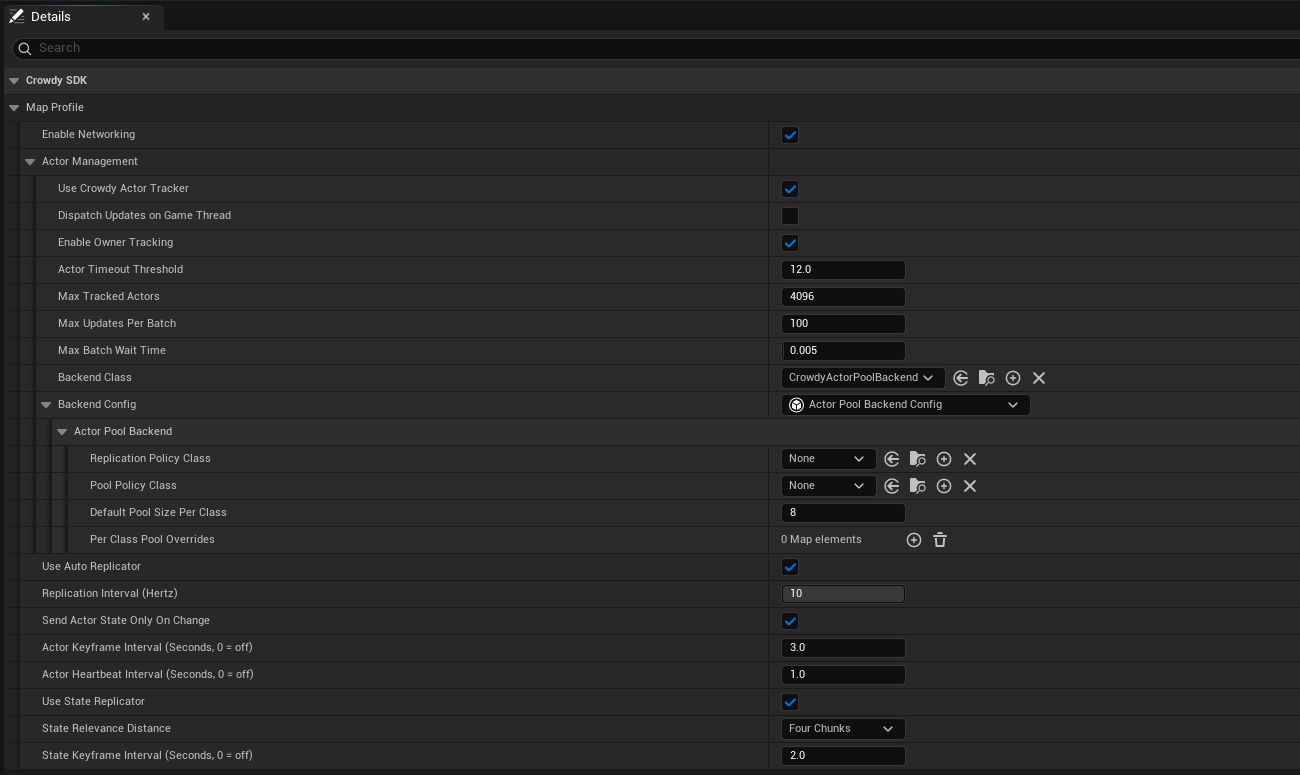
The shipped default profile leaves Backend Config at None and runs on the built-in one; the map profile page shows that state and when to assign your own.
| Field | Default | Effect |
|---|---|---|
bUseCrowdyActorTracker | on | Off means no tracker, no actor manager, and no backend on this map. |
bDispatchUpdatesOnGameThread | off | Also broadcast each update batch to OnUpdatesGameThread for a Blueprint listener. |
bEnableOwnerTracking | on | Track the local player's own actor echo as well: the reflection the Quickstart uses as proof that the server is receiving you. |
ActorTimeoutThreshold | 12 s | Seconds of silence before an entity is dropped on a guess. The server announces a real departure about five seconds after the last update, so this is the fallback. |
MaxTrackedActors | 4096 | How many network-received actors may be tracked at once. A bound on forged ids, not a performance setting; set it above the largest crowd you intend to show. |
MaxUpdatesPerBatch, MaxBatchWaitTime | 100, 5 ms | How updates for not-yet-seen entities are batched off the game thread. |
The tracker's events, all on the game thread: OnRemoteEntityAppeared (an id seen for the first time, with its InitialState), OnRemoteEntityTimedOut (this client heard nothing for ActorTimeoutThreshold), OnRemoteEntityLeft (the server said it is gone, with an FCrowdyActorLeft carrying the ECrowdyActorLeftReason: Stale, or SessionReleased when the server ended that actor's session), and OnRemoteEntityLeftAnnounced (every departure, including one for an actor this client never held, for code keeping its own per-sender state). Whichever of timed-out and left reaches an actor first is the only one that reports it. The delegate types are FOnActorSpawnRequested, FOnActorTimeoutRequested, FOnActorLeftReported (used by both departure events), and FOnActorUpdateGameThreadBatch. ToggleOwnerTracking and ToggleBroadcastUpdatesToGameThread change those two settings at runtime. Configure does not: it applies only before the tracker starts, which is before any Blueprint can call it, so on a running tracker it logs a Warning and changes nothing, and its Blueprint node is deprecated. Set the limits in the map profile or in the Crowdy SDK developer settings instead. FCrowdyActorUpdate is the batch element, carrying PayloadTypeID, the payload type id the sender's state blob led with, kept even when no struct is registered for it on this client. crowdy.replication.tracker.maxgatheredupdates caps the backlog of gathered updates for actors already on screen. You do not normally touch any of this: the actor manager and the rendering backend consume it for you.
Looking entities up
UCrowdyEntitySubsystem is the registry. FindEntity(NetID) returns the actor or null; FindEntityID(Actor) is the reverse lookup; IsLocallyOwned(NetID) is true when the record names the local player as the owner and the role says this client simulates it (a record that contradicts itself reads as not mine); GetLocalPlayerID and GetHostID read the two ids everything else is compared against; SetLocalPlayerID exists for a game that manages the player id itself, which the session normally seeds for you. OnEntityRegistered and OnEntityUnregistered (FOnCrowdyEntityRegistered, FOnCrowdyEntityUnregistered) fire with the NetID as records come and go. The Blueprint-friendly statics on UCrowdyUtilities wrap the same registry: GetCrowdyEntityID, GetCrowdyEntity, GetCrowdyEntityOwnerID, GetCrowdyEntityRole (an ECrowdyRole), GetAllCrowdyEntitiesByOwner, CrowdyIsEntityRegistered, and GetLocalPlayerEntityID.
Gotchas
IsLocallyOwnedmeans two different things: on the subsystem it takes a NetID and asks the record; on the component it takes nothing and asks whether this client is the entity's authority, host-owned included. See Entity component.- A spawned entity is owned by its spawner, full stop. To hand it over, use Ownership transfer.
InitialStatereachesOnCrowdySpawnedonce on each client that receives the spawn event, on the actor that client draws. A late joiner receives it for a Static entity (from a repeat) but not for a Dynamic one.- Two unrelated participants can derive the same NetID (a NetID has 32 bits of real entropy). The incumbent keeps it and the newcomer is refused with a log line; a system that binds state to an id should register through
TryRegisterEntityand give up its claim when theECrowdyEntityRegistrationit returns isRefusedIdHeldByLiveParticipant(orRefusedInvalidNetIDfor a record with no usable id) rather thanRegistered. UHelperFunctionshas the id helpers a custom identity scheme would reach for:GetDeterministicID(Seed)turns a seed into the sameFGuidon every client, with those same 32 bits of entropy, andGetNewIDandGetNewUUIDmint random ones. Prefer the component's identity policies; these exist for code that already has a seed.
Related
- Entities, Identity, and Ownership: NetIDs, policies, owner and proxy.
- Entity component: every callable and event on the component.
- Ownership transfer: moving an entity to another player.
- Rendering backends: how a proxy is drawn, and the pooled-proxy gotchas.
- Continuous state: Dynamic mode and the executor.