Map Profiles
A map profile is a UCrowdyMapProfile data asset: one asset configures one map end to end. A map you configure nothing for runs on the profile the plugin ships; a profile of your own is how you change a map's settings, or switch the SDK off there. A configured row whose asset fails to load resolves to no profile, and that map has no networking however correct the code is.
When you need one
When a map needs settings the shipped default does not have: a Backend Config of your own, a different send cadence, a tighter relevance distance. The Quickstart authors none and runs on the shipped default. A map that should run without the SDK gets a profile with Enable Networking unticked; that records the intent, and it is the only way to switch the SDK off on one map.
Create the asset
In the Content Browser, Add, Miscellaneous, Data Asset, pick Crowdy Map Profile. The Details panel shows every field of the asset:
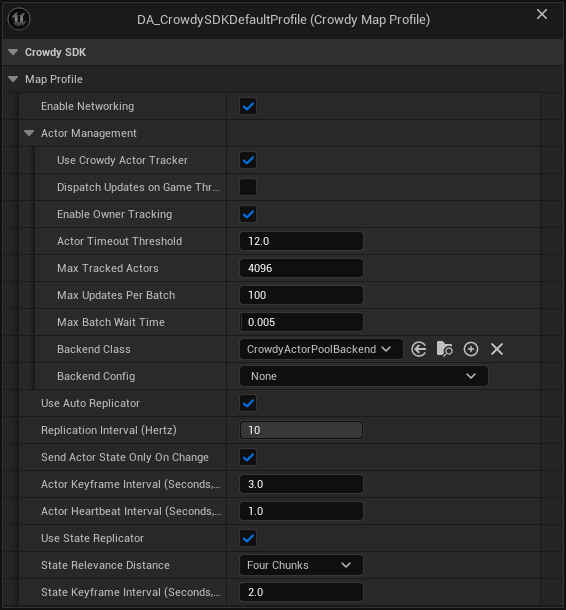
The screenshot is the SDK's own shipped default profile. Backend Config is empty on it, which is fine: the actor pool runs on a built-in config when none is set.
| Field | Default | What it controls |
|---|---|---|
bEnableNetworking | on | Gates the host subsystem, the event router, and the entity subsystem on this map. Off means the map runs with the SDK loaded but idle. |
ActorManagement | see Rendering backends | Which backend draws remote entities (BackendClass, BackendConfig) and the actor tracker settings. Pick Crowdy Mass Rendering Backend as the Backend Class to draw a crowd; see Turn Mass on for a map. |
bUseAutoReplicator | on | The continuous state channel for Dynamic entities. See Continuous state. |
ReplicationIntervalHz | 10 (1 to 10) | Shown as Replication Interval (Hertz). The send cadence shared by the continuous channel and the Crowdy State replicator. Greyed out in the Details panel when Use Auto Replicator is off, but still read by the Crowdy State replicator. |
bSendActorStateOnlyOnChange | on | Shown as Send Actor State Only On Change. An unchanged Dynamic entity sends a keyframe or a heartbeat instead of restating its state every interval. |
ActorKeyframeIntervalSeconds | 3.0 | Full re-send period for an unchanged Dynamic entity, so a late observer converges. 0 turns keyframes off. |
ActorHeartbeatIntervalSeconds | 1.0 | Heartbeat period for an unchanged Dynamic entity: the spatial header and no state, which is what keeps an idle entity from being reaped. 0 turns heartbeats off. |
bUseStateReplicator | on | Master switch for Crowdy State property replication. See Crowdy State. |
StateRelevanceDistance | Four Chunks | Shown as State Relevance Distance. How far a Crowdy State delta travels, as a chunk count (ECrowdyReplicationDistance), tighter than the continuous channel. |
StateKeyframeIntervalSeconds | 2.0 | Period of the Crowdy State keyframe, the full re-send of every property marked CrowdyHeartbeat. 0 turns the keyframe off map-wide; on-change replication is unaffected. |
ActorManagement.BackendClass defaults to UCrowdyActorPoolBackend. With ActorManagement.BackendConfig left empty, the backend creates a transient Actor Pool Backend Config and applies remote movement with UCrowdyTransformRepPolicy, the shipped policy that reads the default executor's FCrowdyActorState (location and rotation) and interpolates across a ring of recent samples, extrapolating briefly when an update is late. Set a config of your own when your executor sends a state struct of its own, when you want pool sizes per class, or when you want a different pool policy. The actor pool refuses a config of another backend's class with a warning naming the field. The Crowdy Mass Rendering Backend takes its own Backend Config, and ignores a config of another class without a word. See Rendering Backends and Turn Mass on for a map.
Assign the profile
Open Project Settings, Plugins, Crowdy SDK and find the Map Profiles category of UCrowdySDKDeveloperSettings:
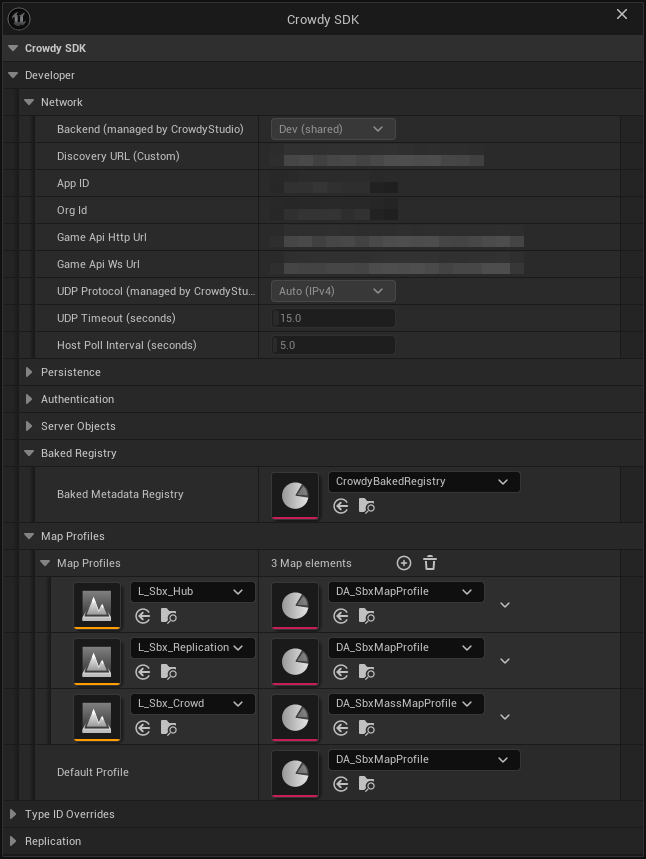
MapProfilesmaps a level asset to a profile. The lookup is by the map's short name, with the Play in Editor prefix stripped, so a PIE session resolves the same entry as a packaged build.DefaultProfilecovers every map without an entry.
The SDK resolves the profile for a world through UCrowdySDKDeveloperSettings::ResolveProfileForWorld, in this order:
- A
MapProfilesentry whose map matches the current one. DefaultProfile, if set.- The profile a plugin ships. The Crowdy SDK plugin registers its own
DA_CrowdySDKDefaultProfileat module startup throughRegisterShippedDefaultProfile, so a project that sets nothing at all runs on that asset rather than going inactive. The log says so once per world. - Nothing: the SDK stays inactive on the map and logs a warning, once per world, naming the map and the fix.
A MapProfiles row or a DefaultProfile that points at an asset the build cannot load returns no profile and does not fall through to the next step. The warning names the asset path; check that it still exists and is packaged.
Every SDK subsystem resolves through the same function, and both warnings are reported once per world rather than once per subsystem, so you will see one line, not a dozen.
Check it from code
A lantern that never lights for other players is nearly always a map whose profile did not resolve. The example, CheckMapProfile, called from the lantern's BeginPlay, asks the same question the SDK asks, once, so the answer is in the log before anything else is suspected.
- C++
- Blueprint
// Lantern.cpp
#include "Data/CrowdyMapProfile.h"
#include "Utils/CrowdySDKDeveloperSettings.h"

void ALantern::CheckMapProfile()
{
	// A lantern that never lights for other players usually has no active profile; rule that out first.
	const UCrowdyMapProfile* Profile = UCrowdySDKDeveloperSettings::ResolveProfileForWorld(GetWorld());
	if (!Profile || !Profile->bEnableNetworking)
	{
		UE_LOG(LogTemp, Warning, TEXT("ALantern: no active map profile; this lantern will not replicate."));
	}
}
ResolveProfileForWorld is a plain C++ static. There is no Blueprint node for it.
There is no Blueprint node for profile resolution: assigning a profile is Project Settings and Data Asset editing only, which the two screenshots above cover. What a Blueprint can read is the connection, Get UDP Connection State on the Crowdy SDK Subsystem; a connected state with dead entities is the profile symptom.
Success signal. With a resolved profile the entity subsystem logs registrations once crowdy.entity.trace 1 is on. Without one, the log carries a single resolved no map profile warning for the map and no entity ever registers.
The shipped default, in one paragraph
The plugin registers a shipped profile under the provider name CrowdySDK, and only one registration is in effect at a time: a second plugin offering a different profile is refused and logged, so which one a map runs on never depends on module load order. UnregisterShippedDefaultProfile withdraws an offer at module shutdown; GetShippedDefaultProfilePath and GetShippedDefaultProfileProvider report what is currently offered; ResolveShippedDefaultProfile returns the asset, or null with a reason when an offer exists but its asset failed to load. None of these is something a game calls; they exist so a plugin can carry a profile.
Gotchas
- A
MapProfilesrow orDefaultProfilenaming an asset that did not load means no networking on that map. Check this first when a map looks dead; the warning names the asset. - The shipped default profile has no
BackendConfig, which means the built-in transform policy draws remote entities. On 2.14.0 and earlier nothing was drawn from the continuous channel in that state; see What's Changed. - A non-networked map wants a profile with Enable Networking off, not no profile. The warning text asks for exactly that.
StateKeyframeIntervalSecondsis a safety net, not the mechanism. Changed properties ship on change whatever the interval; 0 only stops the periodic baseline forCrowdyHeartbeatproperties.ReplicationIntervalHzis one clock for two channels: continuous state and Crowdy State share it but send independently.
Related
- Rendering backends:
BackendClass,BackendConfig, and the policy classes. - Turn Mass on for a map: choose the Crowdy Mass Rendering Backend and give it a Backend Config.
- Continuous state: what
bUseAutoReplicatorand the keyframe and heartbeat intervals drive. - Crowdy State: what
bUseStateReplicator,StateRelevanceDistance, andStateKeyframeIntervalSecondsdrive. - Config Sync: the network half of the same settings class, written by Crowdy Studio.