Rendering Backends
A rendering backend turns the continuous state a remote entity's owner sends into something on screen for everyone else. The SDK ships two: the actor pool, which is the default, and the Crowdy Mass Rendering Backend, which draws remote entities as crowd rows (see Draw a crowd with Mass). A project customises the actor pool through two policy classes, or replaces the backend by implementing four methods.
When you touch this
When a Dynamic entity moves on its owner and not on anyone else, when you want your own state struct applied to a proxy, or when pooled actors of the entity's class are the wrong way to draw a crowd; see Draw a crowd with Mass. A Static entity never comes through here: its proxy is the actor its spawn event made, driven by Crowdy State and events, and a client that joined after the spawn builds it from a repeat of that event.
The default: the actor pool
FCrowdyActorManagementConfigStruct::BackendClass on the map profile defaults to UCrowdyActorPoolBackend, so a profile that never chose a backend gets this one. It uses UCrowdyActorPoolSubsystem to keep a pool of pre-spawned actors per entity class, checks one out when a remote entity appears, registers it in the entity registry so entity-targeted events reach it like any actor, and hands every update to a UCrowdyRepApplicationPolicy: the shipped UCrowdyTransformRepPolicy unless you provide one.
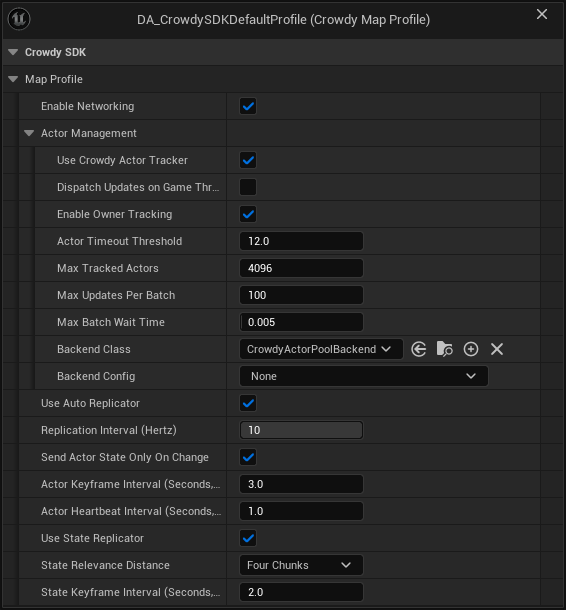
The screenshot is the SDK's shipped default profile, and its Backend Config reads None: the backend runs on a built-in config in that case.
When BackendConfig is empty, UCrowdyActorPoolBackend::InitializeBackend creates a transient Actor Pool Backend Config and, since it names no policy, instantiates UCrowdyTransformRepPolicy: it reads the default executor's FCrowdyActorState and sets the pooled actor's location and rotation, interpolated across a ring of recent samples with bounded extrapolation. A BackendConfig of another backend's class is refused: the backend logs Backend Config is a <class>, but this backend needs a CrowdyActorPoolBackendConfig and returns false, the actor manager logs could not initialize, so no remote entity will be drawn on this map, and remote entities arriving as continuous-state updates are tracked with nothing on screen. Spawn-event proxies and Crowdy State are unaffected either way. See Map profiles.
The fallback arrived in 2.15.0. On 2.14.0 and earlier an empty Backend Config, or one with no Replication Policy Class, tracks remote entities and draws nothing, and the fix there is an Actor Pool Backend Config naming UCrowdyTransformRepPolicy. See What's Changed.
Configure it
UCrowdyActorPoolBackendConfig, set as the profile's BackendConfig:
| Field | Default | Effect |
|---|---|---|
ReplicationPolicyClass | none | Your UCrowdyRepApplicationPolicy subclass. Unset means UCrowdyTransformRepPolicy, which moves the proxy from FCrowdyActorState; set it when your executor sends more than the transform, and move the proxy yourself in it. |
PoolPolicyClass | none, optional | A UCrowdyActorPoolPolicy subclass. Unset means the concrete base, which already hides pooled actors, shows them on activation, and strips proxy movement. |
DefaultPoolSizePerClass | 8 | Pools are created lazily per entity class with this many actors made up front. |
PerClassPoolOverrides | empty | A per-class up-front size; a class listed here is also pre-warmed at map load. |
MaxPoolSizePerClass | 256 | How far a class's pool may grow. When every actor is in use, the pool spawns one more, up to this cap (never below the up-front size). |
bRenderLocalOwner | off | Also draw a pooled copy of entities this client owns, driven by the server's echo of its own updates. Off, the owner sees only its real actor. Turn it on to watch the round trip on a single client. |
When an entity's spawn event already made an actor of the entity's class, the pool draws that actor and takes nothing from the pool, so what OnCrowdySpawned set on it stays. When ownership of a drawn entity moves to this client, the pool lets go of the actor, which this client now moves; when it moves away, the pool draws this client's actor from the new owner's updates.
A pool that is full grows by one actor at a time, spawned during play with collision off until it is activated. At the cap, a new entity of that class waits: it is activated as soon as another entity of the class leaves, or, if its spawn event already made an actor for it, that actor is kept and drawn instead of being replaced. Nothing is dropped. The cap is there so a flood of made-up entity ids from a misbehaving peer cannot make your client spawn without limit; raise it if you legitimately expect more than 256 live remote entities of one class.
UCrowdyTransformRepPolicy skips an update whose struct is not FCrowdyActorState, so a Dynamic entity whose executor sends its own struct stands still until its profile names a policy that reads it. UCrowdyRepApplicationPolicy has two pure virtuals and requires a subclass; UCrowdyActorPoolPolicy ships full bodies and is meant to be instantiated as is.
The replication application policy
The policy is what moves a remote player's proxy. Continuous state is how pawns, players, and AI move, so a policy's first job is to take the location and rotation out of each update and put the proxy where the owner was at RenderTimeMs. The shipped UCrowdyTransformRepPolicy does exactly that for FCrowdyActorState, and for a pawn that only moves it is all you need. You write your own only when your executor sends more than the transform, and then you apply the transform yourself first and your extra fields after, because a custom policy replaces the shipped one rather than adding to it: UCrowdyActorPoolBackend::ResolvePolicyClass instantiates the config's class instead of UCrowdyTransformRepPolicy, so a policy that never sets location and rotation leaves every proxy under it standing still.
UCrowdyRepApplicationPolicy reads a state struct out of each update and applies it to the pooled actor each frame:
| Override | Called | What you do |
|---|---|---|
ExtractFields(State, ServerTimestampMs, SlotId) | Per update, per slot | Read your struct out of State into your own per-slot buffers. Return false when the struct type is wrong and the update is skipped. |
ApplyToActor(Actor, SlotId, RenderTimeMs) | Per frame, per active slot | Apply the buffered state, interpolated to RenderTimeMs, to the actor. |
OnInstanceActivated(Actor, InitialState) | Once, when a slot activates | A BlueprintNativeEvent: set initial state on the actor. |
OnInstanceDeactivated(SlotId) | When the entity leaves | Clean up per-slot state. |
GetExpectedSlotCount() | At startup | How many slots to pre-allocate; 64 by default. Match your expected player count. |
The sample ring
Both the shipped policy and the example below keep their per-slot history in TInterpolatedField<T, Capacity>, a small ring buffer the SDK ships in Data/TInterpolatedField.h, 32 samples deep by default. TInterpolatedField::Push(Value, TimestampMs) stores one sample with the server timestamp the update carried. TInterpolatedField::Sample(RenderTimeMs, LerpFn) finds the two samples that bracket the render time by binary search and blends between them with the function you pass (FMath::Lerp for a location; a quaternion slerp for a rotation). When the render time runs past the newest sample, Sample extrapolates from the last two by calling the same function with an alpha above 1, for at most 0.2 seconds beyond the newest; after that it holds the value extrapolated to 0.2 seconds. The step is measured over at least the average gap of the last four samples (50 ms when only two are held), so two updates that arrive almost together after a sender hitch extrapolate at the sender's normal pace instead of throwing the proxy far ahead for a frame. A render time older than the oldest sample holds the oldest sample; a slot is in that state only briefly after activation, until the render time, which runs one interpolation delay behind, catches up with the samples already held. A location follows that extrapolation in full; the rotation slerp clamps its alpha to 1.2, so a rotation extrapolates by at most a fifth of a step. With one sample it returns that sample; with none, the default you pass. PhysicalIndex is the ring's own index arithmetic, nothing you call.
The reason a proxy built on it does not jitter is the render time itself: the actor manager renders at the estimated server time minus the interpolation delay (100 ms), so the proxy is always drawn a little behind the newest sample, between two samples it already holds, and never snaps to the latest one as it lands. Extrapolation only runs when an update is late, and its cap keeps a lost stream from sliding a proxy across the map.
The example: the same shape, with your own field added
ULanternRepPolicy is what the shipped policy does, plus one field. FLanternPlayerState, the struct the continuous state page's executor sends for ALanternPlayer, carries Location, Rotation, and bTorchLit. The policy keeps one TInterpolatedField<FVector> and one TInterpolatedField<FRotator> per slot: ExtractFields refuses any other struct type and pushes the location and rotation with the update's server timestamp; ApplyToActor samples both at RenderTimeMs, calls SetActorLocationAndRotation on the proxy, and only then applies the torch flag to the proxy's Torch light. The flag is applied as the latest value: a boolean is not something to blend. OnInstanceDeactivated resets the slot so a reused slot never starts from a departed player's history. The policy header includes LanternPlayer.h for the struct, so this snippet depends on the executor-override block being in your project first.
- C++
- Blueprint
// LanternRepPolicy.h
#include "Data/CrowdyRepApplicationPolicy.h"
#include "Data/TInterpolatedField.h"
#include "LanternPlayer.h"
#include "LanternRepPolicy.generated.h"

// Replaces the shipped transform policy, so it moves the proxy itself and then applies the one field of its own.
UCLASS()
class ULanternRepPolicy : public UCrowdyRepApplicationPolicy
{
	GENERATED_BODY()

public:
	virtual bool ExtractFields(const FInstancedStruct& State, int64 ServerTimestampMs, int32 SlotId) override;
	virtual void ApplyToActor(AActor* Actor, int32 SlotId, int64 RenderTimeMs) override;
	virtual void OnInstanceDeactivated(int32 SlotId) override;

private:
	TArray<TInterpolatedField<FVector>> Positions;
	TArray<TInterpolatedField<FRotator>> Rotations;
	TArray<bool> bTorchLitBySlot;

	void EnsureSlot(int32 SlotId);
};

// LanternRepPolicy.cpp
#include "LanternRepPolicy.h"

#include "Components/PointLightComponent.h"

bool ULanternRepPolicy::ExtractFields(const FInstancedStruct& State, int64 ServerTimestampMs, int32 SlotId)
{
	const FLanternPlayerState* Player = State.GetPtr<FLanternPlayerState>();
	if (!Player)
	{
		return false;
	}
	// Each slot keeps a ring of timestamped samples; Sample reads them back at whatever render time the pool asks for.
	EnsureSlot(SlotId);
	Positions[SlotId].Push(Player->Location, ServerTimestampMs);
	Rotations[SlotId].Push(Player->Rotation, ServerTimestampMs);
	bTorchLitBySlot[SlotId] = Player->bTorchLit;
	return true;
}

void ULanternRepPolicy::EnsureSlot(int32 SlotId)
{
	if (SlotId >= Positions.Num())
	{
		Positions.SetNum(SlotId + 1);
		Rotations.SetNum(SlotId + 1);
		bTorchLitBySlot.SetNumZeroed(SlotId + 1);
	}
}
// LanternRepPolicy.cpp
void ULanternRepPolicy::ApplyToActor(AActor* Actor, int32 SlotId, int64 RenderTimeMs)
{
	if (!Positions.IsValidIndex(SlotId))
	{
		return;
	}
	const FVector Location = Positions[SlotId].Sample(RenderTimeMs, [](const FVector& A, const FVector& B, float T) { return FMath::Lerp(A, B, T); });
	const FRotator Rotation = Rotations[SlotId].Sample(RenderTimeMs, [](const FRotator& A, const FRotator& B, float T)
	{
		return FQuat::Slerp(A.Quaternion(), B.Quaternion(), FMath::Clamp(T, 0.f, 1.2f)).GetNormalized().Rotator();
	});
	// The transform first, then the field of your own: the proxy's torch follows the owner's.
	Actor->SetActorLocationAndRotation(Location, Rotation);
	if (const ALanternPlayer* Player = Cast<ALanternPlayer>(Actor))
	{
		Player->Torch->SetVisibility(bTorchLitBySlot[SlotId]);
	}
}

void ULanternRepPolicy::OnInstanceDeactivated(int32 SlotId)
{
	if (!Positions.IsValidIndex(SlotId))
	{
		return;
	}
	Positions[SlotId] = {};
	Rotations[SlotId] = {};
	bTorchLitBySlot[SlotId] = false;
}
ExtractFields and ApplyToActor are C++ only, so the policy class is C++. Set it as Replication Policy Class on the Actor Pool Backend Config in the map profile's Details panel. OnInstanceActivated is the one hook a Blueprint subclass of the policy may implement.
The pool policy
UCrowdyActorPoolPolicy decides what a pooled actor does at three moments, each a BlueprintNativeEvent a Blueprint subclass can implement without C++: OnActorPooled(Actor) once per actor right after it is spawned into the pool, OnActorActivated(Actor, InitialState) when it is checked out (its InitialState is empty in the shipped pool, and the identity lands on the component right after it returns), and OnActorDeactivated(Actor) when it goes back. The base hides and shows the actor and disables proxy movement; subclass only to add per-actor behaviour at those moments.
Pooled actors are genuinely spawned (SpawnActorDeferred and FinishSpawning), so their constructors and Blueprint-added components run. Before BeginPlay the pool marks any entity component on them dormant, so a pre-warmed actor registers no entity and no listener while it stands for nothing. UCrowdyActorPoolSubsystem::RegisterPool(FCrowdyPoolConfig) (ActorClass, PoolPolicyClass, PoolSize, MaxPoolSize) is what the backend calls to create a pool, a no-op for a class that already has one, and HasPool(Class) says whether one exists; AcquireActor checks an actor out, growing the pool up to MaxPoolSize when every actor is in use, and ReleaseActor checks it back in. crowdy.pool.trace 1 logs spawn, release, reuse, and growth.
What a pooled proxy does and does not do
The spawn event creates a proxy actor and broadcasts OnCrowdySpawned with the payload; the actor pool then treats that actor as an orphan, destroys it, and swaps in a pre-warmed pooled actor that never received it. Anything a proxy needs to look right must be a class default or a field of the replicated state struct, never a one-time spawn value.
The pool is fed only by inbound network state, so the owner ends up with the local actor it drives directly and the pooled proxy the server echoes back, interpolation-delayed. There is no per-entity flag to choose. Hide one side yourself, in the entity's own code: SetActorHiddenInGame on the local actor when IsLocallyOwned() if the round-tripped proxy is the one that should show. With Enable Owner Tracking on (the default) the local player's own avatar is echoed and drawn the same way; turning it off suppresses that one echo and no other owned entity's.
- A proxy's
GetNetID()andGetRole()work: the backend assigns the identity to the pooled actor's component when it checks it out.RemoteProxyis the role it reports.
Swapping at runtime
UCrowdyActorManager::SetBackend(NewBackend) (Blueprint: Set Backend) swaps the active backend: the previous one is deinitialized, slot state is preserved, and the new one receives ApplyInterpolation from the next tick. The new backend must already be initialized, and InitializeBackend is C++ only, so this is a C++ operation in practice. GetActiveBackend() is the live backend, null when none initialized; a backend that refused to initialize is absent here and present in the profile, which is how to tell the two apart from code.
Writing a backend
Subclass UCrowdyRenderingBackend and pair it with a UCrowdyRenderingBackendConfig subclass carrying whatever your backend needs (an instanced mesh, a pool size). Four overrides are required and three optional:
| Override | Required | Contract |
|---|---|---|
ActivateInstance(SlotId, UUID, EntityClass, InitialState) | yes | A remote instance became visible. Acquire the rendering resource for SlotId. EntityClass is never null. |
DeactivateInstance(SlotId, UUID) | yes | It left. Release the resource and the per-slot state. |
ExtractUpdate(State, ServerTimestampMs, SlotId) | yes | An update arrived. Parse the struct into your interpolation buffers. |
ApplyInterpolation(SlotId, RenderTimeMs) | yes | Apply the interpolated state; RenderTimeMs is already offset by the interpolation delay. |
InitializeBackend(World, Config) | no | Acquire subsystems, read the config. Return false, after logging the reason and the remedy, when you cannot draw with what you were given; the manager refuses you rather than installing you. |
DeinitializeBackend() | no | Release what you held. |
IsInstanceActive(SlotId) | no | Whether SlotId holds something drawn. Return false when ActivateInstance could not acquire a resource (a full pool), and the actor manager calls ActivateInstance again once capacity may have freed or the entity registers. The default, true, never retries. |
DrawsEntitiesAsCrowdRows() is one more, for a backend that represents entities without spawning an actor of the entity's class; the editor reads it off the class default object to decide whether to show authoring surfaces that only make sense on that representation. The default is false. The Crowdy Mass Rendering Backend that ships in the SDK is the one backend that returns true; choose it as the map profile's Backend Class and see Turn Mass on for a map.
SlotId is a stable index the actor manager assigns for the instance's lifetime; keep your per-instance state in arrays indexed by it.
The actor manager is already the single caller of ActivateInstance and DeactivateInstance. A backend that also subscribes to UCrowdyActorTracker activates every entity twice and spawns everything double. The four overrides are your only entry points.
Gotchas
BackendClassalone draws the default executor's movement throughUCrowdyTransformRepPolicy. A custom state struct needsBackendConfigwith aReplicationPolicyClassthat reads it, and that policy replaces the shipped one: applyLocationandRotationyourself before anything else, or every proxy stands still.- A policy built on
TInterpolatedFieldis the smooth choice for anything that moves. Sample it atRenderTimeMs, never at the newest sample: the delay is what hides the network. bUseCrowdyActorTrackeroff on the profile means no tracker, no manager, and no backend at all.- A pooled proxy's spawn-time look comes from class defaults or the state struct, never the spawn payload.
- A pool at its cap warns once per class, naming the class and
MaxPoolSizePerClass; each entity it could not draw is acrowdy.pool.traceline, not a warning, since it is retried. RaiseMaxPoolSizePerClassif you see the warning. On 2.16.0 and earlier, a pool never grew pastDefaultPoolSizePerClass(8), every entity past that was dropped with a warning and never retried, and its spawn-event actor was destroyed first; see What's Changed. - A class that arrives over the wire before it is loaded cannot be drawn; see Preloaded Entity Classes on Entities and spawning.
Related
- Map profiles: where
BackendClassandBackendConfiglive. - Draw a crowd with Mass: the Crowdy Mass Rendering Backend, which draws remote entities as crowd rows.
- Continuous state: the executor that produces what the policy consumes.
- Entities and spawning: the actor tracker and the spawn event.
- Entity component: the identity a pooled actor is given.