RPC Events in Blueprint
A Blueprint sends and receives CrowdyEvents with no C++: tick one checkbox on a Custom Event, choose a recipient, and call the event by name. The body of the event is the receiver.
When to use one
The same cases as RPC events in C++: a moment other clients should see, not a value a late joiner needs. The Blueprint needs a Crowdy Entity Component on the actor (or to be a replicated subsystem); a Custom Event on an actor without one has no entity to route by.
Mark the event
Select the Custom Event node. Its Details panel gains a Crowdy SDK category with a Crowdy Replicates checkbox; this is the node's own Details panel, not the actor's.
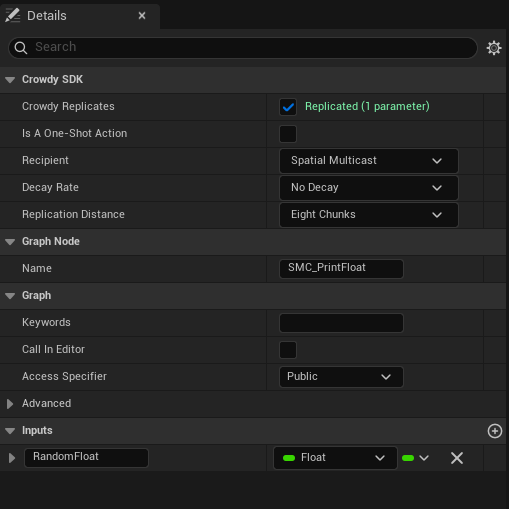
Ticking it writes the CrowdyReplicates marker onto the event and clears any Unreal replication flag on the node, since the two cannot combine. A status line under the checkbox tells you at once whether the signature is accepted: green Replicated (N parameters), or a red problem naming the parameter, using the same validator the C++ scan runs. Old assets marked with the earlier spelling CrowdyReplicate are still recognised.
The status line reads Disable Unreal replication - it cannot combine with Crowdy replication, or Set Access Specifier to Public - Crowdy Replicates cannot be private, until you fix the node. A private or protected event is refused because the SDK invokes it from outside the class.
The compiler splices a dispatch gate into the head of a marked event at compile time. Until you press Compile the log says Custom event 'X' Crowdy Replicates ... Recompile to activate. and the event still runs locally only.
The lantern's Sparkle event is the Blueprint twin of the C++ page's Sparkle_Implementation, with the style struct flattened into two inputs, Color and Intensity. Its body is the receiver: Set Light Color and Set Intensity on Light, each fed by a Get Light node. The graph below is the whole example; the Details panel of its event node is where Crowdy Replicates is ticked and Spatial Multicast is chosen.
Pick the recipient
Once Crowdy Replicates is ticked, three more rows appear. Recipient is the ECrowdyEventRecipient the C++ page uses, with the same default:
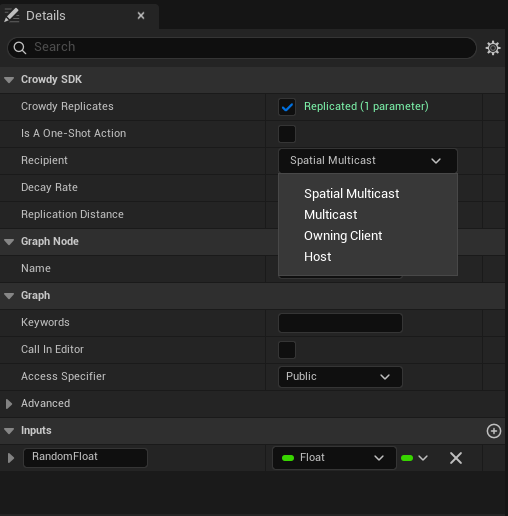
- Spatial Multicast (the default): everyone in range, over the chunk-based path, thinned by decay.
- Multicast: every member of the app's session channel, whatever the distance, over the channel transport.
- Owning Client: only the target entity's owner; another client's call becomes a request to that owner.
- Host: only the elected host; another client's call becomes a request to the host.
Decay Rate and Replication Distance sit below the recipient and are greyed out unless the recipient is Spatial Multicast, because only the spatial path reads them. Channel appears only for Multicast: type a channel name, or press Pick to choose from the app's channels, which the picker fetches live from Crowdy Studio when you are signed in there; free text always works. Is A One-Shot Action appears only once a map profile assigned in Project Settings, Plugins, Crowdy SDK (a Map Profiles entry or the Default Profile) selects a backend that draws crowd rows. A project that uses only the actor pool never sees it. See Play poses and one-shot actions.
A typo, or a channel nobody created, logs a warning at connect time and every call to the event silently reaches nobody. See Channels.
There is no ownership gate on the host. If the rest of the session must see the outcome of a Host event, the host sends a second, Multicast or Spatial Multicast event with the result.
Call it
Call the event by name from any graph on the actor, exactly like a local Custom Event: drag off an exec pin, type Sparkle, and fill the Color and Intensity pins. There is no separate node kind for the call and none in the figure above; the call node is the ordinary one the editor offers for any custom event. The gate at the head of the event routes the call over the transport and skips the local body when this client is not a recipient; when it is, the body runs here as well.
For a Spatial Multicast event the owner runs the body itself and sends it, so the call sits behind an Is Locally Owned check the way the Quickstart does; a proxy's copy of the trigger must not send a second one.
Receive it
There is no second node and no second graph. The same Sparkle body shown above is the receiver: on every recipient the SDK replays the call through the event, the gate recognises the replay and lets the body run, and Color and Intensity arrive on the event's own pins with the values the caller passed.
What the checkbox generates is a call to UCrowdyReplicatedEventLibrary::CrowdyDispatchReplicatedEvent at the top of the event. It is marked internal-use and never placed by hand; if a marked event ever loses its gate (a manual edit, a bad merge), calling it runs the body locally and announces nothing, which looks exactly like a transport drop. Recompile.
Success signal. With one client, crowdy.rpc.loopback 1 and crowdy.rpc.trace 1 show the send and the looped-back receive; the sparkle then comes from the receive rather than the local run.
Gotchas
- The checkbox lives on the Custom Event node's Details, not the actor's.
- A red status line is the fastest signal that a pin type is rejected. Read it before compiling.
- The Channel field is join-only. Create the channel in Crowdy Studio or at runtime first.
- The Blueprint event body runs on the caller for Spatial Multicast and Multicast, and only where the recipient says for Owning Client and Host. Do not add a second local call.
- Cheat-sensitive data never rides a CrowdyEvent; it belongs on the truth plane, in your server code.
Related
- RPC events in C++: the parameter rules and the routing keys in full.
- Recipients and routing: what a chunk is, decay, and targeted sends.
- Channels: creating the channel a Multicast event names.