Persistence
Use UCrowdyPersistenceSubsystem to save and load gameplay structs. It is a game instance subsystem in the CrowdyServices module.
The flow is simple:
- Tag a struct as persistent.
- Push it when it changes.
- Pull it back later.
Pushes go over UDP for speed. Pulls go over GraphQL and return through a callback on the game thread.
Tag the struct
A persistent record is a plain USTRUCT with a Crowdy meta tag. There are two shapes.
One record per subject. Use CrowdyPersistent for one record per subject. A subject is the actor or object the slot belongs to, such as a player pawn. Each subject gets its own copy.
USTRUCT(meta=(CrowdyPersistent))
struct FSampleProgress
{
    GENERATED_BODY()

    UPROPERTY()
    int32 Level = 0;

    UPROPERTY()
    FVector LastLocation = FVector::ZeroVector;
};
One shared record. Add CrowdySingleton for a single shared record. A singleton has no per-subject copies. There is one record for the whole app.
USTRUCT(meta=(CrowdyPersistent, CrowdySingleton))
struct FWorldClock
{
    GENERATED_BODY()

    UPROPERTY()
    int32 DayNumber = 0;
};
Push and pull
The same two operations are available in C++ and Blueprint.
- C++
- Blueprint
PushState and PullState are C++ templates on the subsystem.
template<typename T>
void PushState(const T& Data, UObject* Subject = nullptr);

template<typename T>
void PullState(UObject* Subject, TFunction<void(bool, const T&)> Callback);
PushStatesends the data over UDP. It returns right away. After each push the subsystem verifies the write and retries automatically if needed, so you do not write retry code yourself.PullStatereads the data over GraphQL. It is asynchronous. Your callback runs on the game thread. The first argument is a success flag. The second is the loaded struct, valid only when the flag is true.
Subject is the actor or object the slot belongs to. Pass the same subject on push and pull so the keys match. For a CrowdySingleton struct, pass nullptr.
The same two operations are exposed as Blueprint nodes.
Push Stateis a plain call. It sends the struct and returns.Pull Stateis a latent node. It holds the exec line until the load finishes, then continues with the loaded value and a success flag. Wire your read logic off the completed pin so it runs only after the data arrives.
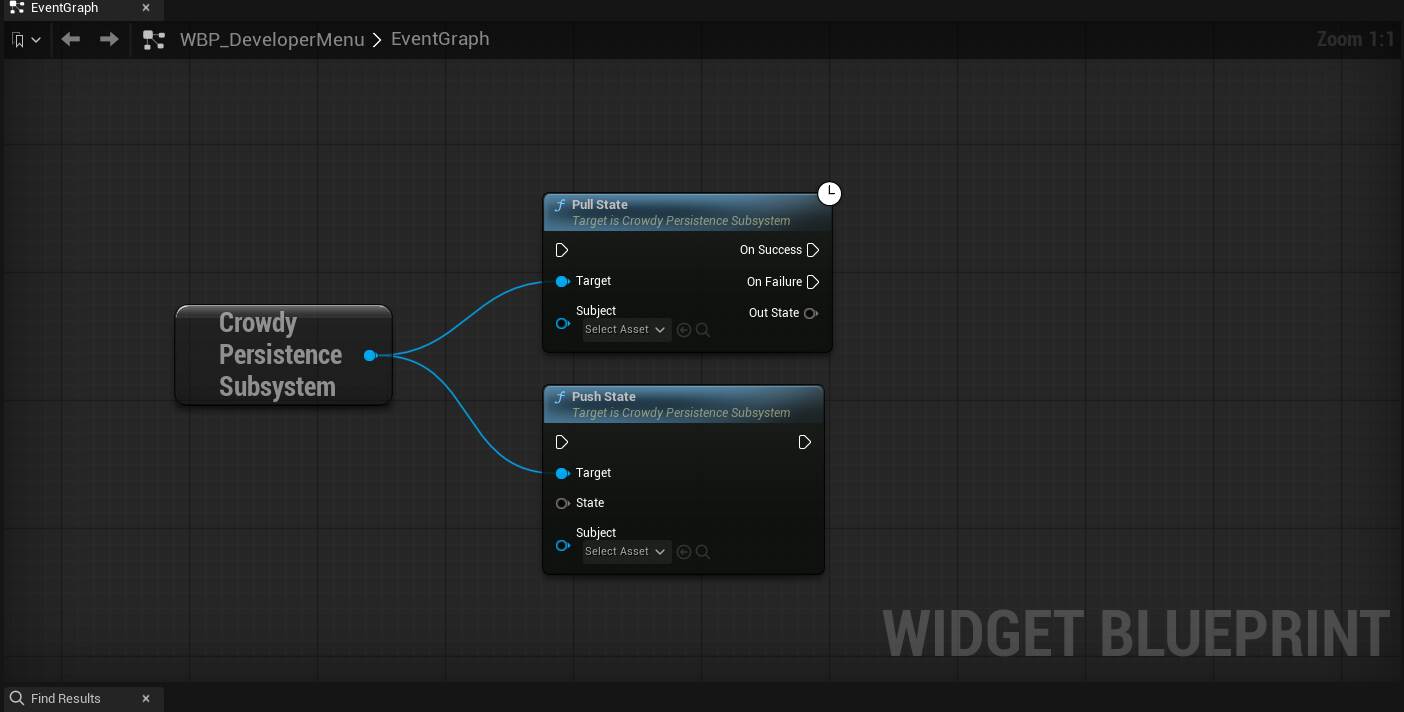
Subject identifies the instance key. For per-subject records the subject is usually the player pawn or controller. For a singleton there is no instance, so the subject is nullptr.
Save and load example
This switch saves progress on one signal and loads it on another. It uses FSampleProgress from above and treats the player pawn as the subject.
#include "Subsystem/CrowdyPersistenceSubsystem.h"
#include "Kismet/GameplayStatics.h"

void ASamplePersistenceSwitch::Save(APawn* Player)
{
    UGameInstance* GI = GetGameInstance();
    if (!GI)
    {
        return;
    }

    UCrowdyPersistenceSubsystem* Persistence =
        GI->GetSubsystem<UCrowdyPersistenceSubsystem>();
    if (!Persistence)
    {
        return;
    }

    FSampleProgress Progress;
    Progress.Level = 3;
    Progress.LastLocation = Player->GetActorLocation();

    Persistence->PushState<FSampleProgress>(Progress, Player);
}

void ASamplePersistenceSwitch::Load(APawn* Player)
{
    UGameInstance* GI = GetGameInstance();
    if (!GI)
    {
        return;
    }

    UCrowdyPersistenceSubsystem* Persistence =
        GI->GetSubsystem<UCrowdyPersistenceSubsystem>();
    if (!Persistence)
    {
        return;
    }

    Persistence->PullState<FSampleProgress>(Player,
        [Player](bool bSuccess, const FSampleProgress& Loaded)
        {
            if (!bSuccess)
            {
                return;
            }

            Player->SetActorLocation(Loaded.LastLocation);
        });
}
The push and the pull use the same struct type and the same subject. That pairing is what lets the pull find the record the push wrote.
Clear before logout
ClearAllState() zeroes everything written this session. Call it before logout so the next account does not read the previous account's data.
Persistence->ClearAllState();
Call ClearAllState() as part of your logout flow. Skipping it can leave one player's saved state visible to the next player who signs in on the same client.
What this is for
Persistence holds authoritative, save-worthy data such as progress, inventory counts, or unlocks.
It is not the path for high-frequency view state like movement or animation. Continuous view state belongs in a Dynamic entity's state executor. See Entities and Spawning.
Persistence is one of the solutions to store the game state. The actual game state is supposed to be done through game models. It's currently being worked on to make it easier to use.